Account Management and Data Governance · Topic 3 of 9
Encryption, Key Management and Tri-Secret Secure
How Snowflake encrypts data by default, the key hierarchy, key rotation and periodic rekeying, and customer managed keys with Tri-Secret Secure.
- 5 min
- Includes a diagram
- Four level hierarchy: root, account master, table master, file keys; the root is in an HSM.
- Rotation: keys older than 30 days; old key retired, new key active.
- Rekeying:
PERIODIC_DATA_REKEYING, retired keys older than one year, Enterprise or higher, extra Fail-safe storage for 7 days.
What it is
Snowflake encrypts all customer data automatically, with no setup. Keys are organized in a hierarchy so that each key protects a small amount of data, and Snowflake rotates them on a schedule. An administrator can add two things on top: periodic rekeying, which re-encrypts old data under new keys, and Tri-Secret Secure, which makes the account key depend on a key that the customer controls.
The exam asks you to name the layers, say what rotation and rekeying each do, and know what happens when a customer managed key is lost.
How it works
How Snowflake encrypts data
- At rest. All customer data is encrypted with AES, using keys rooted in a hardware security module (HSM) in the cloud.
- In transit. Data moving between clients and the service uses TLS.
- Internal stages. The client encrypts files on the user's machine before upload, and Snowflake encrypts them again once they are stored.
- External stages. Client-side encryption is recommended. A stage can carry a
MASTER_KEY(a Base64 AES key, 128 or 256 bit); the client makes a random key per file, encrypts the file with it, then encrypts that key with the master key. If files arrive unencrypted, Snowflake encrypts them when loading them into a table. - Unloads. Unloads to a Snowflake-provided stage are encrypted automatically; unloads to a customer stage can use client-side encryption.
The key hierarchy
There are four levels: root key, account master keys, table master keys and file keys. Each account gets its own hierarchy, and each lower key covers less data. A lower key is encrypted by the key above it, so compromising one file key exposes only that file.
Rotation and rekeying
| Key rotation | Periodic rekeying | |
|---|---|---|
| What happens | A key older than 30 days is retired and a new active key is created | A retired key older than one year is replaced, its data is re-encrypted and the old key is destroyed |
| Old key | Retired: decrypts existing data only | Destroyed |
| New key | Encrypts new data | Encrypts the re-encrypted data |
| Edition | All | Enterprise Edition or higher |
| Control | Automatic | PERIODIC_DATA_REKEYING account parameter |
ALTER ACCOUNT SET PERIODIC_DATA_REKEYING = TRUE;Rekeying runs online without downtime. Time Travel and Fail-safe retention are unchanged, but rekeyed files in Fail-safe incur an extra 7 days of storage charges, so rekeying adds a small cost.
Rotation protects new data from a compromised old key. Rekeying protects old data. A scenario that asks for "data encrypted a year ago must be re-encrypted" points to periodic rekeying.
Tri-Secret Secure
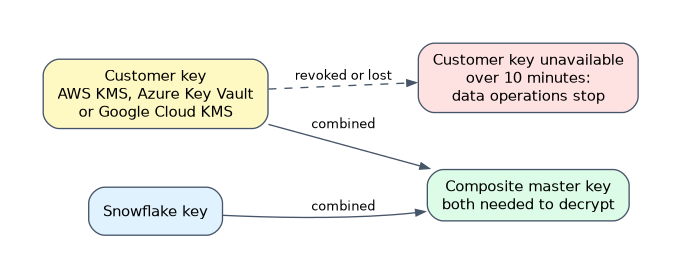 Tri-Secret Secure requires Business Critical edition or higher. The customer holds a key in their own cloud key service: AWS KMS, Azure Key Vault or Google Cloud KMS. Snowflake combines the customer key with its own key to form a composite master key for the account. Both are needed to decrypt data.
Consequences to remember:
- New versions of the customer managed key take effect when Snowflake next rotates the account master key, roughly every 30 days.
- If the customer key becomes unavailable, Snowflake tolerates an outage of up to 10 minutes. After that, all data operations in the account stop until access is restored.
- Deleting or revoking older versions of the customer key can cause permanent data loss.
- The customer can revoke the key to make the account's data unreadable, which is the point of the feature and also its risk.
| Snowflake managed keys | Tri-Secret Secure | |
|---|---|---|
| Who holds keys | Snowflake | Snowflake and the customer |
| Edition | All | Business Critical or higher |
| Customer can cut access | No | Yes, by revoking the key |
| Risk | Low | Key loss can block or destroy access |
Common mistakes
Thinking encryption must be enabled. It is on by default for all editions.
Confusing rotation with rekeying. Rotation happens about every 30 days for everyone; rekeying is optional, yearly and needs Enterprise Edition.
Deleting an old customer managed key version. Data encrypted under that version may become unrecoverable.
Expecting Tri-Secret Secure on Enterprise. It needs Business Critical.
Forgetting key availability. A customer key that is disabled for more than a few minutes stops data operations.
What to remember for the exam
- Four level hierarchy: root, account master, table master, file keys; the root is in an HSM.
- Rotation: keys older than 30 days; old key retired, new key active.
- Rekeying:
PERIODIC_DATA_REKEYING, retired keys older than one year, Enterprise or higher, extra Fail-safe storage for 7 days. - Tri-Secret Secure: Business Critical, composite master key, customer key in AWS KMS, Azure Key Vault or Google Cloud KMS.
- Customer key unavailable beyond about 10 minutes halts operations; deleting old key versions risks permanent loss.
Check yourself
What is the difference between key rotation and rekeying?
Rotation retires keys after 30 days and uses a new key for new data; rekeying re-encrypts old data with a new key once a retired key is over a year old.
Which edition is required for Tri-Secret Secure?
Business Critical or higher.
What happens if the customer managed key is unavailable for longer than the tolerated outage?
Data operations in the account stop until the key is available again.
Topic 3 of 9 in Account Management and Data Governance
Test yourself on Account Management and Data Governance
The full Snowflake ADA-C02 question bank has 814 questions, with timed practice exams and an explanation for every answer.
This study guide is independent and is not affiliated with, endorsed by, or sponsored by Snowflake. Vendor names, certification names and exam codes are trademarks of their respective owners and are used for identification only.