Account Management and Data Governance · Topic 7 of 9
Access History, Tagging and Tag-Based Masking
Audit who read or changed data with ACCESS_HISTORY, classify objects with tags, and use tag-based masking policies so protection follows the tag.
- 5 min
- Includes a diagram
ACCESS_HISTORY: Enterprise or higher, 365 days, up to 180 minutes latency; direct vs base objects;POLICIES_REFERENCED.- Tags are string values on objects, inherited down the hierarchy, max 50 per object.
CREATE TAGcreates;APPLY TAGsets;TAG_REFERENCESaudits;apply_methodshows how a tag arrived.
What it is
Two governance tools answer different questions. ACCESS_HISTORY tells you what happened: which user read or changed which objects and columns, and which policies applied. Tags describe what the data is, with a name and a string value attached to objects. When you attach a masking policy to a tag, the policy then protects every column that carries the tag.
How it works
Audit with ACCESS_HISTORY
SNOWFLAKE.ACCOUNT_USAGE.ACCESS_HISTORY has one row per query that read or wrote data. It needs Enterprise Edition or higher, covers the last 365 days, and can lag by up to 180 minutes. An ORGANIZATION_USAGE version adds an account name column.
| Column | Contains |
|---|---|
QUERY_ID, QUERY_START_TIME, USER_NAME | The statement, when and who |
DIRECT_OBJECTS_ACCESSED | Objects named in the query, such as a view |
BASE_OBJECTS_ACCESSED | The underlying tables and columns behind views |
OBJECTS_MODIFIED | Objects and columns the query wrote to |
OBJECT_MODIFIED_BY_DDL | DDL on objects, including policy and tag changes |
POLICIES_REFERENCED | Masking and row access policies enforced in the query |
PARENT_QUERY_ID, ROOT_QUERY_ID | Links a query to the statement that called it |
SELECT ah.query_id, ah.user_name, ah.query_start_time
FROM snowflake.account_usage.access_history ah,
     LATERAL FLATTEN(ah.base_objects_accessed) f
WHERE f.value:objectName::STRING = 'HR.PUBLIC.EMPLOYEES'
  AND ah.query_start_time > DATEADD('day', -30, CURRENT_TIMESTAMP());
Things to remember:
- Failed queries appear in
QUERY_HISTORYbut not inACCESS_HISTORY. - Records that exceed size limits are truncated.
- Filter on
QUERY_START_TIMEwith narrow ranges for speed. - The database role
SNOWFLAKE.GOVERNANCE_VIEWERgrants access to governance views such asACCESS_HISTORY,TAG_REFERENCESand the policy views.
To answer "who read the salary column through a view?", filter BASE_OBJECTS_ACCESSED, not DIRECT_OBJECTS_ACCESSED. The direct column shows only the view.
Tagging use cases
| Use case | Example |
|---|---|
| Data protection | Tag sensitive columns, then apply masking or row access policies |
| Resource monitoring | Tag warehouses with a cost center to group credit use |
| Governance and auditing | Report how many objects hold personal data and who owns them |
| Discovery | Find objects by tag in search and Snowsight |
Implement and manage tagging
A tag is a schema-level object holding a name and string values.
CREATE TAG gov.tags.sensitivity ALLOWED_VALUES 'public', 'internal', 'pii';
ALTER TABLE hr.public.employees MODIFY COLUMN ssn SET TAG gov.tags.sensitivity = 'pii';
ALTER WAREHOUSE etl_wh SET TAG gov.tags.cost_center = 'finance';
ALTER TABLE hr.public.employees MODIFY COLUMN ssn UNSET TAG gov.tags.sensitivity;
SELECT SYSTEM$GET_TAG('gov.tags.sensitivity', 'hr.public.employees.ssn', 'COLUMN');
Key properties:
- Values are strings;
ALLOWED_VALUESrestricts them. - Inheritance: a tag on a parent flows to children. A table tag reaches its columns, and an account tag reaches warehouses.
- Limits: up to 50 tags on an object, and a separate limit of 50 distinct tags across all columns of a table.
- Propagation: tags can follow data from a tagged table to views built on it and to tables created from it, for example by
CREATE TABLE AS SELECT. Propagation needs Enterprise Edition or higher and is switched on for the tag. - Privileges:
CREATE TAGon the schema to create;APPLY TAG(global, or on a given tag) to set it. A common model is atag_adminrole: centralized, where it creates and applies all tags, or decentralized, where teams apply andtag_admincreates. - Auditing assignments:
ACCOUNT_USAGE.TAG_REFERENCES,INFORMATION_SCHEMA.TAG_REFERENCESandTAG_REFERENCES_WITH_LINEAGElist tagged objects; theapply_methodcolumn shows whether a tag was set manually or propagated. - Sharing: tags on a share are set by the provider and are not visible to the consumer.
Tag-based masking policies
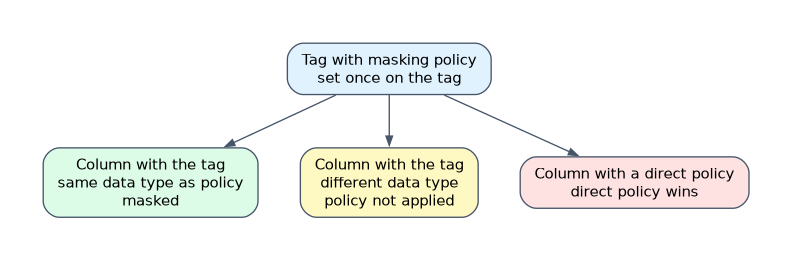 Instead of attaching a masking policy to hundreds of columns, attach it once to a tag.
CREATE MASKING POLICY gov.policies.mask_pii AS (val STRING) RETURNS STRING ->
  CASE WHEN IS_ROLE_IN_SESSION('PII_READER') THEN val ELSE '*****' END;

ALTER TAG gov.tags.sensitivity SET MASKING POLICY gov.policies.mask_pii;
ALTER TABLE hr.public.employees MODIFY COLUMN ssn SET TAG gov.tags.sensitivity = 'pii';
The policy applies automatically to any column that carries the tag and has the same data type as the policy. If a policy has been set directly on a column, the direct policy takes precedence over the tag-based one. Tag-based masking requires Enterprise Edition or higher.
A tag by itself protects nothing. Without a masking or row access policy bound to it, a tagged column is fully readable.
Common mistakes
Believing a tag restricts access. Tags describe; policies enforce.
Querying DIRECT_OBJECTS_ACCESSED to find base table reads. Use BASE_OBJECTS_ACCESSED for the tables behind views.
Expecting an audit record the same minute. Allow up to three hours of latency.
Tagging every column by hand. Tag at table or schema level and let inheritance work, or use classification.
Using a tag-based policy on a column of the wrong data type. It applies only when the data type matches the policy signature.
What to remember for the exam
ACCESS_HISTORY: Enterprise or higher, 365 days, up to 180 minutes latency; direct vs base objects;POLICIES_REFERENCED.- Tags are string values on objects, inherited down the hierarchy, max 50 per object.
CREATE TAGcreates;APPLY TAGsets;TAG_REFERENCESaudits;apply_methodshows how a tag arrived.- Tag-based masking: attach the policy to the tag, tag the column; data type must match; direct column policy wins.
- Propagation and tag-based masking need Enterprise or higher.
Check yourself
Which column of
ACCESS_HISTORYshows the tables behind a view?BASE_OBJECTS_ACCESSED;DIRECT_OBJECTS_ACCESSEDshows only the view.A column has a masking policy set directly and also carries a tag with another masking policy. Which applies?
The policy set directly on the column.
Which privilege is needed to set a tag on an object?
APPLY TAG, held on the account or on that specific tag.
Topic 7 of 9 in Account Management and Data Governance
Test yourself on Account Management and Data Governance
The full Snowflake ADA-C02 question bank has 814 questions, with timed practice exams and an explanation for every answer.
This study guide is independent and is not affiliated with, endorsed by, or sponsored by Snowflake. Vendor names, certification names and exam codes are trademarks of their respective owners and are used for identification only.