Problem Management · Topic 2 of 2
Problem Lifecycle Configuration
CIS-ITSM problem lifecycle: New, Assess, Root Cause Analysis, Fix in Progress, Resolved and Closed, plus problem tasks, workarounds and known errors.
- 5 min
- Includes a diagram
- States: New, Assess, Root Cause Analysis, Fix in Progress, Resolved, Closed.
- Confirm moves Assess to Root Cause Analysis.
- Cause notes hold the root cause; Fix notes hold the permanent fix.
What it is
The problem lifecycle is the path a problem takes from being logged to being closed. ServiceNow's state model follows the problem process: decide whether the problem is worth working, find the cause, fix it, confirm the fix, and close.
Each state has clear entry rules and actions on the record that move it on. An implementer configures who can take those actions, what must be filled in, and how the workaround and known error reach the service desk.
How it works
The states
| State | What happens |
|---|---|
| New | The problem is logged, often from an incident |
| Assess | A problem coordinator reviews it and decides whether it is valid and worth working |
| Root Cause Analysis | The cause is investigated, often through problem tasks |
| Fix in Progress | The cause is known and the permanent fix is being made, usually through a change |
| Resolved | The fix is in place; the team watches for new incidents |
| Closed | Final, with a resolution code that says how it ended |
Moving from Assess to Root Cause Analysis is done with Confirm, which records that the problem will be worked. Moving to Fix in Progress requires the root cause to be documented in Cause notes, and the fix is described in Fix notes.
The other ways out
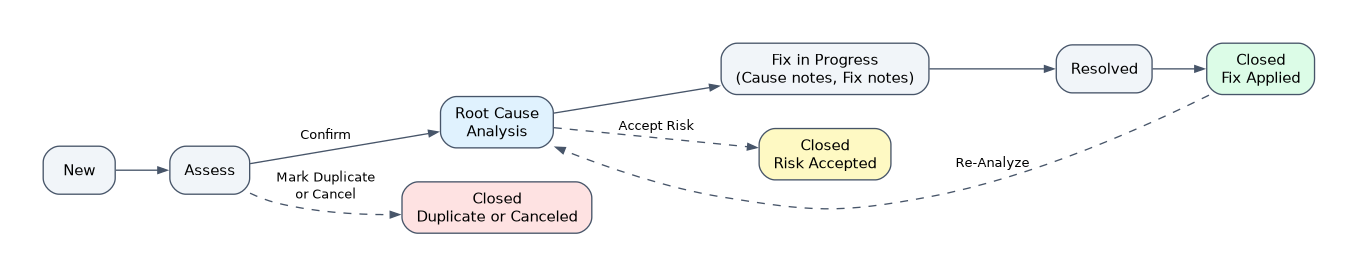 Not every problem ends with a fix. The lifecycle has actions for the other outcomes.
| Action | When | Result |
|---|---|---|
| Mark Duplicate | During Assess, the problem already exists | Closed as a duplicate of the existing problem |
| Cancel | During Assess, the problem is not valid | Closed as canceled |
| Accept Risk | No permanent fix exists or it is not worth the cost | Closed with the risk accepted by default; review it periodically |
| Re-Analyze | The problem comes back or the analysis was weak | Returns to Root Cause Analysis |
The resolution codes on a closed problem match these outcomes: Fix Applied, Risk Accepted, Duplicate and Canceled. Reporting on them shows how many problems were really fixed.
Problem tasks
A coordinator who is not the expert splits the work into problem tasks and assigns them to groups or people. A task has a type.
| Problem task type | Used for |
|---|---|
| General | Any piece of work, such as gathering logs or contacting a vendor |
| Root Cause Analysis | Investigating the cause, assigned to the team with the expertise |
Analysts work tasks with the problem_task_analyst role. The coordinator keeps ownership of the problem and moves it on once the tasks give an answer.
Workarounds and known errors
A workaround restores service before the root cause is fixed. The coordinator records it in the Workaround field and communicates it to the linked incidents, so the agents working them can apply it.
When the cause and workaround are documented, the problem can be marked as a known error. A known error article in knowledge then carries the root cause and workaround to every agent, which helps deflect and resolve new incidents faster.
Resolving and closing
When the fix, usually a change, is complete, the problem is resolved with Fix Applied. The team then watches for new incidents on the same CI or service. If none arrive, the problem is closed; if they do, it is re-analyzed.
Linked incidents do not wait for this. They are resolved as soon as their users have service back, often with the workaround.
What an implementer configures
| Need | Where |
|---|---|
| Who may move problems between states | Roles: problem_coordinator, problem_admin |
| Who works tasks | problem_task_analyst and assignment groups |
| Mandatory fields per state | UI policies or data policies on problem |
| Targets for analysis time | SLA definitions on problem or problem task |
| Known error articles | Knowledge base used for known errors |
How the exam asks about this
- "The coordinator decides a reported problem is the same as an open one." Mark Duplicate during Assess.
- "Fixing the root cause would cost more than living with it." Accept Risk, with a periodic review.
- "A resolved problem's incidents start again a week after the change." Re-Analyze to return the problem to Root Cause Analysis.
What to remember for the exam
- States: New, Assess, Root Cause Analysis, Fix in Progress, Resolved, Closed.
- Confirm moves Assess to Root Cause Analysis.
- Cause notes hold the root cause; Fix notes hold the permanent fix.
- Mark Duplicate, Cancel and Accept Risk close a problem without a fix; Re-Analyze reopens it into Root Cause Analysis.
- Problem task types are General and Root Cause Analysis.
- A known error article shares the root cause and workaround with agents.
Resolving a problem does not mean incidents were waiting on it. Incidents are resolved when service is restored, and the problem is resolved when the cause is fixed.
Common mistakes
Skipping Assess. Assess is where invalid and duplicate problems are filtered out. Without it the queue fills with records nobody will work.
Using Cancel for an accepted risk. Cancel means the problem was not valid. A real problem that will not be fixed is closed with Accept Risk so it can be reviewed later.
Keeping the workaround on the problem only. A workaround helps nobody if agents cannot see it. Communicate it to the linked incidents and publish it as a known error article.
Check yourself
Which action moves a problem from Assess to Root Cause Analysis?
Confirm. It records that the coordinator has accepted the problem as valid and worth working.
When should Accept Risk be used?
When no permanent fix exists or the fix is not worth the cost. The problem closes with the risk accepted and should be reviewed periodically.
What are the two problem task types?
General, for any piece of work, and Root Cause Analysis, for investigating the cause with the right expert team.
Topic 2 of 2 in Problem Management
Test yourself on Problem Management
The full ServiceNow CIS-ITSM question bank has 598 questions, with timed practice exams and an explanation for every answer.
This study guide is independent and is not affiliated with, endorsed by, or sponsored by ServiceNow. Vendor names, certification names and exam codes are trademarks of their respective owners and are used for identification only.