Incident Management · Topic 3 of 3
Incident Lifecycle Configuration
CIS-ITSM incident lifecycle: states, On hold reasons, resolution code and notes, auto close, parent and child incidents, and SLA definitions on incident.
- 5 min
- Includes a diagram
- Base states: New, In Progress, On Hold, Resolved, Closed, Canceled.
- On hold reason explains a pause; Awaiting Caller returns to In Progress when the caller replies.
- Resolution code and Resolution notes record the fix.
What it is
The incident lifecycle is the set of states an incident moves through, from the moment it is logged to the moment it is closed. Configuring it means deciding what each state means, what must be filled in to enter it, and how time is measured along the way.
The out of box state model is simple on purpose. Most customer requirements are met by using the existing states well, not by adding new ones.
How it works
The states
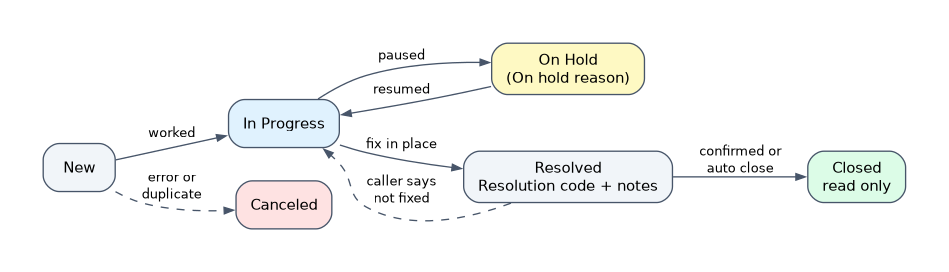
| State | Meaning |
|---|---|
| New | Logged, not yet worked |
| In Progress | Assigned and being worked |
| On Hold | Work is paused; On hold reason says why |
| Resolved | A fix or workaround is in place; waiting for confirmation or auto close |
| Closed | Final; the record is read only |
| Canceled | Raised in error or a duplicate; not a real incident |
An incident moves to In Progress once someone works it. Resolved is not the end; the caller can still say the issue is not fixed, which returns it to In Progress.
On hold reasons
When an agent sets the state to On Hold, the On hold reason field records why. The base reasons are Awaiting Caller, Awaiting Change, Awaiting Problem and Awaiting Vendor.
When the reason is Awaiting Caller and the caller replies, the incident moves back to In Progress automatically. This keeps the agent from missing the reply.
On hold reasons are the right answer to "we need a waiting status". Add a reason to the choice list rather than a new state, because SLAs, reports and workspace views already understand On Hold.
Resolving
To resolve, the agent fills in Resolution code and Resolution notes. The code gives a reportable category of how it was fixed; the notes say what was done.
These two fields feed knowledge and problem management. Thin resolution notes are the main reason incident data cannot be reused.
Closing and auto close
Resolved incidents close automatically after a number of days set by the glide.ui.autoclose.time property, under Incident > Administration > Incident Properties. A value of zero turns auto close off.
Once Closed, the record cannot be reopened. A recurrence is a new incident, which can be linked to the same problem.
Parent and child incidents
When many users report the same outage, one incident becomes the parent and the others are linked to it through the Parent incident field. The agent works only the parent.
Resolving the parent resolves its children, so every caller gets an update without anyone touching each child.
SLAs on incidents
Response and resolution targets are built as SLA definitions in Service Level Management. Each definition applies to a table, such as incident, and has a duration, a schedule and conditions.
| Condition | Effect |
|---|---|
| Start | When the clock starts, such as Priority is 1 |
| Pause | When the clock stops counting, such as State is On Hold |
| Stop | When the target is met, such as State is Resolved |
| Reset and Cancel | When the timer restarts or no longer applies, such as a priority change |
When a start condition matches, the platform attaches a Task SLA record to the incident and tracks elapsed and remaining time against the schedule. The SLA definition's flow, built in Workflow Studio, sends warnings before a breach.
Three types share the same engine. An SLA is the promise to the customer, an OLA is a target between internal groups, and an Underpinning contract is a target with an outside vendor.
Where to configure
| Need | Where |
|---|---|
| States and on hold reasons | Choice list on the incident State and On hold reason fields |
| Auto close days | Incident Properties |
| Mandatory fields at a state | UI policy or data policy on incident |
| Response and resolution targets | SLA definitions |
How the exam asks about this
- "Agents need to show that they are waiting for a third party without the SLA running." Set On Hold with On hold reason Awaiting Vendor, with a pause condition on the SLA definition.
- "Resolved incidents stay open for weeks." Set the auto close days in Incident Properties.
- "Two hundred users report the same email outage." Make one incident the parent and link the rest as children, then resolve the parent.
What to remember for the exam
- Base states: New, In Progress, On Hold, Resolved, Closed, Canceled.
- On hold reason explains a pause; Awaiting Caller returns to In Progress when the caller replies.
- Resolution code and Resolution notes record the fix.
- glide.ui.autoclose.time sets the auto close days; zero disables it.
- Resolving a parent incident resolves its children.
- SLA definitions use start, pause and stop conditions with a schedule; Task SLA records track the timers.
Adding a new incident state for every kind of wait is a common wrong answer. Use On Hold with a new On hold reason so SLAs and reports keep working.
Common mistakes
Confusing Resolved and Closed. Resolved means a fix is in place and the caller can still reject it. Closed is final and read only.
Using Canceled for a fixed issue. Canceled is for records that were raised in error. A real incident that was fixed is Resolved with a resolution code.
Building timers outside Service Level Management. Response and resolution targets belong in SLA definitions. Custom date fields and scripts lose the schedule, pause logic and breach reporting.
Check yourself
What should an implementer do when the customer wants a "Waiting for vendor" status?
Use the On Hold state with the Awaiting Vendor on hold reason. If needed, add a pause condition to the SLA definition.
Which fields are filled in when an incident is resolved?
Resolution code, which categorizes how it was fixed, and Resolution notes, which describe what was done.
What attaches an SLA timer to an incident?
An SLA definition whose start condition matches the incident. The platform then creates a Task SLA record that tracks the time.
Topic 3 of 3 in Incident Management
Test yourself on Incident Management
The full ServiceNow CIS-ITSM question bank has 598 questions, with timed practice exams and an explanation for every answer.
This study guide is independent and is not affiliated with, endorsed by, or sponsored by ServiceNow. Vendor names, certification names and exam codes are trademarks of their respective owners and are used for identification only.