Change Management · Topic 3 of 3
Risk, Conflicts, Approvals and CAB
ServiceNow change risk conditions and assessments, conflict detection, change approval policies, CAB definitions and the CAB Workbench for CIS-ITSM.
- 5 min
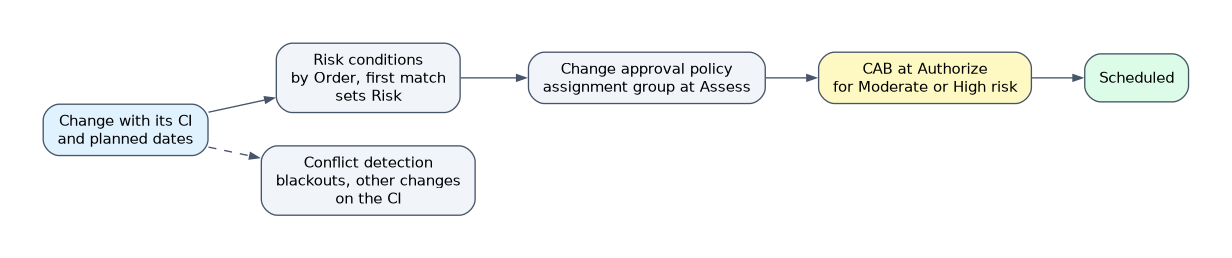
- Includes a diagram
- Risk conditions run by Order, lowest first, and the first match wins.
- Calculate Risk shows only when conditions apply and the user has admin or itil.
- Risk assessments use questionnaires; risk conditions use record data.
What it is
Before a normal change is scheduled, ServiceNow answers three questions: how risky is it, does its timing clash with anything, and who must approve it?
Risk calculation sets the change's Risk (and can set Impact). Conflict detection checks the CI and planned dates against other changes and schedules. The change approval policy turns those facts into approvals, and the Change Advisory Board (CAB) reviews the riskier changes at Authorize.
How it works
Risk conditions
Risk conditions are rules with a condition (built with the condition builder or a script) and the Risk and Impact values to set when the condition is true. They run in order of their Order field, lowest first, and the first matching condition is applied; later ones are skipped.
The Best Practice - Change Risk Calculator is active by default in the base system. The Calculate Risk related link appears on the change form only when risk and impact conditions apply to the record and the user has the admin or itil role.
Risk assessments
The Change Management - Risk Assessment plugin adds questionnaires. The person raising the change answers questions, and the weighted answers produce a risk value. When this plugin is active, the Run Risk Calculation business rule replaces the Calculate Risk business rule.
| Use | When the requirement is |
|---|---|
| Risk conditions | Risk can be derived from data already on the record, such as the CI, its services or the planned window |
| Risk assessment | Risk depends on human judgment that only the requester can supply, gathered as answers to questions |
Risk depends on the CI. If the CI changes, recalculate the risk, because the new risk can change which approvals are needed.
Conflict detection
Conflict detection flags a change when its CI, or a parent or child of that CI:
- is already scheduled in another change at the same date and time,
- falls outside its maintenance window,
- falls inside a blackout window,
- or is assigned to someone already scheduled at that time.
It runs automatically when the Configuration item, Planned start date and Planned end date are filled or updated, and when the state changes while those values exist. It can also run on a schedule if automatic detection is enabled, or be run manually. Results appear in the conflict section of the change form, and the Scheduling Assistant helps pick a free window.
Change approval policies
 A change approval policy has three parts:
| Part | Role |
|---|---|
| Policy inputs | The values evaluated, such as risk, type or the CI |
| Decisions | Conditions that decide whether an approval definition applies |
| Approval definitions | The approval to create, such as a group or the CAB |
When a decision matches, its approval definition is applied; if several decisions match, all of their approval definitions are applied. The Workflow Studio flows call the Apply Change Approval Policy action, which creates the approvals.
The base normal change policy asks the change's assignment group to approve at Assess, and asks the CAB approval group to approve at Authorize when risk is Moderate or High. A lower risk change can avoid CAB.
CAB definitions and the CAB Workbench
A CAB definition names the CAB manager, delegates who can stand in as manager, and the board members and board groups expected to attend. From it, CAB meetings are scheduled with an agenda of the changes to review.
The CAB Workbench (Change > Change Advisory Board > CAB Workbench) runs the meeting. It shows the agenda, lets the board approve or reject each change based on the decision, and records notes in the CAB meeting record. A delegate can take control of the meeting as host.
How the exam asks about this
- "Changes to a CI that supports a critical service must always be rated High risk." Create a risk condition, ordered so it is evaluated before broader rules.
- "The board must review every Moderate or High risk change before work starts." Configure the change approval policy to add CAB approval at Authorize.
- "No changes may run on the payroll servers during month end close." Define a blackout schedule so conflict detection flags them.
What to remember for the exam
- Risk conditions run by Order, lowest first, and the first match wins.
- Calculate Risk shows only when conditions apply and the user has admin or itil.
- Risk assessments use questionnaires; risk conditions use record data.
- Conflict detection checks the CI and its parent or child CIs against other changes, maintenance windows, blackout windows and assignee schedules.
- A change approval policy is policy inputs, decisions and approval definitions; every matching decision applies.
- CAB is set up with a CAB definition and run in the CAB Workbench.
Changing the CI after approvals were set is not harmless. Recalculating risk on the new CI can change the decision outcome and therefore the approvals the change needs.
Common mistakes
Ordering a broad risk condition first. Only the first matching condition applies. A general rule with a low Order hides more specific rules placed after it.
Mixing up blackout and maintenance schedules. A blackout window blocks changes during a period. A maintenance window is the only period when changes are allowed.
Hard coding approvers in the flow. Approvers that depend on risk or CI belong in the change approval policy, so they can be changed without editing the flow.
Check yourself
Three risk conditions match a change. Which one sets the Risk?
The one with the lowest Order value, because conditions run in order and the first match is applied.
Which fields trigger automatic conflict detection when they are filled or updated?
The Configuration item, Planned start date and Planned end date fields.
In the base normal change policy, when is the CAB asked to approve?
At Authorize, when the change's risk is Moderate or High; the assignment group approves at Assess.
Topic 3 of 3 in Change Management
Test yourself on Change Management
The full ServiceNow CIS-ITSM question bank has 598 questions, with timed practice exams and an explanation for every answer.
This study guide is independent and is not affiliated with, endorsed by, or sponsored by ServiceNow. Vendor names, certification names and exam codes are trademarks of their respective owners and are used for identification only.