Change Management · Topic 1 of 3
Change Types, States and Models
ServiceNow change types, states and change models for CIS-ITSM: normal, standard and emergency paths, state transitions, roles and model choice.
- 5 min
- Includes a diagram
- Normal changes use every state; standard changes skip Assess and Authorize; emergency changes skip Assess only.
- Changes cannot be canceled in Review or Closed.
- Change models define states, transitions and transition conditions, and a change can move only along its model's transitions.
What it is
Change Management controls how changes to services and CIs are requested, assessed, approved, implemented and reviewed. Every change is a change request record in the change_request table, and the work inside it is split into change tasks in the change_task table.
The architecture rests on two ideas. The change type (normal, standard or emergency) sets how much scrutiny a change gets. The change model lets an organization define its own fit for purpose state model, transitions and conditions on top of those types.
How it works
The three change types
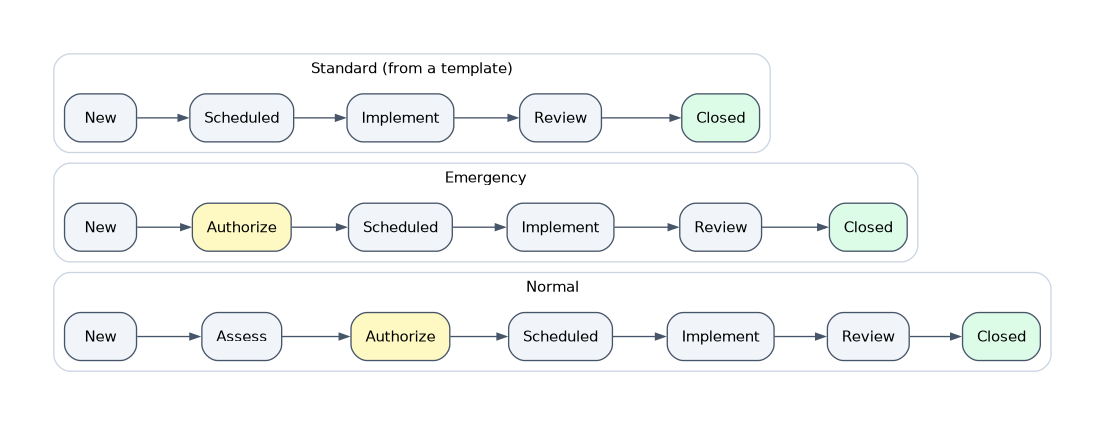
| Type | Meaning | State path |
|---|---|---|
| Normal | Needs assessment and authorization; approvals depend on risk | New, Assess, Authorize, Scheduled, Implement, Review, Closed |
| Standard | Pre approved, low risk and repeatable; created from a template | New, Scheduled, Implement, Review, Closed |
| Emergency | Must be done quickly to restore or protect a service | New, Authorize, Scheduled, Implement, Review, Closed |
A standard change skips Assess and Authorize because its content was approved once, when the template was accepted. An emergency change skips Assess but still has to pass Authorize before it is implemented.
States and cancellation
Each state has a clear purpose. Assess is where the change is reviewed by the people who know the CI, Authorize is where formal approval happens, Scheduled means the change is approved and waiting for its planned start, Implement is the work, and Review checks the outcome before Closed.
A change can be canceled in any state up to and including Implement. It cannot be canceled once it is in Review or Closed. Canceled is an end state like Closed, but it records that the change never completed.
Change models
Change models extend the ITIL change types. A model defines the states a change can use, the transitions between them and the conditions each transition needs. A change can only move along those transitions, once their conditions are met.
The out of box models come from the Change Management - Change Model Foundation Data plugin. They include Normal, Emergency and Standard (ITIL mode 1), plus models such as Change Registration (captures changes made in an external system, with no approvals), Cloud Infrastructure, Site Reliability Ops, Unauthorized Change and DevOps.
| Choose | When the requirement is |
|---|---|
| Change type with its out of box flow | A classic ITIL process with normal, standard and emergency changes |
| Change model | A new fit for purpose process, such as cloud provisioning, with its own states and transition rules |
| Standard change template | The same low risk change done again and again with identical content |
Build your own model, or copy an out of box one and adapt it, rather than editing the base models in place.
Flows behind the process
The approvals, task creation and state moves for each type run in flows built in Workflow Studio. The out of box flows call the change approval policy to decide which approvals to create at each stage. Customizing the process usually means copying and changing a flow or a policy, not adding scripts to the form.
Roles
| Role | What it allows |
|---|---|
| itil | Create and work on change requests and change tasks; view and use the Standard Change Catalog |
| change_manager | The role for the people who own and govern the change process |
| admin | Configure models, properties, risk conditions and policies |
The Change Manager owns the process. The assignment group and assigned to owner are responsible for the change, and approvers act at Assess and Authorize.
Where users work
Changes are created from Change > Create New, where the user picks the type or model, and worked in the classic form or in Service Operations Workspace. The Change Schedule shows planned changes on a calendar so teams can see what is happening when.
How the exam asks about this
- "A team performs the same password reset on a server every week with no surprises." Use a standard change from the Standard Change Catalog.
- "A production outage requires an immediate fix that cannot wait for normal assessment." Raise an emergency change; it goes from New to Authorize.
- "The cloud team needs its own states and rules for provisioning changes." Configure a change model rather than editing the normal change flow.
What to remember for the exam
- Normal changes use every state; standard changes skip Assess and Authorize; emergency changes skip Assess only.
- Changes cannot be canceled in Review or Closed.
- Change models define states, transitions and transition conditions, and a change can move only along its model's transitions.
- Change requests live in change_request and their work items in change_task.
- Workflow Studio flows drive approvals and tasks; the change approval policy decides who approves.
- The itil role creates and works changes; change_manager owns the process.
Do not edit the out of box change models in place. Build a copy for your own process so the base models and their transitions stay intact.
Common mistakes
Treating emergency changes as unapproved. An emergency change skips Assess, not Authorize. It still needs authorization before it reaches Implement.
Using an emergency change for anything urgent. Urgency alone does not make a change an emergency. If the work is routine and pre approved, a standard change is the right type.
Building a new process by scripting the normal change. A different process with its own states belongs in a change model. Scripting around the normal change is harder to maintain and breaks on upgrade.
Check yourself
Which states does a standard change pass through?
New, Scheduled, Implement, Review and Closed. It skips Assess and Authorize because its template was approved in advance.
In which states can a change request no longer be canceled?
Review and Closed. It can be canceled up to and including Implement.
What does a change model define that a change type alone does not?
Its own state model, the transitions between states and the conditions each transition requires.
Topic 1 of 3 in Change Management
Test yourself on Change Management
The full ServiceNow CIS-ITSM question bank has 598 questions, with timed practice exams and an explanation for every answer.
This study guide is independent and is not affiliated with, endorsed by, or sponsored by ServiceNow. Vendor names, certification names and exam codes are trademarks of their respective owners and are used for identification only.