User Interface · Topic 1 of 4
Preventing Security Vulnerabilities in UI and Data Access
Secure Apex and UI code: sharing keywords, user mode queries and DML, stripInaccessible, SOQL injection, cross-site scripting and CSRF on Salesforce.
- 4 min
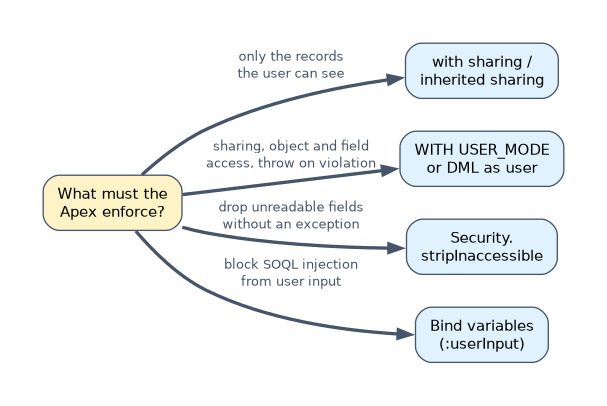
- Includes a diagram
- Apex runs in system mode; sharing keywords control records only.
inherited sharingruns aswith sharingwhen it is the entry point.- User mode (
WITH USER_MODE,as user) enforces sharing, CRUD and FLS.
What it is
Apex runs in system mode by default: it ignores the running user's object permissions and field-level security, and record sharing depends on the class's sharing keyword. That power makes it easy to show users data they should not see.
Secure code enforces three layers of access, and protects against code-level attacks such as SOQL injection and cross-site scripting (XSS).
How it works
Record access: sharing keywords
| Keyword | Behaviour |
|---|---|
with sharing | Enforces the running user's sharing rules |
without sharing | Ignores sharing rules; use only with a clear reason |
inherited sharing | Uses the caller's sharing; runs as with sharing when it is the entry point |
| No keyword | Uses the caller's context; as an entry point it generally runs without sharing |
Sharing keywords control records only. They do not check object permissions or field-level security.
Object and field access (CRUD and FLS)
| Technique | What it does |
|---|---|
WITH USER_MODE in SOQL | Enforces sharing, object and field permissions for every field in the query, including WHERE; throws on any inaccessible field |
insert as user acc; / Database.insert(recs, AccessLevel.USER_MODE) | DML in user mode |
Security.stripInaccessible(AccessType.READABLE, records) | Removes fields the user cannot read, without throwing |
WITH SECURITY_ENFORCED | Older option; checks fields in SELECT and FROM only, not WHERE or ORDER BY; throws on a violation |
Schema.sObjectType.Case.isDeletable() and field isAccessible() | Manual describe checks |
// Throws if the user cannot read any referenced field, filter fields included
List<Case> cs = [SELECT Subject FROM Case WHERE Internal_Score__c > 50 WITH USER_MODE];

// Silently drops fields the user cannot see
SObjectAccessDecision d = Security.stripInaccessible(AccessType.READABLE,
    [SELECT Name, Salary__c FROM Employee__c]);
List<Employee__c> safe = d.getRecords();
Salesforce recommends user mode for new code.
SOQL injection
// Vulnerable: user input becomes part of the query text
String q = 'SELECT Id FROM Account WHERE Name = \'' + userInput + '\'';

// Safe: bind variable keeps input out of the query text
List<Account> accs = [SELECT Id FROM Account WHERE Name = :userInput];
Other defences: String.escapeSingleQuotes(userInput) when a dynamic query must be built, and an allowlist for values that cannot be bound, such as field names or sort directions.
Cross-site scripting (XSS)
- Visualforce escapes merge fields by default.
escape="false"onapex:outputTextturns that off and is risky. - In JavaScript, HTML or URL contexts in Visualforce, use
JSENCODE,HTMLENCODE,JSINHTMLENCODEandURLENCODE. - Lightning Web Components render template values as text; avoid setting
innerHTMLwith user data. - Lightning Web Security (or Lightning Locker) isolates components so one namespace cannot reach another's DOM.
CSRF and other risks
- Visualforce forms include anti-CSRF tokens; do not perform DML in a page's constructor or
actionattribute on load, which runs without a user action. - Never store secrets in code; use Named Credentials for callout authentication.
A worked example
An @AuraEnabled method in a without sharing class returns all Salary__c values to an LWC. Interns can now see every salary. The fix: declare the class with sharing so only shared records return, and query WITH USER_MODE (or strip inaccessible fields) so users without field access to Salary__c cannot read it. Hiding the column in the component does not fix it, because the data still reaches the browser.
Security in the UI layer is never enough. If an answer only hides a field in a component or layout, it is wrong when the question is about access.
How the exam asks about this
- "Enforce FLS on fields in the WHERE clause too."
WITH USER_MODE. - "Remove fields the user cannot read without an exception."
Security.stripInaccessible. - "Stop SOQL injection in a search box." A bind variable.
What to remember for the exam
- Apex runs in system mode; sharing keywords control records only.
inherited sharingruns aswith sharingwhen it is the entry point.- User mode (
WITH USER_MODE,as user) enforces sharing, CRUD and FLS. WITH SECURITY_ENFORCEDdoes not check WHERE clause fields.- Bind variables stop SOQL injection; encoding functions stop XSS in Visualforce.
String.escapeSingleQuotes() helps with string values only. It cannot make a user-supplied field name or ORDER BY clause safe; use an allowlist.
Common mistakes
Assuming with sharing enforces field-level security. It enforces record sharing only.
Hiding sensitive fields only in the UI. The data is still returned to the browser.
Using escape="false" to display rich text from users. It opens an XSS hole.
Check yourself
Which SOQL clause enforces field-level security on filter fields as well as selected fields?
WITH USER_MODE.What does
inherited sharingdo when its class is the entry point?It runs as
with sharing.What is the main defence against SOQL injection?
Bind variables, which keep user input out of the query text.
Topic 1 of 4 in User Interface
Test yourself on User Interface
The full Salesforce Platform Developer question bank has 645 questions, with timed practice exams and an explanation for every answer.
This study guide is independent and is not affiliated with, endorsed by, or sponsored by Salesforce. Vendor names, certification names and exam codes are trademarks of their respective owners and are used for identification only.