Process Automation and Logic · Topic 6 of 7
Transactions, Order of Execution and Recursion
The Salesforce save order of execution: before-save flows, triggers, validation rules, after-save flows, roll-ups, commit, recursion and savepoints.
- 5 min
- Includes a diagram
- Before-save flows, then before triggers, then validation rules, then the save.
- After triggers, then workflow and processes, then after-save flows, then roll-ups.
- Commit comes last; emails and async jobs run only after commit.
What it is
A transaction is a set of operations that succeed or fail together. When a record is saved, Salesforce runs a fixed sequence of steps, the save order of execution: flows, triggers, validation, more automation, roll-ups, then the commit.
If any step throws an unhandled error, everything in the transaction rolls back. Updates made by automation can also cascade into other saves and fire triggers again, which is where recursion comes from.
How it works
The save order (simplified)
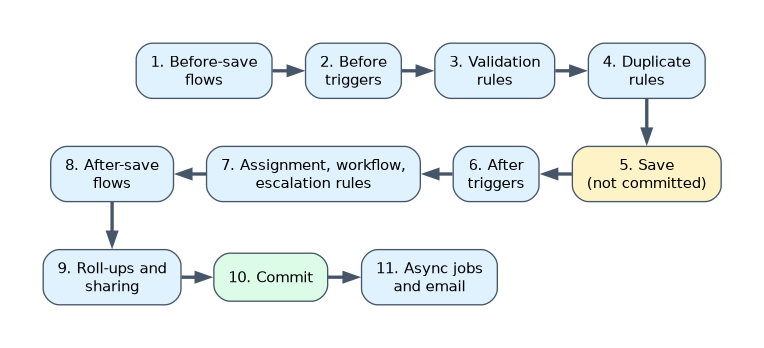
| Step | What runs |
|---|---|
| 1 | Load the original record, or initialize a new one, and apply the new field values |
| 2 | System validation (for example, required fields and field formats from the UI) |
| 3 | Before-save record-triggered flows |
| 4 | Before triggers |
| 5 | System validation again, and custom validation rules |
| 6 | Duplicate rules |
| 7 | Record saved to the database, not yet committed |
| 8 | After triggers |
| 9 | Assignment rules, auto-response rules, then workflow rules; a workflow field update saves the record again and fires before and after update triggers one more time |
| 10 | Escalation rules, then processes and the flows they launch |
| 11 | After-save record-triggered flows, then entitlement rules |
| 12 | Roll-up summary fields on the parent are recalculated, and the parent goes through its own save |
| 13 | Criteria-based sharing is evaluated |
| 14 | Commit of all DML |
| 15 | Post-commit logic: emails sent, asynchronous Apex such as @future and Queueable jobs, and asynchronous flow paths |
Three facts appear in many questions:
- Before-save flows run before before triggers. A trigger sees, and can change, a value set by a before-save flow.
- Validation rules run after before triggers. A trigger can make a record fail validation, or fix it so it passes.
- Asynchronous work starts only after commit. If the transaction rolls back, the future call or queued job never runs.
Example: who wins?
A before-save flow sets Priority__c to Medium when it is blank. A before insert trigger changes Medium to Low. A validation rule fails when Priority is Low and Amount is over 1,000. A user saves a record with blank Priority and Amount 2,000.
Flow sets Medium, the trigger sets Low, and the validation rule then fails the save. The order decides the outcome.
Recursion
An after update trigger on Account updates Contacts, and a Contact trigger updates the Account again: the triggers call each other. Salesforce stops a chain at a trigger depth of 16 with an error, but a loop usually needs fixing long before that.
public class AccountTriggerHandler {
    private static Set<Id> processed = new Set<Id>();
    public static void afterUpdate(List<Account> accs) {
        List<Account> toDo = new List<Account>();
        for (Account a : accs) {
            if (!processed.contains(a.Id)) {
                processed.add(a.Id);
                toDo.add(a);
            }
        }
        // work only on toDo
    }
}
Track processed record Ids in a static Set rather than using a single static Boolean. A Boolean that is set after the first chunk of 200 records skips every later chunk of the same transaction, so records 201 and above are never processed.
Savepoints and rollback
Savepoint sp = Database.setSavepoint();
try {
    insert ord;
    insert lines;
} catch (DmlException e) {
    Database.rollback(sp);
    throw new OrderException('Order not saved: ' + e.getMessage());
}
Database.rollback(sp) undoes DML since the savepoint. Each savepoint and rollback counts against the DML statement limit.
A worked example
An after insert trigger on Account issues 1 query, then inserts 2 Contacts per account in one DML statement. The Contact before insert trigger runs 2 queries per run. A user inserts 200 accounts in one statement.
The Account trigger uses 1 query. The 400 contacts are processed in two chunks of 200, so the Contact trigger runs twice: 4 queries. The transaction uses 5 queries, and every step shares those limits.
For "what is the final value" questions, write the order down: before-save flow, before trigger, validation, after trigger, after-save flow. Then apply each change in turn.
How the exam asks about this
- "Does a before trigger see the value a before-save flow set?" Yes, flows run first.
- "Which runs first, validation rules or before triggers?" Before triggers.
- "Why are only the first 200 records processed?" A static Boolean recursion guard.
What to remember for the exam
- Before-save flows, then before triggers, then validation rules, then the save.
- After triggers, then workflow and processes, then after-save flows, then roll-ups.
- Commit comes last; emails and async jobs run only after commit.
- Trigger depth is limited to 16; use a static Set of Ids to stop recursion.
- An unhandled exception anywhere rolls back the whole transaction.
A workflow field update fires the before and after update triggers one more time. Code that is not idempotent can double its effect.
Common mistakes
Putting validation rules before triggers. Before triggers run first.
Expecting a future method to run when the transaction fails. It is only queued after commit.
Using a static Boolean as the recursion guard for bulk loads. It skips later chunks.
Check yourself
In which order do before-save flows, before triggers and validation rules run?
Before-save flows, then before triggers, then validation rules.
When does an
@futuremethod enqueued in a trigger run?After the transaction commits; if it rolls back, the method never runs.
Why is a static Set of processed Ids better than a static Boolean as a recursion guard?
A Boolean skips every later chunk of 200 records in the same transaction; a Set skips only records already handled.
Topic 6 of 7 in Process Automation and Logic
Test yourself on Process Automation and Logic
The full Salesforce Platform Developer question bank has 645 questions, with timed practice exams and an explanation for every answer.
This study guide is independent and is not affiliated with, endorsed by, or sponsored by Salesforce. Vendor names, certification names and exam codes are trademarks of their respective owners and are used for identification only.