Wireless Standards · Topic 3 of 3
Frequencies and Channels
Learn how Wi-Fi channel numbers map to frequencies in the 2.4 GHz and 5 GHz bands, which channels do not overlap, and how to set frequency and scan list.
- 5 min
- Includes a diagram
- RouterOS sets the frequency in MHz, not as a channel number.
- In 2.4 GHz, channel 1 is 2412 MHz, and the centres are 5 MHz apart.
- The non overlapping 20 MHz channels in 2.4 GHz are 1, 6 and 11.
What it is
A frequency is the centre of the radio channel that two Wi-Fi devices use to talk.
Wi-Fi works in unlicensed bands, mainly 2.4 GHz and 5 GHz. In RouterOS you set a frequency in MHz, not a channel number.
The choice matters because devices on the same or overlapping frequencies take turns, and they also disturb each other. A good plan keeps neighbouring links apart.
How it works
Channel numbers are steps of 5 MHz, and the width of the channel decides how much they overlap.
The 2.4 GHz band
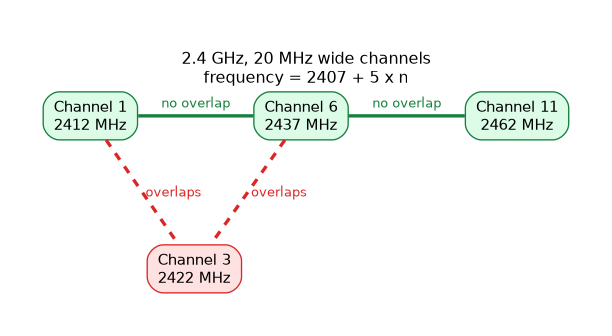 Channel centres are 5 MHz apart, and each normal channel is about 20 MHz wide. The first channel is at 2412 MHz, and the centre of channel
 n is:
frequency = 2407 + 5 x n (channels 1 to 13)| Channel | Frequency |
|---|---|
| 1 | 2412 MHz |
| 6 | 2437 MHz |
| 11 | 2462 MHz |
| 13 | 2472 MHz |
Because the centres are only 5 MHz apart and the channels are 20 MHz wide, neighbouring channels overlap heavily. The usual non overlapping set is channels 1, 6 and 11. Which channels are allowed depends on the country, as the country topic explains.
The 5 GHz band
Here the channel centre follows a simple rule:
frequency = 5000 + 5 x channel numberCommon examples are channel 36 at 5180 MHz, channel 40 at 5200 MHz, channel 44 at 5220 MHz and channel 48 at 5240 MHz. Channels 20 MHz wide are spaced 20 MHz apart, so they do not overlap. This gives many more usable channels than 2.4 GHz, though not all are allowed in every country.
Some 5 GHz channels need radar detection in many countries. The interface may wait and listen before it uses such a channel.
Comparing the two bands
| Point | 2.4 GHz | 5 GHz |
|---|---|---|
| Non overlapping 20 MHz channels | Three in common use | Many more |
| Interference | Often crowded | Usually quieter |
| Signal over walls and distance | Better | Weaker |
| Standards | b, g, n | a, n |
2.4 GHz travels further and passes through walls better. 5 GHz has more room and less interference, but a given power covers less distance.
Setting the frequency
On an access point you set the frequency directly:
/interface wireless set wlan1 mode=ap-bridge ssid=Office band=2ghz-b/g/n frequency=2437A station does not need a fixed frequency. It searches the frequencies in its scan list, and it joins the access point it finds:
/interface wireless set wlan1 mode=station scan-list=2412,2437,2462The scan list can hold single frequencies and ranges. A shorter list means the station finds the access point faster. The default scan list covers all the frequencies of the band.
Choosing a good frequency
Do not guess. Use the tools in the Wireless Tools chapter, such as the scan and the frequency monitor, to see what is already in use. Pick the quietest channel, and keep two nearby links on non overlapping channels.
For the 2.4 GHz band, remember that an interface on channel 3 is disturbed by those on 1 and 6. A link on channel 1 is not.
Other sources of noise
Wi-Fi shares 2.4 GHz with other devices, such as microwave ovens, cordless phones and Bluetooth. These are not Wi-Fi, so ordinary scans do not show them. A spectral scan can, on cards that support it.
What to remember for the exam
Seven facts help with this topic.
- RouterOS sets the frequency in MHz, not as a channel number.
- In 2.4 GHz, channel 1 is 2412 MHz, and the centres are 5 MHz apart.
- The non overlapping 20 MHz channels in 2.4 GHz are 1, 6 and 11.
- In 5 GHz, frequency is 5000 plus 5 times the channel number.
- 5 GHz has more non overlapping channels but a shorter reach.
- A station uses a scan list to find the access point.
- Some 5 GHz channels need radar detection.
When a station takes a long time to connect, shorten its scan-list to the frequencies the access point can use.
Common mistakes
Four mistakes are typical.
Using neighbouring 2.4 GHz channels. Channels 1 and 3 overlap, while 1 and 6 do not.
Typing a channel number as a frequency. RouterOS expects MHz, so enter 2437 and not 6.
Forgetting non Wi-Fi noise. A scan shows only Wi-Fi, so other sources need a spectrum view.
Leaving a long scan list. The station spends time on frequencies the access point never uses.
Check yourself
Work through these three questions.
Which three 2.4 GHz channels do not overlap, and what are their frequencies?
Channels 1, 6 and 11 do not overlap, at 2412, 2437 and 2462 MHz. The centres of other channels are only 5 MHz apart.
How do you work out the frequency for a 5 GHz channel?
The frequency is 5000 plus 5 times the channel number. Channel 36 is therefore 5180 MHz.
What does the scan list do on a station?
It lists the frequencies the station searches when it looks for an access point. A shorter list lets it connect faster.
Topic 3 of 3 in Wireless Standards
Test yourself on Wireless Standards
The full MikroTik MTCWE question bank has 447 questions, with timed practice exams and an explanation for every answer.
This study guide is independent and is not affiliated with, endorsed by, or sponsored by MikroTik. Vendor names, certification names and exam codes are trademarks of their respective owners and are used for identification only.