Wireless Advanced Settings · Topic 6 of 6
Virtual AP
Learn how a virtual AP lets one RouterOS radio serve several SSIDs with separate security, how to create it with a master interface, and its limits.
- 4 min
- Includes a diagram
- A virtual AP shares the radio of a master interface.
- It is created with
master-interface, its ownssidand asecurity-profile. - All SSIDs on one radio use the same frequency, band and width.
What it is
A virtual AP is an extra access point interface that shares the radio of a real one.
It lets one radio announce more than one SSID. Each virtual interface can have its own name, its own security and its own place in the network.
A common use is a staff network and a guest network on the same hardware.
How it works
A virtual interface follows a master interface for the radio settings, and has its own SSID and security.
Creating a virtual AP
You create the virtual interface and name its master:
/interface wireless add name=vap1 master-interface=wlan1 mode=ap-bridge ssid=Guest security-profile=guest-profilemaster-interfaceis the real interface whose radio is shared.ssidis the name that clients see for this network.security-profileselects the encryption and keys for this network.mode=ap-bridgemakes it behave as an access point.
The master keeps its own SSID and settings. A client can join either name.
What is shared and what is not
| Shared with the master | Own to the virtual interface |
|---|---|
| The radio | The SSID |
| The frequency | The security profile |
| The band and channel width | The interface name |
| The airtime | Its own MAC address |
Because the radio is shared, all the SSIDs live on the same channel. The virtual interface cannot use another frequency.
Why use virtual APs
The common reasons are:
- Separate networks with different security, such as staff and guests.
- A guest network without client to client traffic.
- Different bridges or VLANs for different groups, with one radio.
- A separate SSID for a device that needs an older security type.
One piece of hardware serves all of them, and the cost is lower than separate access points.
Separating the networks
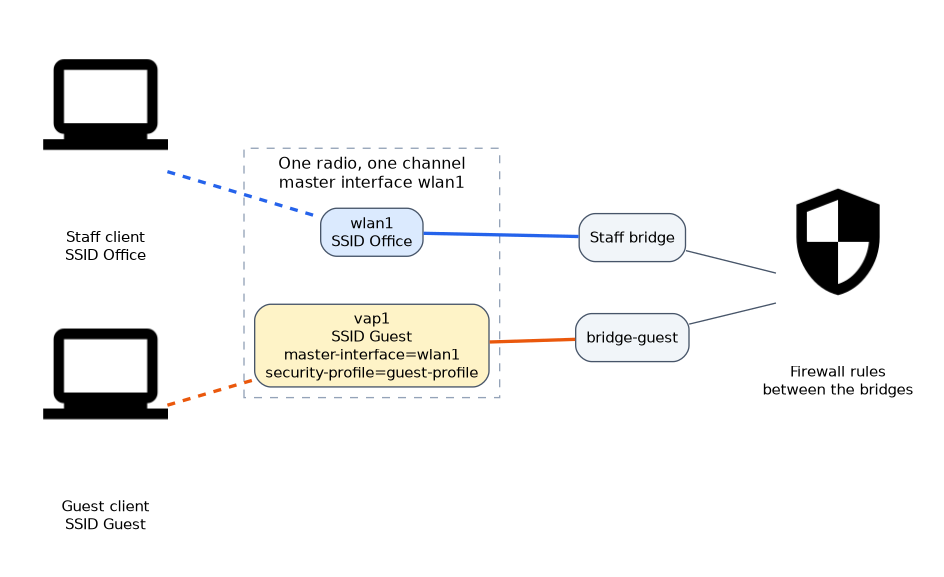 A new SSID does not separate traffic by itself. To keep guests apart from staff, put each interface into its own bridge, and control traffic between the bridges with the firewall.
/interface bridge port add bridge=bridge-guest interface=vap1For guests, you can also turn off forwarding between clients on that interface with default-forwarding=no. Clients then cannot talk to each other directly.
The cost of more SSIDs
Each SSID sends its own beacons, which use airtime on the shared channel. Every added virtual AP takes more airtime for management traffic, and leaves less for data.
| Number of SSIDs | Effect |
|---|---|
| One or two | Small cost |
| Many | A noticeable share of airtime goes to beacons |
Keep the number small, and use only the networks that you need.
Do not create many SSIDs on one radio. The extra beacons use airtime on the shared channel and slow everyone.
Security per SSID
Each virtual interface points to a security profile. You can give staff a strong profile and guests a different one. The profiles are covered in the security chapter.
Checking the result
/interface wireless print
/interface wireless registration-table print
The first command shows the virtual interface and its master. The registration table shows which interface each client joined, so you can see which SSID each client uses.
Limits to remember
- A virtual interface depends on its master. If the master is disabled, the virtual interface stops too.
- Changing the channel on the master changes it for every virtual interface.
- Features that need their own radio settings are not available per virtual interface.
Name the virtual interface after its purpose, such as vap-guest, so that you recognise it in a long list.
What to remember for the exam
Six facts cover virtual APs.
- A virtual AP shares the radio of a master interface.
- It is created with
master-interface, its ownssidand asecurity-profile. - All SSIDs on one radio use the same frequency, band and width.
- Each virtual interface has its own MAC address.
- Separating traffic needs separate bridges and firewall rules.
- Every extra SSID costs airtime for beacons.
Common mistakes
Four errors are typical.
Assuming separate channels. The virtual interface uses the master's channel.
Expecting separation from the SSID alone. Without separate bridges, the networks are not isolated.
Creating too many SSIDs. Beacons use airtime, so keep the number low.
Disabling the master. The virtual interfaces stop working with it.
Check yourself
Work through these three questions.
What is a virtual AP?
It is an extra access point interface that shares the radio of a master interface. It has its own SSID and security, but the same channel.
How do you keep a guest SSID apart from the staff network?
Put the virtual interface in its own bridge and control traffic between the bridges with the firewall. A new SSID alone does not isolate traffic.
Why should you limit the number of SSIDs on one radio?
Each SSID sends its own beacons, which use airtime on the shared channel. More SSIDs leave less airtime for data.
Topic 6 of 6 in Wireless Advanced Settings
Test yourself on Wireless Advanced Settings
The full MikroTik MTCWE question bank has 447 questions, with timed practice exams and an explanation for every answer.
This study guide is independent and is not affiliated with, endorsed by, or sponsored by MikroTik. Vendor names, certification names and exam codes are trademarks of their respective owners and are used for identification only.