Wireless Advanced Settings · Topic 1 of 6
Advanced Wireless Settings, HW Retries and HW Protection
Learn the advanced wireless settings in RouterOS, how hw-retries affect delivery, and how hw-protection with RTS and CTS helps against hidden nodes.
- 5 min
- Includes a diagram
- Advanced settings tune the radio and should be changed only for a measured problem.
hw-retriessets how many times the hardware repeats an unacknowledged frame.- More retries lower loss but raise delay and airtime use.
What it is
The advanced wireless settings tune how the radio behaves under real conditions such as noise, long distance and hidden clients.
The basic settings, like mode, band, frequency and SSID, get a link working. The advanced settings make it work well when the air is not ideal.
Two of them matter most here. HW retries decide how hard the hardware tries to deliver a frame, and HW protection reduces collisions between clients that cannot hear each other.
How it works
Advanced settings change the radio's retry and protection behaviour, and they should be changed one at a time.
Showing the advanced settings
In the graphical tools the advanced settings sit behind an advanced mode button on the wireless tab. On the console they are ordinary properties of the interface:
/interface wireless print detail where name=wlan1Many of these settings have safe defaults. Change them only when you have a measured problem, and record the old value so that you can go back.
Some advanced settings
| Setting | Purpose |
|---|---|
hw-retries | How many times the hardware repeats a frame before it gives up |
hw-protection-mode | Whether RTS and CTS style protection is used |
hw-protection-threshold | The frame size from which protection is used |
hw-fragmentation-threshold | The frame size above which frames are split |
adaptive-noise-immunity | Receiver tuning for noisy places, covered next |
wmm-support | Traffic priority support, covered later |
disconnect-timeout | How long a silent client is kept before it is removed |
HW retries
When a frame is not acknowledged, the hardware sends it again. The hw-retries setting limits how many repeats happen before the frame is dropped.
/interface wireless set wlan1 hw-retries=10A higher value gives more chances to deliver a frame on a noisy link, so fewer frames are lost. The cost is more airtime used, and longer delays, which hurts voice and other time sensitive traffic. A lower value drops frames sooner, which gives better delay but more loss.
The retry counters in the registration table show whether retries are common. If hw-frames is much larger than frames, the link is already repeating a lot, and a higher retry count will add to the load.
Raise hw-retries only for a long or noisy link that carries data. Keep it low for real time traffic.
The hidden node problem
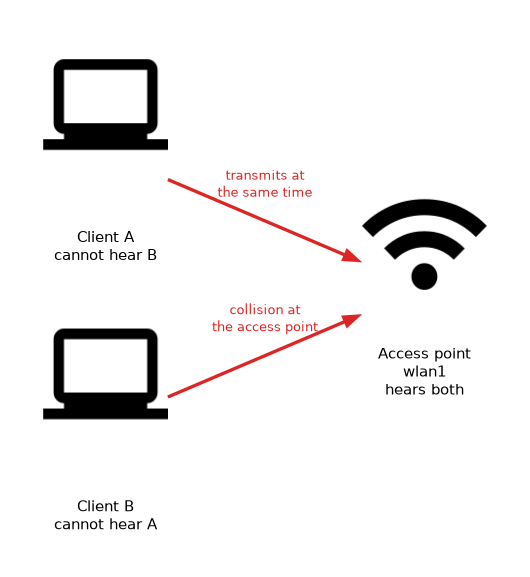 Wi-Fi devices listen before they transmit. Two clients on opposite sides of an access point may not hear each other. Both can transmit at once, and the frames collide at the access point.
This is the hidden node problem. It gets worse when there are many clients, or on long links where clients are far apart.
HW protection
Protection adds a short handshake before a data frame. The sender asks for the channel, and the receiver replies that the channel is reserved. Other devices that hear the reply stay quiet.
/interface wireless set wlan1 hw-protection-mode=rts-cts
/interface wireless set wlan1 hw-protection-mode=cts-to-self| Mode | How it works |
|---|---|
none | No protection |
rts-cts | The sender sends a request and waits for the receiver's reply |
cts-to-self | The sender announces the channel is reserved, with no request |
rts-cts handles true hidden nodes, because the receiver's reply reaches clients that cannot hear the sender. cts-to-self uses less airtime, but it protects only against devices that can hear the sender.
The hw-protection-threshold setting limits protection to larger frames. Small frames are not worth a handshake, because the handshake costs more than a collision.
The price of protection
The handshake uses airtime. Turning protection on for a link that has no hidden nodes lowers throughput for no gain. Use it where the registration table shows many retries and the clients cannot hear each other.
Protection is a cure for hidden nodes, not for noise. If retries come from interference, protection will lower speed and not fix the cause.
A lab approach
- Look at
hw-framesagainstframesfor several clients. - If one far client has many retries, suspect a hidden node.
- Turn on
rts-ctsand compare the retry level and the throughput. - If nothing improves, turn it off again and look for noise.
What to remember for the exam
Six facts cover this topic.
- Advanced settings tune the radio and should be changed only for a measured problem.
hw-retriessets how many times the hardware repeats an unacknowledged frame.- More retries lower loss but raise delay and airtime use.
- The hidden node problem is two clients that cannot hear each other.
hw-protection-modecan benone,rts-ctsorcts-to-self.- Protection costs airtime, so use it only where hidden nodes exist.
Common mistakes
Four errors come up often.
Raising retries for voice traffic. More repeats add delay, which hurts real time traffic.
Using protection by default. It lowers throughput when no hidden nodes exist.
Blaming noise on hidden nodes. Protection does not cure interference.
Changing many settings together. You cannot tell which one helped.
Check yourself
Work through these three questions.
What does
hw-retriescontrol?It sets how many times the hardware repeats a frame that was not acknowledged before it drops the frame. More retries reduce loss but raise delay and airtime use.
What is the hidden node problem?
Two clients cannot hear each other, so they transmit at the same time and their frames collide at the access point. Protection with
rts-ctsis a cure.Which
hw-protection-modehandles true hidden nodes best?rts-ctshandles them, because the receiver's reply reaches clients that cannot hear the sender.cts-to-selfuses less airtime but protects less.
Topic 1 of 6 in Wireless Advanced Settings
Test yourself on Wireless Advanced Settings
The full MikroTik MTCWE question bank has 447 questions, with timed practice exams and an explanation for every answer.
This study guide is independent and is not affiliated with, endorsed by, or sponsored by MikroTik. Vendor names, certification names and exam codes are trademarks of their respective owners and are used for identification only.