Nv2 Protocol · Topic 2 of 3
Nv2 Configuration Options
Learn the Nv2 settings in RouterOS, including wireless protocol, nv2 cell radius, nv2 qos, queue count and Nv2 security for an AP and a station.
- 5 min
- Includes a diagram
wireless-protocol=nv2selects the protocol on both ends.nv2-cell-radiusis the distance to the farthest client, in kilometres, and it is set on the access point.- A cell radius that is too small stops far clients, and one that is too large wastes airtime.
What it is
The Nv2 configuration options are the settings that tell an interface to use Nv2 and shape how it schedules traffic.
Most of them are on the access point, which owns the schedule. The station mainly needs to match the protocol, the band, the SSID and the security settings.
The most important one is the cell radius, because the access point uses it to build its timing.
How it works
You select Nv2, set the cell radius, choose the traffic handling and match the security at both ends.
Selecting the protocol
On both the access point and the station:
/interface wireless set wlan1 wireless-protocol=nv2The band must be an 802.11n band, such as 5ghz-onlyn or 2ghz-onlyn, with a matching frequency on the access point.
The access point
A basic access point setup looks like this:
/interface wireless set wlan1 mode=ap-bridge ssid=Nv2Link band=5ghz-onlyn frequency=5180 wireless-protocol=nv2 nv2-cell-radius=10| Setting | Purpose |
|---|---|
wireless-protocol | Selects Nv2 |
nv2-cell-radius | The distance to the farthest client, in kilometres |
nv2-qos | How traffic is handled with respect to priority |
nv2-queue-count | The number of priority queues |
nv2-security | Whether Nv2 level security is used |
nv2-preshared-key | The key for Nv2 level security |
Cell radius
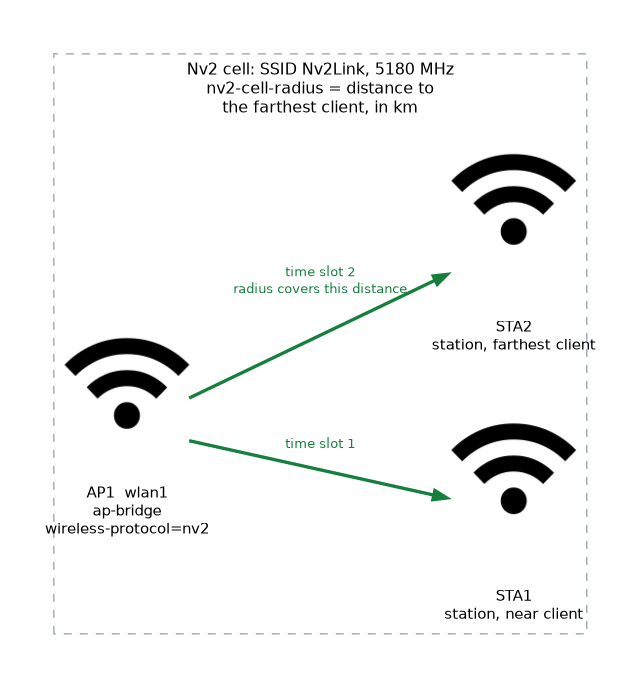 The cell radius is the distance from the access point to the farthest client, given in kilometres. The access point sets its timing so that signals from clients at that distance still arrive inside the right slot.
| Setting | Effect |
|---|---|
| Too small | Far clients arrive late and fail to connect or work badly |
| Correct | Timing fits all clients |
| Too large | Guard time is wasted, which lowers throughput |
Set it to the distance of the farthest client, with a small margin. When a new client is added at a greater distance, raise the value. This replaces the distance and acknowledgement timeout settings of standard Wi-Fi for Nv2.
Quality of service and queues
Nv2 can manage its traffic with priority queues:
/interface wireless set wlan1 nv2-qos=frame-priority nv2-queue-count=4| Setting | Meaning |
|---|---|
nv2-qos=default | Treats traffic with a default method, without regard to the packet priority |
nv2-qos=frame-priority | Uses the packet priority to put traffic into queues |
nv2-queue-count | Sets how many queues exist, so more queues give finer control |
With frame-priority, the packet priority set by the firewall or by a VLAN tag decides the queue, which links Nv2 to the traffic marking used for WMM. A higher priority gets served sooner.
The queue count and the QoS mode should match on both ends, so that traffic is classified in the same way.
Nv2 security
Nv2 can add its own security with a pre shared key:
/interface wireless set wlan1 nv2-security=enabled nv2-preshared-key=SharedNv2KeyBoth ends must have the same setting and the same key, or they cannot talk. How it combines with the normal security profile depends on the RouterOS version, so check your version before you rely on both.
The station
The station side needs less:
/interface wireless set wlan1 mode=station ssid=Nv2Link band=5ghz-onlyn wireless-protocol=nv2It must match the protocol, the SSID, the band and the security settings. It does not set the cell radius, because the access point controls the schedule.
Choosing values
| Situation | Suggested approach |
|---|---|
| Short point to point link | Small cell radius that matches the real distance |
| Multipoint cell | Cell radius for the farthest client |
| Mixed voice and data | nv2-qos=frame-priority, with priorities set by the firewall |
| Open radio environment | Use encryption, either a security profile or Nv2 security |
Checking the result
/interface wireless print detail where name=wlan1
/interface wireless registration-table print detail
/tool bandwidth-test address=192.168.88.2 direction=both
The first command shows the Nv2 settings in force. The registration table shows the connected stations. The bandwidth test shows the real throughput.
Write the farthest client distance on the site record. It is the value you will need when you add clients.
What to remember for the exam
Six facts cover this topic.
wireless-protocol=nv2selects the protocol on both ends.nv2-cell-radiusis the distance to the farthest client, in kilometres, and it is set on the access point.- A cell radius that is too small stops far clients, and one that is too large wastes airtime.
nv2-qoscan use the packet priority, andnv2-queue-countsets the number of queues.nv2-securityandnv2-preshared-keyadd an Nv2 level key, and both ends must match.- Encryption is still needed on an open radio path, so plan the security profile or Nv2 security.
Common mistakes
Four errors are typical.
Cell radius too small. Distant clients cannot join or run poorly.
Cell radius far too large. Guard time is wasted, and throughput falls.
Different Nv2 security settings. The two ends cannot communicate.
Using a legacy band. The band must be an 802.11n band.
Check yourself
Work through these three questions.
What does
nv2-cell-radiusset?It sets the distance to the farthest client, in kilometres, and the access point builds its timing from it. It is set on the access point.
What happens if the cell radius is too small?
Signals from distant clients arrive late, so they fail to connect or work badly. Too large a value wastes airtime instead.
What does
nv2-qos=frame-prioritydo?It uses the packet priority to put traffic into Nv2 queues. A higher priority is served sooner.
Topic 2 of 3 in Nv2 Protocol
Test yourself on Nv2 Protocol
The full MikroTik MTCWE question bank has 447 questions, with timed practice exams and an explanation for every answer.
This study guide is independent and is not affiliated with, endorsed by, or sponsored by MikroTik. Vendor names, certification names and exam codes are trademarks of their respective owners and are used for identification only.