Nstreme Protocol · Topic 3 of 3
Nstreme Dual and Troubleshooting
Learn how Nstreme Dual uses one radio to send and one to receive, how to configure tx radio and rx radio, and how to troubleshoot Nstreme links.
- 5 min
- Includes a diagram
- Nstreme Dual uses one radio to transmit and another to receive, so a link is full duplex.
- The radios use
mode=nstreme-dual-slave, and a combined interface is created in the nstreme dual menu. tx-radio,rx-radio, the two frequencies andremote-macdefine the link.
What it is
Nstreme Dual uses two radios at each end of a link, with one only for sending and one only for receiving.
A normal radio sends and receives on the same channel, so it must take turns. This is called half duplex. With two radios on different frequencies, each end can send and receive at the same time, which is full duplex.
The page also covers how to find and fix problems on Nstreme links.
How it works
Each end has a transmit radio and a receive radio on separate frequencies, joined into one logical interface.
Why two radios help
On a single radio link, the link capacity is shared between the two directions. Doubling the radios allows both directions to run at full speed together. The delay is also lower, since a sender does not wait for the other direction to finish.
The price is two radios, two antennas at each end, and two channels.
The nstreme dual interface
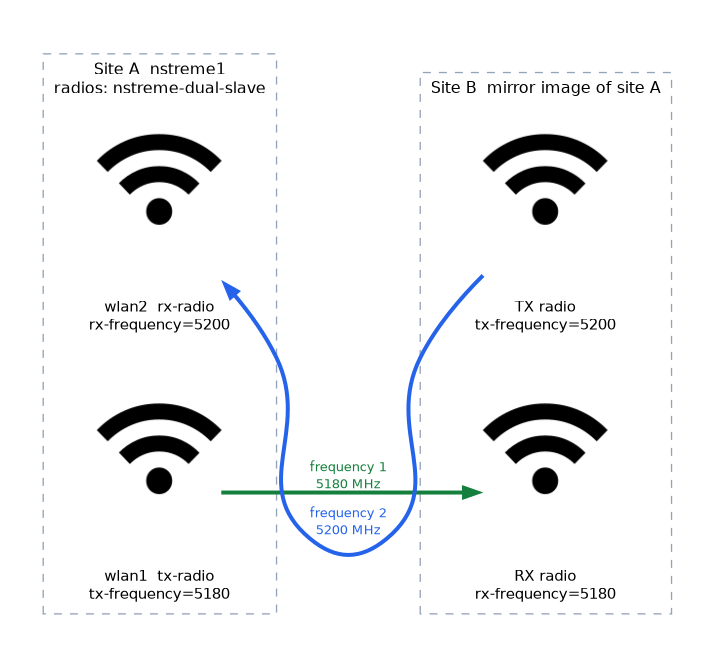 The two radios are combined into one interface. The radios are first set to a special mode, and then the combined interface is created:
/interface wireless set wlan1 mode=nstreme-dual-slave
/interface wireless set wlan2 mode=nstreme-dual-slave
/interface wireless nstreme-dual add name=nstreme1 tx-radio=wlan1 rx-radio=wlan2 tx-frequency=5180 rx-frequency=5200 remote-mac=00:11:22:33:44:55| Setting | Purpose |
|---|---|
tx-radio | The radio that sends |
rx-radio | The radio that receives |
tx-frequency and rx-frequency | The frequency of each direction |
remote-mac | The address of the partner's interface |
The other end mirrors this: its transmit frequency is the first end's receive frequency, and its receive frequency is the first end's transmit frequency.
The bands and channel widths for each direction can also be set. The new nstreme1 interface is then added to a bridge, or given an IP address, like any other link.
/interface bridge port add bridge=bridge1 interface=nstreme1Frequency and antenna planning
The transmit radio and the receive radio at one end are close to each other. If their frequencies are too near, the strong transmit signal swamps the receiver. Keep the two frequencies well apart, and use separate antennas, often with different polarisation, so that they isolate each other.
| Item | Advice |
|---|---|
| Frequency gap | Keep it wide, so the transmitter does not swamp the receiver |
| Antennas | Two antennas per end, with separation or opposite polarisation |
| Direction swap | The two ends must use opposite transmit and receive frequencies |
If the two ends use the same transmit frequency, neither can hear the other. Check that they are mirror images.
Troubleshooting Nstreme links
Work through the likely causes in order:
- Protocol mismatch. One end uses Nstreme and the other uses standard 802.11. Check
wireless-protocolon both. - Hardware support. Not every card supports Nstreme.
- Different SSID, band or frequency. The usual link conditions still apply.
- Security mismatch. Both ends need a compatible security profile.
- Framing too large. High delay and jitter suggest the
framer-limitis too big for the traffic. - Polling with too many clients. Each client gets a small share.
- Interference. Check the channel with the tools from the earlier chapter.
Tools to use
/interface wireless nstreme print
/interface wireless registration-table print detail
/tool bandwidth-test address=192.168.88.2 direction=both
The registration table shows whether the peer is connected and gives its signal and rates. The bandwidth test shows the real throughput. For an Nstreme Dual link, test in both directions at once, because that is the point of the design.
A simple method
- Confirm the link is up and the signal is strong.
- Confirm both ends use the same protocol and compatible settings.
- Run a bandwidth test and compare the result with what you expect.
- Lower the framer limit if delay is the problem, and raise it if bulk throughput is the problem.
- Check for interference, and move frequency if needed.
If Nstreme does not give a gain over standard 802.11, compare against it as a test, by switching both ends to standard mode for a short time.
When a new Nstreme link does not come up, set both ends back to plain 802.11 to prove the radio path works, then switch the protocol again.
What to remember for the exam
Six facts cover this topic.
- Nstreme Dual uses one radio to transmit and another to receive, so a link is full duplex.
- The radios use
mode=nstreme-dual-slave, and a combined interface is created in the nstreme dual menu. tx-radio,rx-radio, the two frequencies andremote-macdefine the link.- The two ends use mirrored transmit and receive frequencies.
- Keep the two frequencies apart, and use separate antennas.
- Troubleshoot by checking the protocol, hardware, security, framing, polling and interference.
Common mistakes
Four errors are typical.
Same frequency in both directions. The two radios at one end disturb each other.
Ends not mirrored. If both ends transmit on one frequency, neither hears the other.
One shared antenna. The transmitter swamps the receiver.
Testing one direction only. The design gains from both directions at once.
Check yourself
Work through these three questions.
What is the benefit of Nstreme Dual?
It uses one radio to send and another to receive on different frequencies. The link is then full duplex instead of half duplex.
How must the two ends of an Nstreme Dual link be set?
The ends mirror each other, so one end's transmit frequency is the other end's receive frequency. Each end also names the partner with
remote-mac.What is a good first step when an Nstreme link does not come up?
Check that both ends use the same protocol, then check hardware support and security. Switching both ends to plain 802.11 proves that the radio path works.
Topic 3 of 3 in Nstreme Protocol
Test yourself on Nstreme Protocol
The full MikroTik MTCWE question bank has 447 questions, with timed practice exams and an explanation for every answer.
This study guide is independent and is not affiliated with, endorsed by, or sponsored by MikroTik. Vendor names, certification names and exam codes are trademarks of their respective owners and are used for identification only.