Firewall Filter, NAT and Mangle · Topic 5 of 6
Mangle Chains and Actions
Learn RouterOS mangle: its five chains, custom chains, every mangle action including mark-connection and mark-packet, passthrough and common conditions.
- 5 min
- Includes a diagram
- Mangle has five chains: prerouting, input, forward, output and postrouting.
- Mangle marks and modifies packets. It never allows or blocks traffic.
- Mark types are connection, packet and routing.
What it is
Mangle marks packets and connections and changes some packet fields, so that other features can act on them.
Mangle never allows or blocks traffic. Its job is to label or modify packets. Queues, routing and filter rules then use those labels.
Mangle rules are in /ip firewall mangle. They follow the same rule layout as filter: chain, conditions, action.
How it works
Mangle has all five chains and a richer set of actions than filter.
Chains
| Chain | Position in the path |
|---|---|
| prerouting | Before the routing decision, after tracking |
| input | For packets addressed to the router |
| forward | For packets passing through |
| output | For packets the router creates |
| postrouting | After routing, before the packet leaves |
Mangle prerouting runs before dstnat. Mangle postrouting runs before srcnat. Custom chains work as in filter, using jump and return.
Marks
Three kinds of mark exist, and each has a different job.
| Mark | Lives on | Typical use |
|---|---|---|
| connection mark | The tracked connection | Classify a whole connection once |
| packet mark | One packet | Select a queue |
| routing mark | One packet | Select a routing table |
A mark is only a label stored in memory. It does nothing until another feature, such as a queue, a route rule or a filter condition, matches it.
Mangle actions
| Action | Effect |
|---|---|
| mark-connection | Set new-connection-mark on the connection |
| mark-packet | Set new-packet-mark on the packet |
| mark-routing | Set new-routing-mark for policy routing |
| change-dscp | Set the DSCP value to new-dscp |
| change-ttl | Change the TTL as set by new-ttl |
| change-mss | Change the TCP MSS to new-mss |
| set-priority | Set the priority field |
| strip-ipv4-options | Remove IPv4 options from the packet |
| clear-df | Clear the DF (do not fragment) flag |
| route | Send the packet to a gateway chosen with route-dst |
| fasttrack-connection | Mark the connection for fasttrack |
| accept | Stop processing the rules of this chain for this packet |
| passthrough | Count the packet and move on |
| jump, return | Move into or out of a custom chain |
| log | Write a log entry and move on |
| add-src-to-address-list, add-dst-to-address-list | Store the address in a list |
| sniff-tzsp, sniff-pc | Copy the packet to a sniffer, either a TZSP stream or a PC |
In version 6, mark-routing sets a routing mark that a route can use. In version 7, the routing mark is the name of a routing table, and routes in that table are used.
The passthrough option
Many mangle actions have a passthrough parameter. With passthrough=yes, the packet carries on to the following mangle rules. With passthrough=no, the rest of the rules in that chain are skipped for the packet.
Use passthrough=no when no later mangle rule needs the packet. This saves processing.
The efficient two step pattern
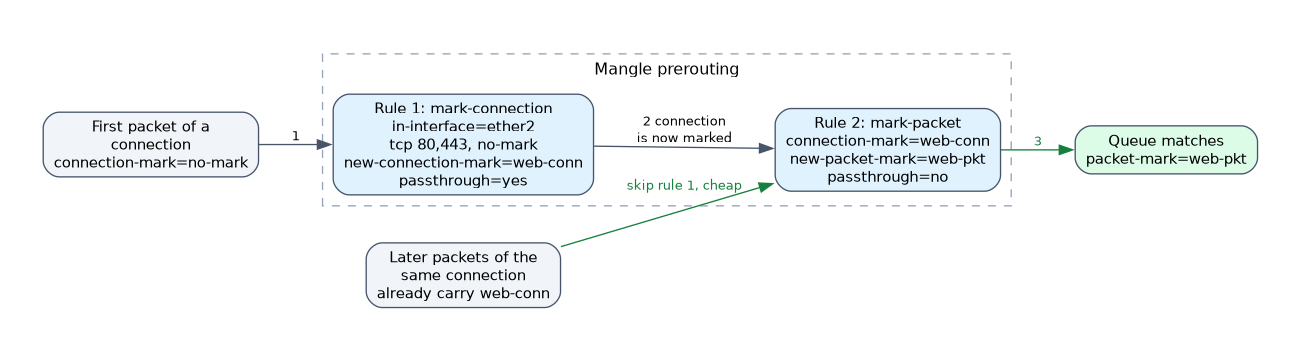 Marking every packet with a heavy rule is wasteful. A better design marks the connection once, then derives the packet mark from the connection mark.
/ip firewall mangle add chain=prerouting in-interface=ether2 protocol=tcp dst-port=80,443 connection-mark=no-mark action=mark-connection new-connection-mark=web-conn passthrough=yes
/ip firewall mangle add chain=prerouting connection-mark=web-conn action=mark-packet new-packet-mark=web-pkt passthrough=no
The first rule only sees packets of connections that have no mark yet. After the first packet, the second rule does the rest cheaply, because the connection mark is already set.
Marking traffic by direction
Replies arrive on a different interface, but they belong to the same connection. Because the connection mark is stored on the connection, a second rule can mark return packets as well, matching on the connection mark alone.
Common conditions
The common conditions are the same as in the other tables. They include src-address, dst-address, protocol, dst-port, in-interface, out-interface, connection-mark, packet-mark, connection-state and src-address-list.
For marks, the special value no-mark matches packets or connections that have no mark yet. This is the key to the two step pattern above.
Set connection marks in prerouting and output, then mark packets from the connection mark. It keeps the rule count and the CPU load low.
What to remember for the exam
Eight facts cover most questions on this topic.
- Mangle has five chains: prerouting, input, forward, output and postrouting.
- Mangle marks and modifies packets. It never allows or blocks traffic.
- Mark types are connection, packet and routing.
passthrough=yescontinues to the next rule.passthrough=noskips the rest of the chain.- Mark the connection first, then derive the packet mark from the connection mark.
connection-mark=no-markmatches a connection that has no mark yet.- A routing mark must be set before the routing decision.
change-dscp,change-ttlandchange-mssrewrite header fields.
A mark does nothing alone. If no queue, route or filter rule matches it, the mark has no effect.
Common mistakes
These four mistakes appear often.
Marking packets without a connection mark. Every packet runs the heavy rule, which wastes CPU.
Forgetting passthrough. With passthrough=no, later rules in that chain never see the packet, so a second mark is never made.
Marking in the wrong chain. A routing mark set after the routing decision cannot change the route.
Expecting mangle to block traffic. Only filter rules drop traffic.
Check yourself
Work through these three questions.
What does
passthrough=nodo in a mangle rule?It stops the packet from being checked against the later rules in the same mangle chain.
Why mark the connection before marking packets?
The connection mark is set once, and later packets are marked cheaply from it.
Which mark is used to select a queue?
The packet mark, which a queue matches.
Topic 5 of 6 in Firewall Filter, NAT and Mangle
Test yourself on Firewall Filter, NAT and Mangle
The full MikroTik MTCTCE question bank has 479 questions, with timed practice exams and an explanation for every answer.
This study guide is independent and is not affiliated with, endorsed by, or sponsored by MikroTik. Vendor names, certification names and exam codes are trademarks of their respective owners and are used for identification only.