Firewall Filter, NAT and Mangle · Topic 1 of 6
Connection Tracking
Learn how RouterOS connection tracking follows connections, what the new, established, related and invalid states mean, and how raw and fasttrack interact.
- 5 min
- Includes a diagram
- Connection tracking follows connections and gives each packet a state.
- The states are new, established, related, invalid and untracked.
- NAT and the
connection-statecondition need tracking to be enabled.
What it is
Connection tracking keeps a table of every connection that passes through or is made by the router.
Without it, each packet would be judged alone. With it, RouterOS can say that a packet is part of an existing conversation. This is what lets you build a stateful firewall and what makes NAT work in both directions.
Each entry records addresses, ports, protocol, state and timers. You can see the table with /ip firewall connection print.
How it works
A packet is matched to a tracked connection early in the path, and gets one of several states.
Where tracking happens
Tracking happens at the start of the path. Packets that arrive on an interface are tracked in prerouting, and packets made by the router are tracked in output. The raw table runs before tracking, so a raw rule can exempt a packet from it.
/ip firewall connection tracking set enabled=auto
/ip firewall connection print
The enabled setting accepts yes, no or auto. With auto, tracking is switched on when firewall or NAT rules need it. If tracking is off, NAT and the connection-state condition cannot work.
Connection states
Every packet gets a state when it is compared with the table. These are the values of the connection-state condition.
| State | Meaning |
|---|---|
| new | The packet starts a new connection, or is not yet part of a known one |
| established | The packet belongs to a connection that has seen traffic in both directions |
| related | The packet starts a new connection but is linked to an existing one, such as an ICMP error or an FTP data connection |
| invalid | The packet does not belong to any connection and cannot start one |
| untracked | The packet was exempted from tracking by a raw rule |
A rule can match several states at once by listing them with commas, for example connection-state=established,related.
The standard stateful pattern
Most firewalls follow the same pattern. Allow established and related traffic first, drop invalid traffic, then allow only the new traffic you want.
/ip firewall filter add chain=input connection-state=established,related action=accept
/ip firewall filter add chain=input connection-state=invalid action=drop
/ip firewall filter add chain=input in-interface=ether2 action=accept
/ip firewall filter add chain=input action=drop
Placing the established rule first is also an efficiency gain. Most packets belong to existing connections, so they leave the rule list at the first rule.
Connection marks and NAT
Tracking also stores marks and NAT results on the connection. A mangle rule can set a connection mark once, and every later packet of that connection carries it.
For NAT, the translation is chosen for the first packet only. Later packets, and replies, are translated from the tracked entry.
Fasttrack
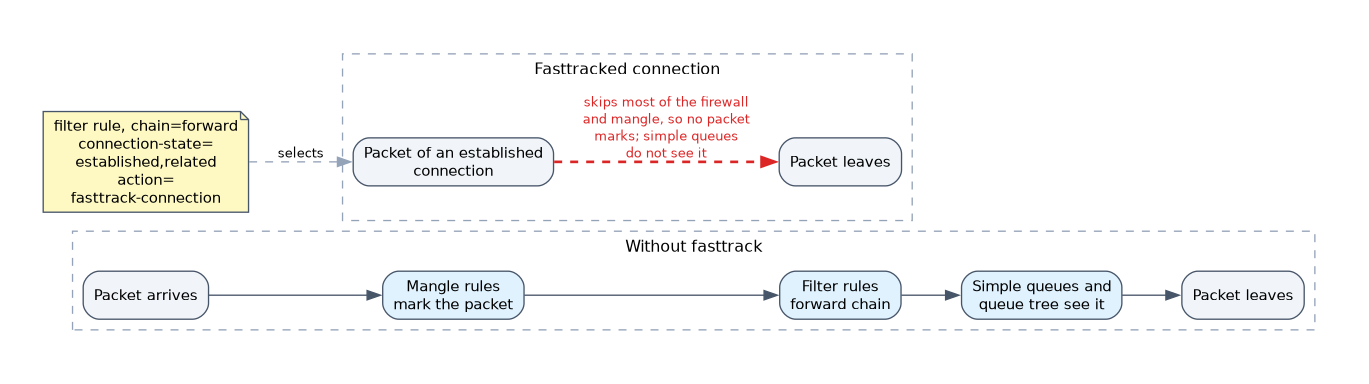 Fasttrack lets selected established connections skip most of the normal path. It is set with a filter rule.
/ip firewall filter add chain=forward connection-state=established,related action=fasttrack-connectionFasttracked packets skip much of the firewall and mangle processing, and simple queues do not see them. This saves CPU, but it also means rules and queues that you expect to apply may not see that traffic. Fasttrack is therefore a trade-off between speed and control.
Mangle rules and simple queues do not see fasttracked traffic. If a queue appears to do nothing, check whether fasttrack covers that connection.
Invalid packets and timeouts
A packet is invalid if it does not fit any connection, for example a TCP packet that arrives without a handshake. Dropping invalid packets is good practice in input and forward.
Connections do not live forever. Each protocol has timeout settings in the connection tracking menu, and idle entries are removed when they expire.
What to remember for the exam
Seven facts cover most questions on this topic.
- Connection tracking follows connections and gives each packet a state.
- The states are new, established, related, invalid and untracked.
- NAT and the
connection-statecondition need tracking to be enabled. - The
enabledsetting acceptsyes,noorauto. - Tracking happens in prerouting for arriving packets and in output for local packets.
- The raw table runs before tracking and can exempt traffic.
- Fasttrack lets established connections bypass most of the path, including mangle and simple queues.
Put the established and related accept rule at the top, and the invalid drop rule straight after it.
Common mistakes
These four mistakes appear often.
Disabling tracking and expecting NAT to work. NAT depends on tracking, so turning it off breaks translation.
Dropping related packets. Related covers ICMP errors and helper-driven connections, so a blanket drop breaks things like FTP data.
Placing the established rule last. Every packet then walks through all other rules first, which wastes CPU.
Forgetting fasttrack. A queue or mangle rule that never counts may be bypassed by a fasttrack rule above it.
Check yourself
Work through these three questions.
Which connection states does the usual accept rule match?
It matches
established,related, so replies and linked connections are accepted.What does a raw rule do that a filter rule cannot?
It runs before connection tracking, so it can exempt traffic from tracking.
Why might a queue not affect a connection?
A fasttrack rule may cover it, and fasttracked packets skip mangle and are not seen by simple queues.
Topic 1 of 6 in Firewall Filter, NAT and Mangle
Test yourself on Firewall Filter, NAT and Mangle
The full MikroTik MTCTCE question bank has 479 questions, with timed practice exams and an explanation for every answer.
This study guide is independent and is not affiliated with, endorsed by, or sponsored by MikroTik. Vendor names, certification names and exam codes are trademarks of their respective owners and are used for identification only.