DHCP Client, Relay and Server · Topic 5 of 5
DHCP Relay
Learn how the RouterOS DHCP relay forwards client requests to a remote server, how giaddr selects the pool, and the checks for a working relay.
- 5 min
- Includes a diagram
- A relay forwards client broadcasts to a remote server as unicast.
- The relay is configured in
/ip dhcp-relay. interfaceis the client facing interface anddhcp-serveris the remote server address.
What it is
A DHCP relay forwards DHCP requests between a client network and a server on a different network.
Clients ask for an address with a broadcast, and a broadcast stops at the router. Without help, a server on another subnet never hears the request. The relay listens on the client side and passes the request on to the server as a unicast.
This lets one central server serve many subnets, so you do not need a server on every router.
How it works
The relay changes the request on its way, and the server uses the change to choose the right pool.
What the relay does
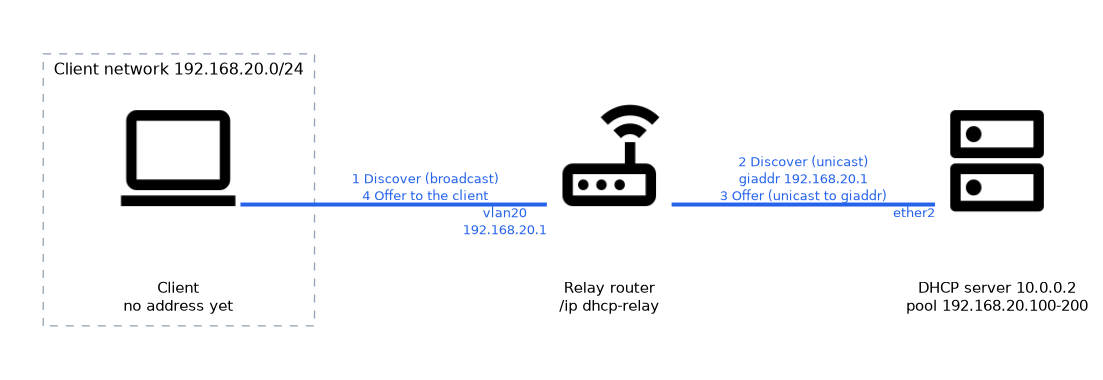 When the relay receives a client broadcast, it does three things. It puts its own address on the client interface in the giaddr field.
It forwards the packet by unicast to the configured server. Later it receives the answer and passes it back to the client.
The server reads giaddr and picks the network entry and pool that match that address. This is how a server knows which subnet the client belongs to, even though the client is far away.
| Step | Packet | Addresses |
|---|---|---|
| 1 | Discover from client | Broadcast on the client network |
| 2 | Relayed Discover | Unicast from relay to server, with giaddr set |
| 3 | Offer from server | Unicast to the relay address in giaddr |
| 4 | Offer to client | Sent by the relay on the client network |
Configuring the relay
The relay is configured in /ip dhcp-relay.
/ip dhcp-relay add name=relay-vlan20 interface=vlan20 dhcp-server=10.0.0.2 local-address=192.168.20.1 disabled=no| Parameter | Meaning |
|---|---|
| interface | The interface where client requests arrive |
| dhcp-server | The address of the remote server, and several can be listed |
| local-address | The address placed in giaddr, which must be an address of the router on the client network |
| add-relay-info | Add relay agent information to the request |
The relay interface needs an IP address in the client subnet. The local-address is the address that the server will use to reach the relay and to pick the pool.
Configuring the server side
The remote server must be ready for the relayed subnet. It needs a network entry and a pool for that subnet.
/ip pool add name=pool-vlan20 ranges=192.168.20.100-192.168.20.200
/ip dhcp-server network add address=192.168.20.0/24 gateway=192.168.20.1 dns-server=10.0.0.2
/ip dhcp-server add name=dhcp-vlan20 interface=ether2 relay=192.168.20.1 address-pool=pool-vlan20 disabled=no
The relay parameter on the server entry tells it to serve requests that arrive with that giaddr. The server also needs a route back to the relayed subnet, because it answers by unicast to the relay address.
Option 82
The relay can add relay agent information, known as option 82, to the request. It tells the server which relay and which port the request came from.
A server can use this to choose leases or to log where a client connects. The relay setting that enables it is add-relay-info.
Checking a relay
If clients on the remote network do not get an address, follow the path.
- The relay is enabled on the correct client interface.
- The
dhcp-serveraddress is reachable from the relay. - The server has a network entry and a pool for the client subnet.
- The server has a route back to the
local-addressnetwork. - Firewalls on the path allow UDP 67 and 68.
Use the packet sniffer on the relay router. Seeing the broadcast arrive and no unicast leave points at the relay, and seeing both but no reply points at the server.
What to remember for the exam
Seven facts cover most questions on this topic.
- A relay forwards client broadcasts to a remote server as unicast.
- The relay is configured in
/ip dhcp-relay. interfaceis the client facing interface anddhcp-serveris the remote server address.local-addressis placed in giaddr, and the server uses giaddr to choose the pool.- The remote server needs a network entry and a pool for the relayed subnet.
- The server needs a route back to the relay local address.
- Option 82 adds relay agent information, enabled with
add-relay-info.
Common mistakes
These four mistakes appear often.
Missing network entry on the server. The server sees the giaddr but has no matching subnet, so it stays silent.
No route back. The server replies by unicast, so it must be able to reach the relay.
Wrong local address. The giaddr must be an address of the relay on the client network.
Pointing the relay at the wrong server address. The request never reaches the server, so clients stay unconfigured.
Check yourself
Work through these three questions.
Why is a relay needed between subnets?
Client requests are broadcasts, which do not cross a router, so the relay forwards them to the server as unicast.
What does the server use to choose the pool for a relayed request?
It uses the giaddr field, which holds the relay local address.
What must the remote server have for a relayed subnet?
A network entry and a pool for that subnet, and a route back to the relay address.
Topic 5 of 5 in DHCP Client, Relay and Server
Test yourself on DHCP Client, Relay and Server
The full MikroTik MTCTCE question bank has 479 questions, with timed practice exams and an explanation for every answer.
This study guide is independent and is not affiliated with, endorsed by, or sponsored by MikroTik. Vendor names, certification names and exam codes are trademarks of their respective owners and are used for identification only.