Securing the Router · Topic 3 of 3
Tunneling Through SSH
Learn how SSH port forwarding wraps a clear text service in an encrypted tunnel, how local and remote forwards differ, and how to enable it on RouterOS.
- 5 min
- Includes a diagram
- An SSH tunnel carries another protocol through an encrypted SSH session.
- It works by port forwarding.
- Local forwarding listens on the SSH client and sends traffic through to a target.
What it is
SSH tunneling sends the traffic of another program through an encrypted SSH connection.
Some services have no encryption of their own, for example a plain web page or an old database client. An SSH tunnel wraps their traffic, so that anyone watching the network sees only SSH.
The tunnel is built by port forwarding. A port on one side is linked to a port on the other side, and the SSH session carries the data between them.
How it works
The SSH client opens a listening port, and everything that reaches it travels inside the encrypted session.
Local forwarding
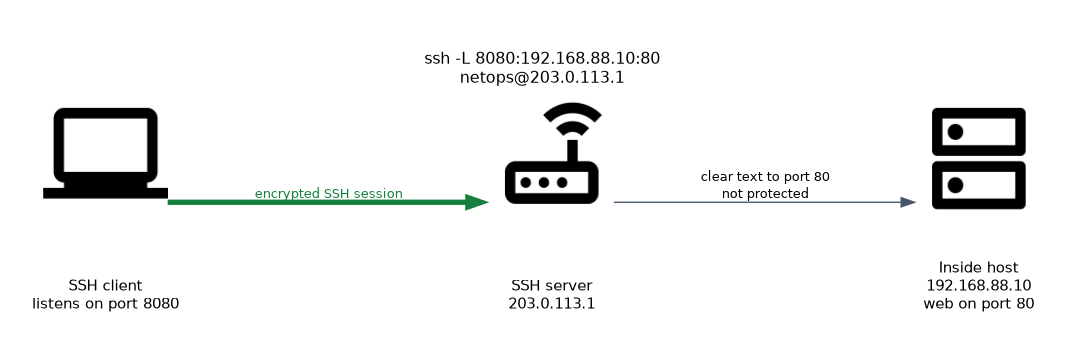 With local forwarding, the SSH client listens on a port on its own machine. Traffic sent to that port goes through the tunnel and leaves from the SSH server towards a target.
Typical use: you are outside, and you want to reach a plain web interface that only the router or the inside network can reach. You connect to the router with SSH and forward a local port to the target.
ssh -L 8080:192.168.88.10:80 netops@203.0.113.1This command runs on the client, not on RouterOS. It opens port 8080 on the client. When you browse to that local port, the traffic goes through the router and reaches port 80 on the host 192.168.88.10.
The format is local port, then target address, then target port. The part after the @ is the SSH server.
Remote forwarding
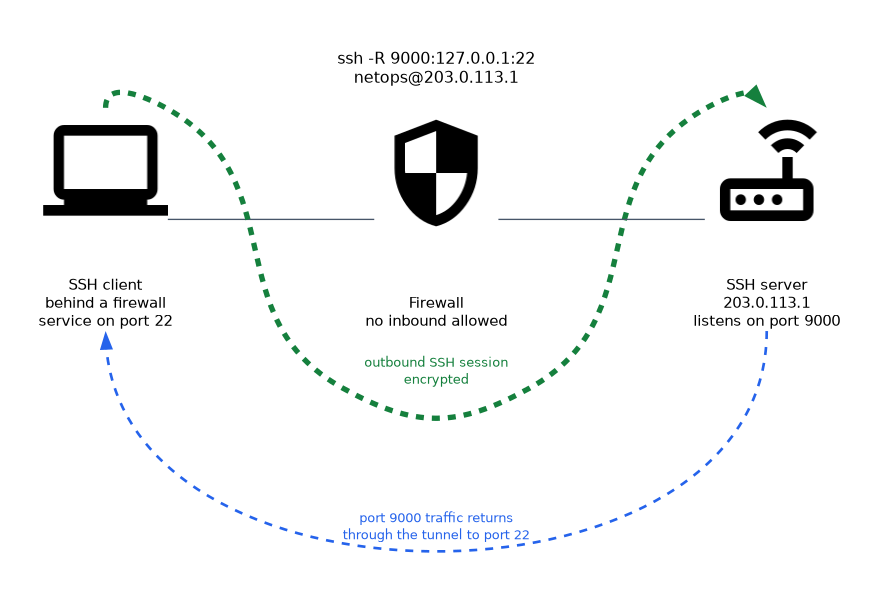 With remote forwarding, the SSH server listens on a port, and traffic sent to it comes back through the tunnel to the client side.
Typical use: a device behind a firewall opens an outbound SSH session to the server. The server side can then reach a service on that device through the tunnel, although no inbound connection from outside is allowed.
ssh -R 9000:127.0.0.1:22 netops@203.0.113.1This opens port 9000 on the SSH server, and sends the traffic to port 22 on the client machine.
Dynamic forwarding
With dynamic forwarding, the SSH client acts as a SOCKS proxy. Each program that uses the proxy can reach many targets through the one tunnel.
ssh -D 1080 netops@203.0.113.1Comparing the three
| Type | Who listens | Typical goal |
|---|---|---|
| Local | The SSH client | Reach an inside service from outside |
| Remote | The SSH server | Let the server side reach a service on the client side |
| Dynamic | The SSH client, as a SOCKS proxy | Send many applications through one tunnel |
RouterOS and SSH forwarding
The SSH server on RouterOS controls whether it accepts forwarding. By default, the router does not do this, and you must turn it on for the cases that you need.
/ip ssh print
/ip ssh set forwarding-enabled=local
The forwarding-enabled setting selects what the router permits, and the value no keeps forwarding off. The value local allows local forwarding only. Allow only the kind of forwarding that you need, and leave it off if you do not need it.
The router can also act as an SSH client for some tasks. It has an /system ssh command that opens a session to another host.
/system ssh 192.168.88.10 user=netopsSecurity view
Forwarding is a double edged feature. It protects clear text traffic, and it can also bypass your firewall. A user who is allowed to log in over SSH with forwarding can reach inside hosts that the firewall would block.
For this reason, give SSH access only to trusted users, and turn forwarding off when it is not needed. Use strong keys on those accounts.
Compared with a VPN
An SSH tunnel carries one port, or one application at a time. A VPN, which you meet in the next chapter, carries all traffic between two networks. SSH tunnels are quick for a single job, and a VPN is better for permanent links.
Remember the direction. Local forwarding opens a port on the client side, and remote forwarding opens a port on the server side.
What to remember for the exam
Seven facts cover SSH tunneling.
- An SSH tunnel carries another protocol through an encrypted SSH session.
- It works by port forwarding.
- Local forwarding listens on the SSH client and sends traffic through to a target.
- Remote forwarding listens on the SSH server and sends traffic back to the client side.
- Dynamic forwarding turns the SSH client into a SOCKS proxy.
- RouterOS controls forwarding with
/ip ssh set forwarding-enabled=. - Forwarding can bypass the firewall, so allow it only where you need it.
Common mistakes
Four mistakes appear here.
Mixing up local and remote forwarding. Ask which side opens the listening port. Local is the client, and remote is the server.
Thinking that the whole path is encrypted. Only the part between the SSH client and the SSH server is. The last step to the target is still clear text.
Leaving forwarding on without need. It lets users reach inside hosts and bypass firewall rules.
Using an SSH tunnel as a permanent VPN. It handles one port at a time and depends on one session staying up.
The traffic from the SSH server to the final target is not encrypted by the tunnel. Do not send secrets there across an untrusted network.
Check yourself
Work through these three questions.
Which side listens when you use local forwarding?
The SSH client listens on a local port. The traffic then goes through the tunnel to the target.
Why can SSH forwarding be a security risk?
It lets a user reach inside hosts that the firewall would block. Allow it only where needed.
Where is the traffic still clear text in an SSH tunnel?
From the SSH server to the final target. Only the part between the SSH client and the SSH server is encrypted.
Topic 3 of 3 in Securing the Router
Test yourself on Securing the Router
The full MikroTik MTCSE question bank has 446 questions, with timed practice exams and an explanation for every answer.
This study guide is independent and is not affiliated with, endorsed by, or sponsored by MikroTik. Vendor names, certification names and exam codes are trademarks of their respective owners and are used for identification only.