Securing the Router · Topic 1 of 3
Port Knocking
Learn how port knocking hides a management service until a client sends a secret sequence of connection attempts, built with RouterOS address lists.
- 5 min
- Includes a diagram
- The service stays closed until the client sends the right sequence.
- Each correct knock adds the source to an address list with a timeout.
- The service is accepted only for sources in the final list.
What it is
Port knocking keeps a service closed until a client sends a secret sequence of connection attempts.
To a scanner, the router looks closed. The management port opens only for a source address that has first "knocked" on the right ports in the right order.
It adds a hidden layer in front of a service such as SSH or WinBox. It does not replace passwords, keys or the firewall.
How it works
The firewall remembers each correct knock in an address list, and the final list opens the service.
The idea
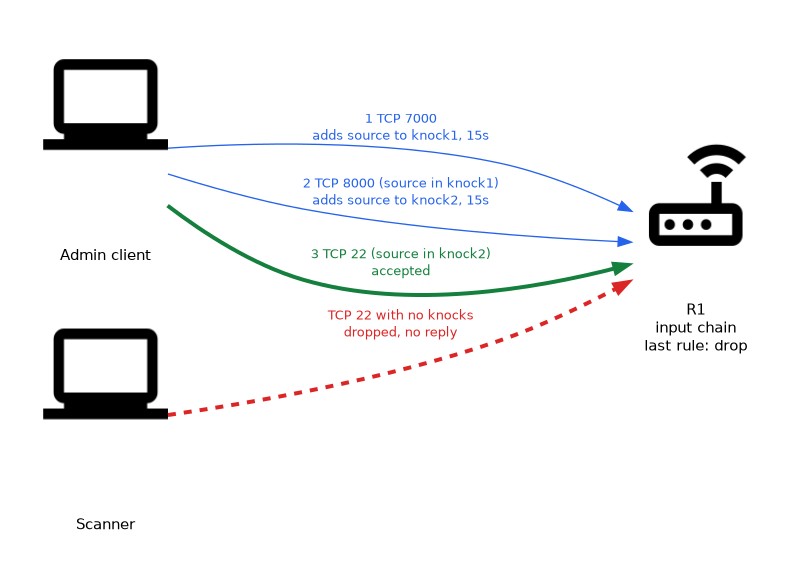 The router listens for connection attempts to ports where no service runs. A correct first knock puts the client address in a first list. A correct second knock, from an address in the first list, puts it in a second list.
A rule at the end accepts the management port, but only for addresses in the last list. Each list entry has a timeout, so the sequence must be completed quickly and the opening does not last forever.
Building the rules
This example uses two knocks and then allows SSH. The ports in the example are arbitrary, and you should pick your own.
/ip firewall filter add chain=input connection-state=established,related action=accept
/ip firewall filter add chain=input protocol=tcp dst-port=7000 action=add-src-to-address-list address-list=knock1 address-list-timeout=15s
/ip firewall filter add chain=input protocol=tcp dst-port=8000 src-address-list=knock1 action=add-src-to-address-list address-list=knock2 address-list-timeout=15s
/ip firewall filter add chain=input protocol=tcp dst-port=22 src-address-list=knock2 action=accept
/ip firewall filter add chain=input action=drop- The first rule keeps existing sessions alive.
- The second rule records the first knock. The packet then continues down the chain and is finally dropped.
- The third rule records the second knock, but only for sources that are in
knock1. - The fourth rule accepts SSH only for sources in
knock2. - The last rule drops everything else, so the router stays silent.
The timeouts are examples. A longer timeout makes knocking easier and also leaves the door open for longer.
The client side
A client knocks by trying to open a TCP connection to the first port, and then to the second port. The attempts do not need to succeed. Any tool that can send these connection attempts in order will do.
After the last knock, the client opens the SSH session within the timeout. The existing session continues even after the list entry expires, because of the first rule.
A wrong order does nothing
A client that knocks on the second port first is not in knock1, so nothing happens. Scanners that probe ports at random almost never find the right sequence. This is the strength of the method.
Checking
/ip firewall address-list print where list=knock1
/ip firewall address-list print where list=knock2
/ip firewall filter print stats
The lists show who has knocked. The counters on the rules show whether each step is matched.
Limits of port knocking
| Strength | Weakness |
|---|---|
| Hides services from scanners | The sequence is sent in clear and can be captured and replayed |
| Cheap, uses only firewall rules | The sequence works like a shared password |
| Stops most random brute force | Lost or reordered packets can break a knock |
Port knocking is security by obscurity. It reduces noise, but it does not prove who the client is. Combine it with strong passwords or keys, and use it on top of other defences.
Use more than two knocks, with ports that are unlikely to be scanned in order, and allow the service only for the knocking address.
What to remember for the exam
Six facts cover port knocking.
- The service stays closed until the client sends the right sequence.
- Each correct knock adds the source to an address list with a timeout.
- The service is accepted only for sources in the final list.
- The knock rules must be above the final drop rule.
- The sequence can be replayed if it is captured, so keys and passwords are still needed.
- Port knocking is obscurity and not authentication.
Common mistakes
Four mistakes appear here.
Putting the final drop before the knock rules. The knock packets are dropped first and the lists never fill.
Skipping the established rule. The session closes when the list timeout ends, because the return packets are no longer matched.
Using a timeout that is too short. The client cannot complete the sequence and the service never opens.
Treating knocking as the only protection. An attacker who sees the sequence can repeat it, so you still need strong credentials.
Test the knock from outside the network before you remove other access. A mistake can lock you out of a remote router.
Check yourself
Work through these three questions.
How does the router remember that a client knocked correctly?
Each correct knock adds the source address to an address list with a timeout. The next rule checks that list.
Why does an existing SSH session survive after the list entry expires?
A rule at the top accepts established and related packets. The list is only needed to start a new connection.
Why is port knocking not enough on its own?
The knock sequence can be captured and replayed, and it does not prove who the client is. You still need strong passwords or keys.
Topic 1 of 3 in Securing the Router
Test yourself on Securing the Router
The full MikroTik MTCSE question bank has 446 questions, with timed practice exams and an explanation for every answer.
This study guide is independent and is not affiliated with, endorsed by, or sponsored by MikroTik. Vendor names, certification names and exam codes are trademarks of their respective owners and are used for identification only.