Firewall · Topic 1 of 7
Packet Flow and Firewall Chains
Learn how packets travel through RouterOS, which chains exist in the raw, mangle, nat and filter tables, and how firewall rules are matched in order.
- 5 min
- Includes a diagram
- The three filter chains are input, forward and output.
- Input is traffic to the router. Forward is traffic through it. Output is traffic from it.
- Raw and mangle have prerouting. Mangle also has postrouting.
What it is
The RouterOS firewall is a set of tables, and each table has chains that a packet passes at fixed points.
A chain is an ordered list of rules. A rule has matchers, which describe the packet, and an action, which says what to do with it.
If you know where a packet is checked, you know where to put a rule. Most mistakes come from putting a rule in the wrong chain.
How it works
Every packet follows one of three paths, and each path touches known chains in a known order.
The built in chains
| Chain | Where it is used | Tables with this chain |
|---|---|---|
| prerouting | Packet just arrived, before the routing decision | raw, mangle |
| input | Packet is for the router itself | filter, mangle |
| forward | Packet passes through the router | filter, mangle |
| output | Packet is created by the router | raw, filter, mangle |
| postrouting | Packet is about to leave | mangle |
| dstnat | NAT done before routing | nat |
| srcnat | NAT done after routing | nat |
The nat table is special. Its two chains are named for what they change, the destination address or the source address.
Three paths
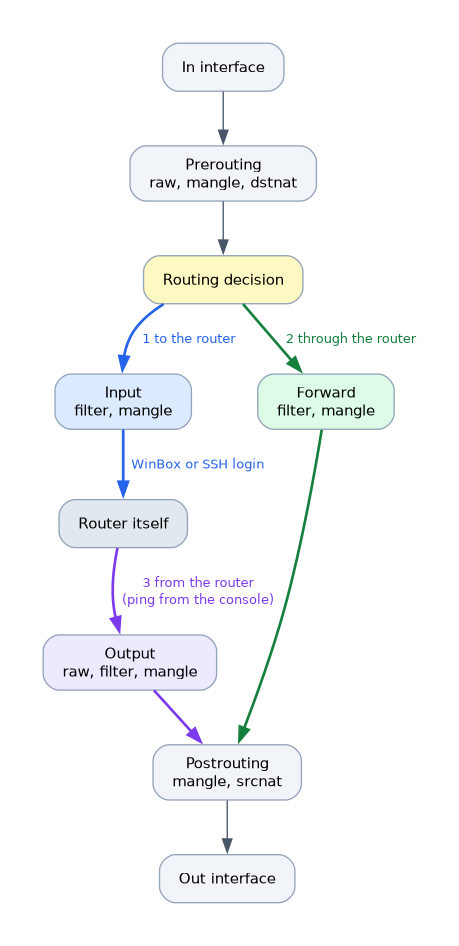 A packet to the router goes through prerouting, then the routing decision, then the input chain. This is the path of a WinBox or SSH login.
A packet through the router goes through prerouting, the routing decision, the forward chain and then postrouting. This is the path of normal user traffic.
A packet from the router starts in the output chain and then goes through postrouting. Pings that you send from the console take this path.
Order inside one point
Within the prerouting point, the raw table is checked first, before connection tracking. Then comes mangle, and then the dstnat chain of the nat table.
Within the postrouting point, mangle comes first and then srcnat. Filter has no postrouting chain, so you cannot filter there.
Rule matching
A chain is read from top to bottom. The first rule whose matchers all fit the packet decides what happens, unless the action is one that continues.
| Action | Effect |
|---|---|
| accept | Stop checking this chain and let the packet continue |
| drop | Silently discard the packet |
| reject | Discard and send an ICMP error back |
| jump | Go to a user defined chain |
| return | Go back to the chain that jumped here |
| passthrough | Count the packet and carry on to the next rule |
| log | Write a log line and carry on |
If no rule matches, the packet is accepted. A chain has no hidden drop at the end, so you add one yourself.
A first look at rules
/ip firewall filter add chain=input connection-state=established,related action=accept
/ip firewall filter add chain=input connection-state=invalid action=drop
/ip firewall filter add chain=input in-interface=ether1 action=drop
/ip firewall filter print
The print command shows the rules with a number. Rule order is the order of that list, and you can change it with move.
/ip firewall filter move 3 destination=0Custom chains
You can create your own chain by giving it a new name. A rule with action=jump and jump-target sends packets there.
/ip firewall filter add chain=forward protocol=icmp action=jump jump-target=icmp-chain
/ip firewall filter add chain=icmp-chain protocol=icmp icmp-options=8:0 action=accept
/ip firewall filter add chain=icmp-chain action=drop
Custom chains keep long rule lists tidy and fast, because packets skip chains they do not need.
To place a rule, ask whether the packet is for the router, through it or from it. Then pick the chain on that path.
What to remember for the exam
Eight facts cover the packet flow.
- The three filter chains are input, forward and output.
- Input is traffic to the router. Forward is traffic through it. Output is traffic from it.
- Raw and mangle have prerouting. Mangle also has postrouting.
- The nat table has dstnat before routing and srcnat after routing.
- Raw is processed before connection tracking.
- Rules are checked from top to bottom and the first match wins.
- Accept, drop and reject end the chain. Passthrough and log do not.
- If no rule matches, the packet is accepted.
Common mistakes
Four mistakes appear again and again.
Protecting the LAN on the input chain. Input only sees traffic for the router. Traffic from a client to the internet uses the forward chain.
Expecting an implicit drop. RouterOS accepts a packet that matches nothing. Add an explicit drop rule at the end of a chain.
Putting a drop rule above the rule that allows your session. The drop catches the packet first. Place the accept rules above it.
Confusing drop and reject. Drop gives no answer at all. Reject sends an ICMP message, which tells a scanner that the host is alive.
Test input chain changes with safe mode on. A wrong drop rule can end your own management session.
Check yourself
Work through these three questions.
Which chain handles a packet that is going through the router to another network?
The forward chain. Input is only for packets addressed to the router itself.
What happens to a packet that matches no rule in a chain?
It is accepted. RouterOS has no hidden drop at the end of a chain.
Which table is checked first at the prerouting point?
The raw table is checked first, before connection tracking. After that come mangle and the dstnat chain.
Topic 1 of 7 in Firewall
Test yourself on Firewall
The full MikroTik MTCSE question bank has 446 questions, with timed practice exams and an explanation for every answer.
This study guide is independent and is not affiliated with, endorsed by, or sponsored by MikroTik. Vendor names, certification names and exam codes are trademarks of their respective owners and are used for identification only.