Cryptography · Topic 3 of 4
Public Key Infrastructure (PKI)
Learn how a public key infrastructure works: certificate authorities, X.509 certificates, requests, chains of trust, revocation and expiry on RouterOS.
- 5 min
- Includes a diagram
- A PKI binds a public key to an identity through a CA signature.
- A certificate follows the X.509 format.
- A certificate holds subject, issuer, public key, validity, serial number, extensions and signature.
What it is
A public key infrastructure, or PKI, is the system that lets you trust that a public key really belongs to the named owner.
Public key cryptography has one weak spot. If anyone can publish a key, an attacker can publish a key in someone else's name.
A PKI solves this with a trusted third party. The third party checks the owner and then signs a certificate that links the name to the key.
How it works
A certificate authority signs certificates, and clients trust a certificate because they trust the authority that signed it.
The parts of a PKI
| Part | Role |
|---|---|
| Certificate authority, or CA | Signs certificates and vouches for the owner |
| Certificate | A signed document that binds a name to a public key |
| Private key | The secret half, which never leaves the owner |
| Certificate signing request, or CSR | The request that carries the public key and the name |
| Revocation list | A list of certificates that must no longer be trusted |
| Trust store | The list of CA certificates that a device trusts |
What a certificate holds
Certificates use the X.509 format. A certificate holds these main fields.
- The subject, which is the owner name, such as a host name.
- The issuer, which is the CA that signed it.
- The public key of the owner.
- A validity period, with a start and an end date.
- A serial number that is unique for that CA.
- Extensions, such as the allowed uses and alternative names.
- The signature of the CA.
The signature is the heart of the certificate. If anyone changes a field, the signature no longer fits.
The chain of trust
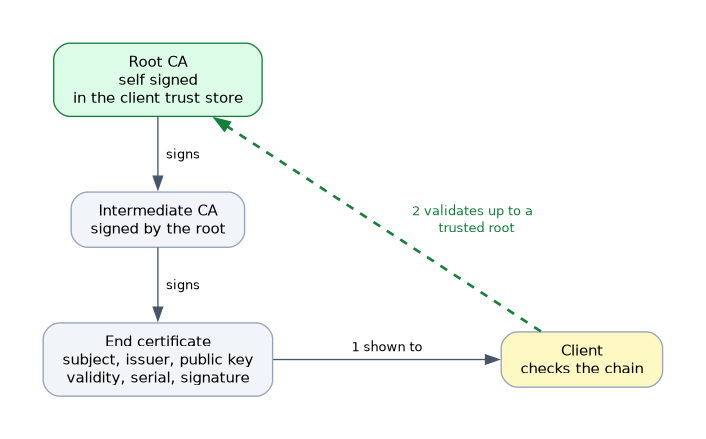 A root CA signs its own certificate, which is called self signed. Devices trust it because it is in their trust store. A root CA key is very valuable, so it is often kept offline.
The root can sign an intermediate CA, and the intermediate signs the end certificates. A client follows the chain from the end certificate up to a root that it trusts. If any link is missing or not trusted, validation fails.
How a certificate is checked
A client that receives a certificate checks several things.
- The signature verifies against the issuer, up to a trusted root.
- The current date is inside the validity period.
- The name in the certificate matches the name that the client wanted.
- The certificate is allowed for this use.
- The certificate has not been revoked.
Issue and revoke
The normal life cycle starts with a key pair on the device that needs the certificate. The device sends a CSR to the CA. The CA signs it, and the device installs the result.
If a private key is stolen or lost, the CA revokes the certificate and publishes it on a revocation list. Clients that check the list then refuse it. Certificates also expire on their end date, so they must be renewed.
Private and public PKIs
| Type | Who is the CA | Trusted by |
|---|---|---|
| Public | A well known commercial or free authority | Every browser and device by default |
| Private | Your own organisation, or your own router | Only devices where you installed the CA |
A private PKI is cheap and fully under your control. You must install your CA certificate on every client that has to trust it.
PKI on RouterOS
RouterOS can store certificates and keys, can act as a CA, and can sign requests.
/certificate print
/certificate print detail where name=router
The listing shows flags for each certificate. The K flag means that the router holds the private key, and the T flag means that the certificate is trusted.
Certificates matter on a router for several services. These include HTTPS management, SSTP and OpenVPN tunnels, and IPsec with certificate authentication. The next page shows how to create and use them.
When a certificate fails, check the chain, the dates and the name first. These three causes explain most failures.
What to remember for the exam
Eight facts summarise PKI.
- A PKI binds a public key to an identity through a CA signature.
- A certificate follows the X.509 format.
- A certificate holds subject, issuer, public key, validity, serial number, extensions and signature.
- Trust comes from the chain up to a root CA that the client already trusts.
- A root CA is self signed.
- A CSR carries the public key and the name to the CA.
- A revoked or expired certificate must not be trusted.
- A private PKI works only on devices where you installed your CA.
Common mistakes
Four mistakes occur often.
Sending the private key to the CA. The CSR holds only the public key and the name. The private key stays with the owner.
Forgetting to install the CA on the clients. A private CA is not trusted until you install it.
Ignoring the validity dates. An expired certificate fails, and a wrong router clock can make a valid certificate look expired.
Using the wrong name. The name in the certificate must match the name or address that the client uses.
The private key of a CA can sign any certificate. Protect it, and keep it off devices that do not need it.
Check yourself
Work through these three questions.
What does a CA do in a PKI?
A CA checks the owner and signs a certificate that binds the owner's name to a public key. Clients trust the certificate because they trust the CA.
What does a certificate signing request contain?
It contains the public key and the name of the owner. The private key stays with the owner.
Why can a valid certificate fail on a router with the wrong clock?
The router checks the validity dates against its own time. A wrong clock can make a valid certificate look expired or not yet valid.
Topic 3 of 4 in Cryptography
Test yourself on Cryptography
The full MikroTik MTCSE question bank has 446 questions, with timed practice exams and an explanation for every answer.
This study guide is independent and is not affiliated with, endorsed by, or sponsored by MikroTik. Vendor names, certification names and exam codes are trademarks of their respective owners and are used for identification only.