VPN and VLANs · Topic 5 of 7
QinQ Implementation
Learn how QinQ double tagging carries customer VLANs inside a provider VLAN, with service tags, the 802.1ad ether type and RouterOS configuration.
- 5 min
- Includes a diagram
- QinQ adds a second VLAN tag to frames that already carry one.
- The inner tag is the customer tag, and the outer tag is the service tag.
- The core forwards only on the outer tag.
What it is
QinQ puts a second VLAN tag on a frame that already has one, so a provider can carry customer VLANs as a whole.
The inner tag belongs to the customer and is called the customer tag, or C-tag. The outer tag belongs to the provider and is called the service tag, or S-tag.
The provider only looks at the outer tag. The customer can use any inner VLAN IDs, even ones the provider also uses, without any clash.
How it works
The edge device adds the outer tag on entry and removes it on exit, while the core forwards on the outer tag.
The two tags
A normal VLAN frame has one tag with the ether type 0x8100. A QinQ frame has two tags, one after the other.
The standard for the outer tag is IEEE 802.1ad, which uses the ether type 0x88a8 for the service tag. Some older equipment uses 0x9100 for the outer tag instead, and some uses 0x8100 for both.
| Tag | Owner | Ether type for outer tag |
|---|---|---|
| Customer tag | Customer | 0x8100 |
| Service tag | Provider | 0x88a8 under 802.1ad, 0x9100 on some older gear |
Both ends of a link must agree on the outer ether type. If they do not, one side does not recognise the outer tag.
Why use QinQ
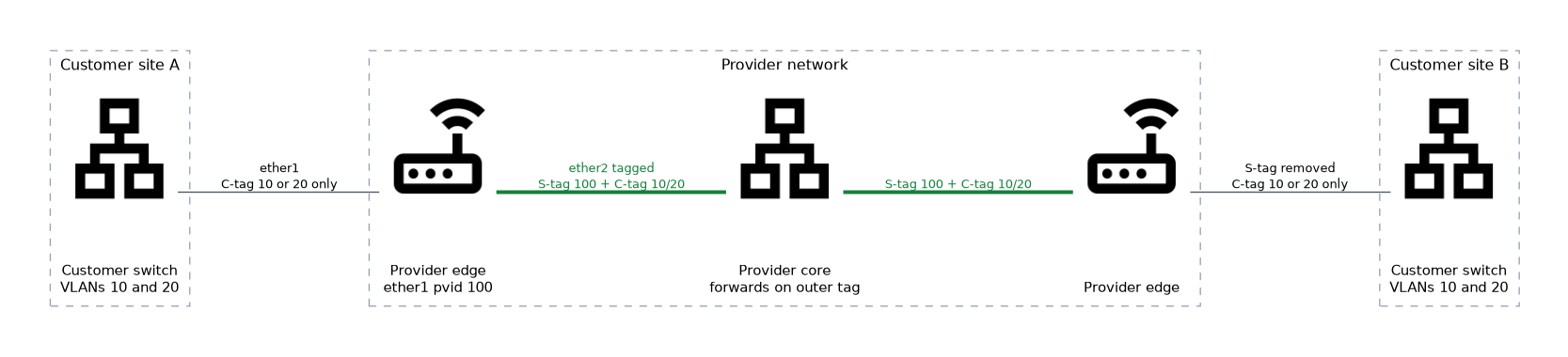 A provider with many customers cannot hand out only 4094 VLAN IDs, because every customer wants its own set. With QinQ, each customer gets one service VLAN, and the customer VLANs travel inside it.
It also hides the customer VLAN plan. The provider network needs no knowledge of the inner IDs.
Configuration with VLAN interfaces
On the provider edge router, create the service VLAN on the customer facing port, and then create the customer VLAN on top of it.
/interface vlan add name=svlan100 vlan-id=100 interface=ether1 use-service-tag=yes
/interface vlan add name=cvlan10 vlan-id=10 interface=svlan100
The first line creates the outer tag with the service tag ether type. The second line stacks a VLAN with ID 10 inside it. A frame sent out of cvlan10 leaves ether1 with two tags, 10 inside and 100 outside.
If you leave out use-service-tag, the outer tag uses the ether type 0x8100. That works between devices that expect the same, but it is not the 802.1ad standard.
Configuration with a bridge
When the router acts as a bridge, you can set the ether type of the bridge so it handles service tags.
/interface bridge add name=bridge-prov vlan-filtering=yes ether-type=0x88a8
/interface bridge port add bridge=bridge-prov interface=ether1 pvid=100
/interface bridge vlan add bridge=bridge-prov tagged=ether2 untagged=ether1 vlan-ids=100
In this design the customer port ether1 puts all incoming frames into the service VLAN 100, whatever tags they already carry. The customer tags remain untouched as the inner tags. The uplink ether2 sends the service VLAN with its outer tag.
Packet size
Each extra tag adds 4 bytes. A QinQ frame is 8 bytes larger than an untagged frame, and 4 bytes larger than a single tagged frame.
The links in the provider network must allow the larger frames. If they do not, full size customer frames are dropped even though small packets work.
Verifying
/interface vlan print
/interface bridge vlan print
/interface bridge port print
Check that both tags are present where you expect them, and that the outer ether type matches on each link.
When the link works for small pings but not for large transfers, check the frame size before anything else.
What to remember for the exam
Seven facts cover most questions on this topic.
- QinQ adds a second VLAN tag to frames that already carry one.
- The inner tag is the customer tag, and the outer tag is the service tag.
- The core forwards only on the outer tag.
- IEEE 802.1ad uses the ether type 0x88a8 for the outer tag.
- A normal VLAN tag uses the ether type 0x8100.
- In RouterOS,
use-service-tag=yeson a VLAN interface selects the service tag ether type. - Every tag adds 4 bytes, so QinQ needs larger frame support.
Both ends of a link must use the same outer ether type, or the outer tag is not recognised.
Common mistakes
These four errors appear often.
Mixing outer ether types. One side sends 0x88a8 and the other expects 0x8100, and the frames are not treated as VLAN frames.
Ignoring the frame size. Two tags make the frame bigger, and links that cannot carry it drop the large frames.
Stacking the VLANs the wrong way round. The service VLAN goes on the physical port, and the customer VLAN goes on the service VLAN.
Thinking the provider can see the customer VLANs. The core network forwards on the outer tag and leaves the inner tags alone.
Check yourself
Work through these three questions.
What are the two tags in QinQ, and who owns each?
The inner tag is the customer tag, owned by the customer. The outer tag is the service tag, owned by the provider.
Which ether type does 802.1ad use for the outer tag, and how do you select it on a VLAN interface?
It uses 0x88a8. Set
use-service-tag=yeson the VLAN interface.Why can large frames fail on a QinQ link that passes small pings?
Each tag adds 4 bytes, so the frame is larger than normal. Links that cannot carry the larger frame drop it.
Topic 5 of 7 in VPN and VLANs
Test yourself on VPN and VLANs
The full MikroTik MTCRE question bank has 417 questions, with timed practice exams and an explanation for every answer.
This study guide is independent and is not affiliated with, endorsed by, or sponsored by MikroTik. Vendor names, certification names and exam codes are trademarks of their respective owners and are used for identification only.