OSPF Dynamic Routing · Topic 7 of 8
Stub Areas, NSSA and Area Ranges
Learn how stub and NSSA areas shrink the OSPF database, how a default route replaces external routes, and how area ranges summarise routes at the ABR.
- 5 min
- Includes a diagram
- A stub area blocks type 5 LSAs, and the ABR injects a default route.
- All routers in a stub area must be configured as stub.
- A stub area cannot contain an ASBR.
What it is
Stub and NSSA areas reduce the amount of routing information that enters an area, and area ranges summarise routes leaving it.
A stub area does not receive external routes. Instead, the area border router sends a default route, so internal routers still reach outside destinations through the ABR.
A not so stubby area, or NSSA, is a stub area that is allowed to contain an AS boundary router. It can send its own external routes out, using a special LSA type.
How it works
The area type decides which LSAs may enter, and ranges decide which routes the ABR advertises out.
Stub areas
Type 5 external LSAs are blocked at the ABR. Type 4 LSAs are not needed either, because no external routes exist in the area. The ABR injects a default route in their place.
All routers in the area must agree that it is a stub. The stub setting is part of the Hello, so a mismatch prevents adjacencies.
/routing ospf area add name=stub1 area-id=0.0.0.1 type=stub default-cost=10The default-cost sets the metric of the default route that the ABR injects. A stub area cannot hold an AS boundary router, and it cannot be the transit area of a virtual link.
Totally stubby areas
A totally stubby area also blocks the summary LSAs of other areas. Only the default route enters. RouterOS does this with a setting on the area that controls whether summary LSAs are injected.
/routing ospf area add name=stub2 area-id=0.0.0.2 type=stub inject-summary-lsas=noWith inject-summary-lsas=no, the ABR leaves out type 3 summaries, and the default route is all that internal routers receive from outside. This gives the smallest database.
NSSA
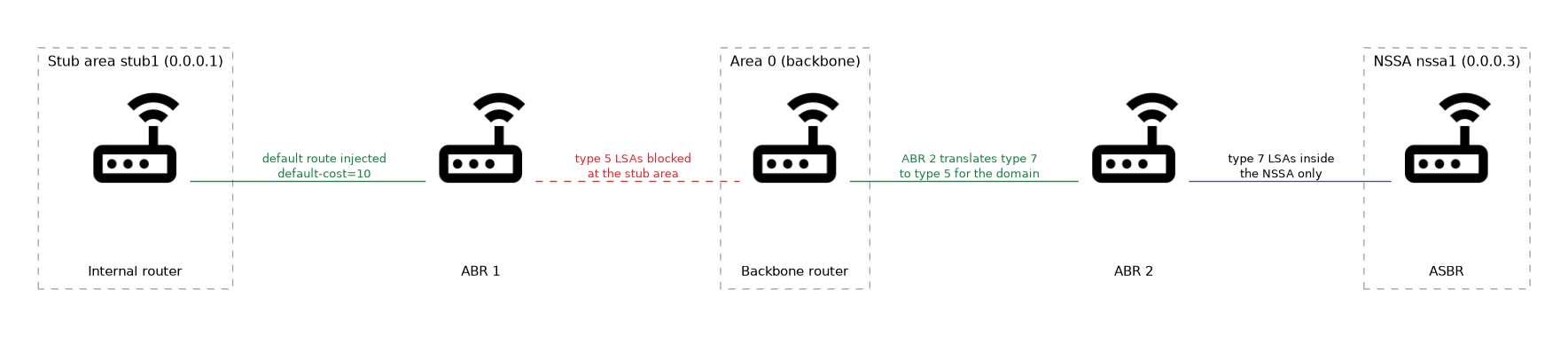 An NSSA allows an ASBR inside the area. The ASBR creates type 7 LSAs, which are flooded only inside the NSSA.
At the ABR, type 7 LSAs are translated into type 5 LSAs and flooded to the rest of the network. One ABR does the translation, and the translator-role setting on the area influences which one.
/routing ospf area add name=nssa1 area-id=0.0.0.3 type=nssa translator-role=translate-candidateComparing the area types
| Area type | Type 5 external | Type 3 summary | Default route | ASBR allowed |
|---|---|---|---|---|
| Normal | Yes | Yes | Not needed | Yes |
| Stub | No | Yes | Injected | No |
| Totally stubby | No | No | Injected | No |
| NSSA | No, uses type 7 | Yes | Optional | Yes |
Area ranges
An area range summarises routes at the ABR. The ABR advertises one summary for many networks of the area, so other areas hold one route instead of many.
/routing ospf area range add area=area1 range=10.1.0.0/16 advertise=yesThe summary is advertised as long as at least one network inside the range exists in the area. Setting advertise=no hides the networks of the range from other areas.
Summaries work best when the addressing in the area is planned in contiguous blocks. The range is applied on the ABR only.
The same idea applies to external routes at the ASBR, but the settings for it depend on the RouterOS version.
Why use these features
Smaller databases mean less memory and faster calculation on weak routers. A flapping network inside a summarised range does not cause updates in other areas.
The price is less detail. With a default route only, a router cannot pick the best exit among several ABRs on the basis of external costs.
Verifying
/routing ospf area print
/routing ospf area range print
/routing ospf lsa printTo check a stub area, look at the LSA list of an internal router. It should show a default route and no type 5 LSAs.
What to remember for the exam
Seven facts cover most questions on this topic.
- A stub area blocks type 5 LSAs, and the ABR injects a default route.
- All routers in a stub area must be configured as stub.
- A stub area cannot contain an ASBR.
- A totally stubby area also blocks type 3 summaries, with
inject-summary-lsas=noin RouterOS v6. - An NSSA allows an ASBR, using type 7 LSAs inside the area.
- The ABR translates type 7 LSAs into type 5 LSAs.
- An area range summarises routes at the ABR, and
advertise=nohides them.
A stub flag that differs between two routers stops the adjacency. Set it on every router in the area.
Common mistakes
These four errors appear often.
Configuring stub on only some routers. The Hello options differ, and the routers do not become neighbours.
Putting an ASBR in a stub area. It cannot inject external routes there, so use an NSSA instead.
Using ranges with scattered addresses. The summary covers networks that belong elsewhere, and traffic can be pulled to the wrong place.
Forgetting the type 7 translation. Without a translating ABR, the external routes of an NSSA never leave it.
Check yourself
Work through these three questions.
What does a stub area change compared with a normal area?
It blocks type 5 external LSAs, and the ABR injects a default route. All routers in the area must be set as stub.
How does an NSSA differ from a stub area?
An NSSA allows an ASBR, which creates type 7 LSAs inside the area. The ABR translates them to type 5 LSAs for the rest of the network.
What does an area range do?
It makes the ABR advertise one summary for many networks of an area. With
advertise=no, the networks are hidden from other areas.
Topic 7 of 8 in OSPF Dynamic Routing
Test yourself on OSPF Dynamic Routing
The full MikroTik MTCRE question bank has 417 questions, with timed practice exams and an explanation for every answer.
This study guide is independent and is not affiliated with, endorsed by, or sponsored by MikroTik. Vendor names, certification names and exam codes are trademarks of their respective owners and are used for identification only.