OSPF Dynamic Routing · Topic 5 of 8
Interface Cost, Network Types and NBMA Multicast Problems
Learn how OSPF interface cost steers traffic, how broadcast, NBMA, point to point and point to multipoint network types differ, and why NBMA needs unicast.
- 5 min
- Includes a diagram
- The cost of a path is the sum of the interface costs along it.
- In RouterOS the cost is not derived from bandwidth, so set it by hand.
- Broadcast and NBMA networks elect a DR, and point to point networks do not.
What it is
Interface cost decides which path OSPF prefers, and the network type decides how OSPF behaves on a link.
Each OSPF interface has a cost. The cost of a path is the sum of the costs of the outgoing interfaces along it, and the lowest sum wins.
The network type tells OSPF whether the link is shared, how neighbours are found and whether a DR is elected. Multicast is the root of most problems on non broadcast links.
How it works
You set a cost on each interface, and OSPF adds the costs along the path to compare routes.
Interface cost
In RouterOS the cost of an interface has a fixed default value. It is not calculated from the bandwidth, so a fast link and a slow link have the same cost until you change them.
/routing ospf interface add interface=ether1 cost=10
/routing ospf interface add interface=ether2 cost=100
To make OSPF prefer a fast link, give it a lower cost than the slow one. The cost has to be set by hand on every interface of a path, in a consistent scheme.
If two paths have the same total cost, OSPF can use both, as equal cost multi path.
Network types
The network type controls how OSPF treats the interface.
| Type | Examples | Neighbours found by | DR election |
|---|---|---|---|
| Broadcast | Ethernet | Multicast Hello | Yes |
| Point to point | Serial, tunnels | Multicast Hello | No |
| NBMA | Frame Relay style networks | Configured unicast neighbours | Yes |
| Point to multipoint | Hub and spoke | Multicast Hello | No |
In RouterOS v6 the setting is network-type, with the values broadcast, nbma, point-to-point, ptmp, ptmp-broadcast and default. With default, the router picks a type from the interface.
/routing ospf interface add interface=ether1 network-type=broadcast
/routing ospf interface add interface=pptp-out1 network-type=point-to-point
In RouterOS v7 the equivalent setting is on the interface template, and it is called type.
Broadcast networks
On Ethernet, OSPF finds neighbours with multicast Hellos and elects a DR and BDR. This is the default behaviour and needs no special setup.
Point to point networks
On a link with exactly two routers, no DR is needed. Adjacencies form directly. This is the best choice for tunnels and for links that carry only two routers.
NBMA and multicast
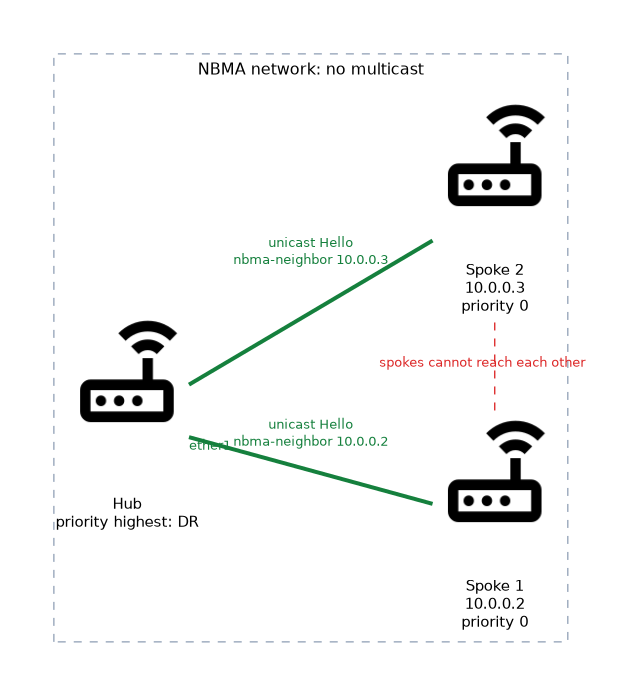 NBMA stands for non broadcast multi access. Many routers share the network, but the network cannot deliver broadcast or multicast.
OSPF depends on multicast Hellos to find neighbours. On an NBMA network, the Hellos never reach the other routers, so adjacencies would not form.
The fix is to give the router a list of neighbours, and OSPF then sends unicast Hellos to them.
/routing ospf interface add interface=ether1 network-type=nbma
/routing ospf nbma-neighbor add address=10.0.0.2 priority=1Problems with NBMA
NBMA still elects a DR, and the DR must reach all other routers directly. In a hub and spoke layout, the spokes cannot reach each other, so the hub must be the DR.
Set the priority of every spoke to 0 so it is never elected, and give the hub the highest priority. If a spoke becomes the DR, the other spokes cannot form adjacencies with it.
A second problem is the static list. Every router needs the right neighbours configured by hand, which does not scale.
Point to multipoint is a common alternative. It treats the network as a set of point to point links, uses multicast where it is available, and does not need a DR. It avoids the DR placement problem, at the cost of more LSA detail.
Verifying
/routing ospf interface print
/routing ospf neighbor printOn hub and spoke NBMA, make the hub the DR, and set the spoke priority to 0.
What to remember for the exam
Seven facts cover most questions on this topic.
- The cost of a path is the sum of the interface costs along it.
- In RouterOS the cost is not derived from bandwidth, so set it by hand.
- Broadcast and NBMA networks elect a DR, and point to point networks do not.
- NBMA cannot carry multicast, so neighbours must be configured with unicast addresses.
- In v6 the
/routing ospf nbma-neighbormenu holds the neighbour list, and v7 uses a different menu. - On hub and spoke NBMA, the hub must be the DR, and the spokes use priority 0.
- Point to multipoint avoids the DR problem on partial mesh networks.
A wrong network type is a common cause of neighbours that never become Full. Both ends must use compatible types.
Common mistakes
These four errors appear often.
Expecting cost to follow bandwidth. A gigabit and a 10 megabit link have the same cost until you set them.
Using broadcast on a non broadcast network. Multicast Hellos never arrive, and the neighbours stay down.
Letting a spoke become the DR. The other spokes cannot reach it, and adjacencies fail.
Forgetting the neighbour list on NBMA. Without it, no Hello is sent to the other routers.
Check yourself
Work through these three questions.
How does OSPF calculate the cost of a path?
It adds the costs of the outgoing interfaces along the path. The lowest total wins.
Why does NBMA need configured neighbours?
The network cannot deliver multicast, so multicast Hellos do not reach the other routers. The router sends unicast Hellos to the configured addresses.
Which router should be the DR on a hub and spoke NBMA network?
The hub, because it is the only router that reaches every spoke. Spokes get priority 0.
Topic 5 of 8 in OSPF Dynamic Routing
Test yourself on OSPF Dynamic Routing
The full MikroTik MTCRE question bank has 417 questions, with timed practice exams and an explanation for every answer.
This study guide is independent and is not affiliated with, endorsed by, or sponsored by MikroTik. Vendor names, certification names and exam codes are trademarks of their respective owners and are used for identification only.