OSPF Dynamic Routing · Topic 2 of 8
OSPF Areas and Router Types
Learn how OSPF areas divide a network, why the backbone area 0 is special, and what internal, backbone, area border and AS boundary routers do.
- 5 min
- Includes a diagram
- An area is a group of routers sharing one link state database.
- Area 0, or 0.0.0.0, is the backbone, and every other area must connect to it.
- An internal router has all its interfaces in one area.
What it is
An OSPF area is a group of routers that share one link state database, and areas keep large networks manageable.
Without areas, every router would hold every link in the whole network, and one change would trigger a calculation everywhere. With areas, the detail stays inside the area, and other areas see only a summary.
An area ID is a 32 bit value. RouterOS writes it like an IPv4 address, for example 0.0.0.1.
How it works
The backbone connects all other areas, and routers take roles based on where their interfaces sit.
The backbone area
Area 0, also written 0.0.0.0, is the backbone. Every other area must connect to it, directly through an area border router. Inter area traffic always passes through the backbone.
This gives a simple two level structure. An area never sends routes straight to another non backbone area.
In RouterOS v6 the backbone area exists by default. In v7 the areas are part of the configuration you create, as shown on the first OSPF page.
/routing ospf area add name=area1 area-id=0.0.0.1
/routing ospf area print
The second command lists the areas. In RouterOS v7, an area also names its instance with instance=default.
Router types
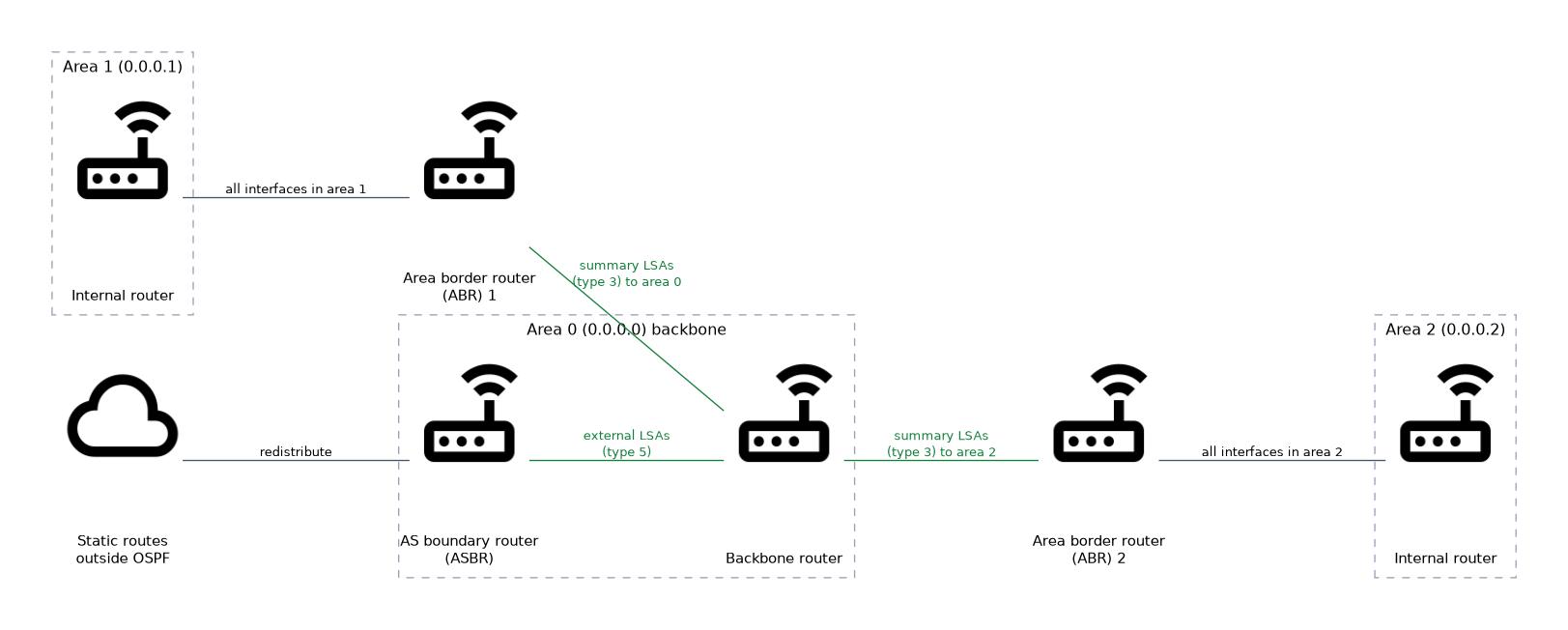 The router types describe roles, and one router can hold several roles.
| Type | Where its interfaces are | Role |
|---|---|---|
| Internal router | All in one area | Normal member of that area |
| Backbone router | At least one in area 0 | Takes part in the backbone |
| Area border router | In two or more areas | Joins areas and summarises routes |
| AS boundary router | Connected to another routing source | Injects external routes into OSPF |
An area border router, or ABR, keeps one database for each area it touches. It creates summary LSAs to describe the routes of one area to the others.
An AS boundary router, or ASBR, redistributes routes that OSPF does not know, such as static or connected routes. It originates external LSAs.
How routes are shared between areas
Inside an area, routers know every link. To another area, the ABR advertises only networks and their costs, as summary LSAs. The remote routers know the cost to reach the ABR and the cost from the ABR to the network.
This hides the topology of an area from the rest of the network. A link failure inside one area does not force a full calculation in other areas.
OSPF prefers routes in a fixed order. Routes inside the area come first, then routes from other areas, and then external routes.
Design points
Areas reduce database size, CPU load and the reach of a flapping link. They also let you summarise address ranges at the borders.
Small networks often use only the backbone. Areas help when the network grows, or when a part of it is made of weaker routers.
Plan the addressing so that each area holds a contiguous range. That allows summarisation at the ABR.
Verifying
/routing ospf area print
/routing ospf lsa print
/routing ospf neighbor print
The LSA list shows which area each LSA belongs to. A router that is an ABR shows LSAs from more than one area.
To spot an ABR, look for a router whose interfaces fall in two areas, one of which is area 0.
What to remember for the exam
Seven facts cover most questions on this topic.
- An area is a group of routers sharing one link state database.
- Area 0, or 0.0.0.0, is the backbone, and every other area must connect to it.
- An internal router has all its interfaces in one area.
- An area border router has interfaces in more than one area and creates summary LSAs.
- An AS boundary router injects external routes and creates external LSAs.
- Routers learn about other areas only through summary information.
- Inside the area routes are preferred over inter area routes, and inter area routes over external routes.
An area that does not touch the backbone is cut off from the rest of the network unless you add a virtual link.
Common mistakes
These four errors appear often.
Connecting two areas directly. Non backbone areas must connect through area 0, so a direct link between two other areas does not work as an inter area path.
Treating router types as exclusive. One router can be an ABR and an ASBR at once.
Forgetting the backbone is just another area. It uses the same rules and needs the same Hello settings.
Planning areas with scattered addressing. Without contiguous ranges, the ABR cannot summarise.
Check yourself
Work through these three questions.
What is special about area 0?
It is the backbone, and every other area must connect to it. Inter area traffic passes through it.
What is the difference between an ABR and an ASBR?
An ABR has interfaces in several areas and creates summary LSAs. An ASBR injects routes from outside OSPF and creates external LSAs.
Why do areas make a large OSPF network easier to run?
Detail stays inside the area, and other areas receive only summaries. A change in one area does not force every router to recalculate.
Topic 2 of 8 in OSPF Dynamic Routing
Test yourself on OSPF Dynamic Routing
The full MikroTik MTCRE question bank has 417 questions, with timed practice exams and an explanation for every answer.
This study guide is independent and is not affiliated with, endorsed by, or sponsored by MikroTik. Vendor names, certification names and exam codes are trademarks of their respective owners and are used for identification only.