Wireless · Topic 3 of 4
Wireless Security, Access Lists, Connect Lists and WPA2
Control who may join a RouterOS wireless network with access lists, connect lists, default authenticate and forward, WPA-PSK, WPA2-PSK and WPS.
- 6 min
- Includes a diagram
- A security profile holds the mode, the authentication types, the keys and the ciphers.
- WPA2-PSK is stronger than WPA-PSK, and a profile with mode
noneis open. - The access list controls which clients an access point accepts.
What it is
Wireless security decides which clients may join a network, what they may do there, and how their traffic is protected.
RouterOS splits these jobs between several tools. A security profile sets the encryption and the key.
The access list controls which clients an access point accepts. The connect list controls which access points a station will join.
Two interface settings, default authenticate and default forward, set the behaviour for clients that no list rule matches.
How it works
The security profile protects the link, and the lists and defaults decide who is allowed.
Security profiles with WPA-PSK and WPA2-PSK
A security profile is a named set of security settings. You then attach it to the wireless interface.
/interface wireless security-profiles add name=sec1 mode=dynamic-keys authentication-types=wpa2-psk wpa2-pre-shared-key=LongSecretKey123 unicast-ciphers=aes-ccm group-ciphers=aes-ccm
/interface wireless set wlan1 security-profile=sec1| Setting | Meaning |
|---|---|
mode | none is an open network, and dynamic-keys uses WPA |
authentication-types | Which methods are offered, such as wpa-psk or wpa2-psk |
wpa-pre-shared-key, wpa2-pre-shared-key | The shared passphrase for each method |
unicast-ciphers, group-ciphers | The encryption used for single and group traffic |
WPA-PSK and WPA2-PSK both use a shared passphrase, called a pre-shared key. WPA2 is the stronger and newer of the two, and it uses the AES cipher. Use WPA2-PSK whenever the clients support it.
Both ends must use matching settings. An open network, with mode none, has no encryption at all.
An interface that uses the default security profile has no protection, so create and attach your own profile before going live.
Access list
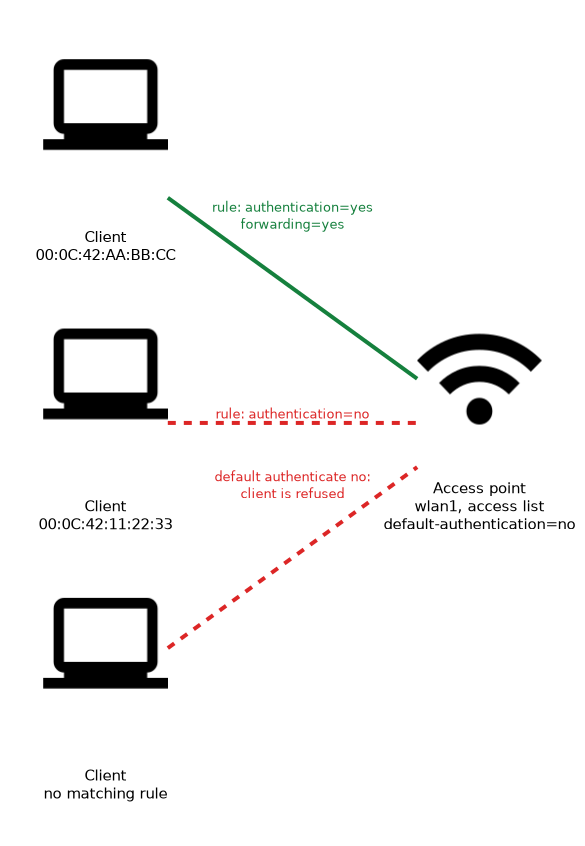 The access list works on an access point. Each rule matches a client, usually by its MAC address, and decides what happens to it.
/interface wireless access-list add mac-address=00:0C:42:AA:BB:CC interface=wlan1 authentication=yes forwarding=yes
/interface wireless access-list add mac-address=00:0C:42:11:22:33 interface=wlan1 authentication=no
The authentication setting decides whether the client may join, and forwarding decides whether it may talk to other wireless clients. Rules are checked from the top, and the first match applies.
The access list can also hold a client specific key. This gives some clients their own passphrase while others use the profile key.
Default authenticate and default forward
These two settings belong to the wireless interface, and they apply when no access list rule matches a client.
/interface wireless set wlan1 default-authentication=no default-forwarding=no- Default authenticate: when set to yes, any client that passes the security check may join. When set to no, only clients with a matching access list rule may join.
- Default forward: when set to yes, clients of the access point may exchange traffic with each other. When set to no, they can reach the network behind the access point but not one another.
Setting default authenticate to no, together with access list rules for known clients, builds a MAC based allow list. Setting default forward to no keeps guests from talking to each other, which suits a public hotspot.
Connect list
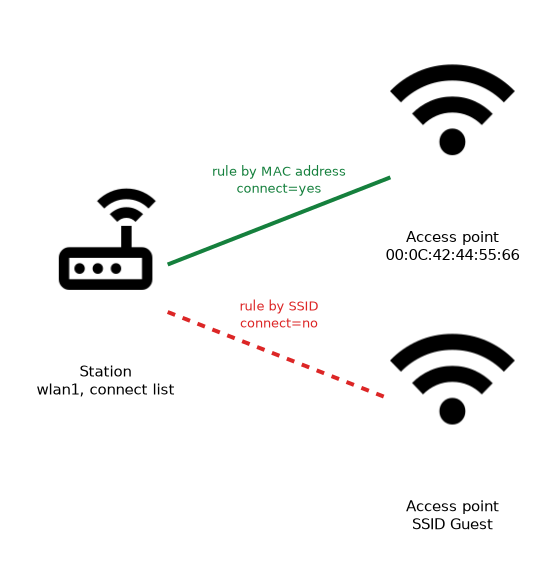 The connect list works on a station. Its rules say which access points the station may or may not connect to.
/interface wireless connect-list add interface=wlan1 mac-address=00:0C:42:44:55:66 connect=yes
/interface wireless connect-list add interface=wlan1 ssid=Guest connect=no
A rule can match an access point by its MAC address or its SSID. With connect=yes the station may join it, and with connect=no it will not. This stops a station from joining the wrong network when several are in range.
| List | Runs on | Controls |
|---|---|---|
| Access list | Access point | Which clients may join, and whether they may talk to each other |
| Connect list | Station | Which access points the station may join |
WPS
WPS is a method that lets a client join without typing the passphrase, usually by pressing a button on both devices. On RouterOS, the access point side is the WPS accept action, and the station side is the WPS client action.
A WPS accept starts a short window in which the access point lets a WPS client join. The client then receives the security settings automatically.
WPS is a convenience, and it widens the attack surface. Where security matters, leave the WPS mode disabled on the interface.
A MAC based list is only a light barrier, because MAC addresses can be copied, so always combine it with WPA2 encryption.
What to remember for the exam
Seven facts cover this topic.
- A security profile holds the mode, the authentication types, the keys and the ciphers.
- WPA2-PSK is stronger than WPA-PSK, and a profile with mode
noneis open. - The access list controls which clients an access point accepts.
- The connect list controls which access points a station may join.
- Default authenticate decides what happens to clients that match no access list rule.
- Default forward decides whether clients may exchange traffic with each other.
- WPS accept runs on the access point, WPS client on the station, and WPS adds risk.
Common mistakes
These four mistakes are common.
Leaving the default profile. The default profile does not protect the link.
Mixing up the two lists. The access list belongs on the access point, and the connect list belongs on the station.
Setting default authenticate to no with an empty access list. Nobody can join.
Trusting MAC filtering alone. MAC addresses can be copied, so keep WPA2 on as well.
Check yourself
Work through these three questions.
What is the difference between the access list and the connect list?
The access list runs on an access point and controls which clients may join. The connect list runs on a station and controls which access points it may join.
What does default forward set to no do?
Clients of the access point cannot exchange traffic with each other. They can still reach the network behind the access point.
Which authentication type should you prefer, WPA-PSK or WPA2-PSK?
Prefer WPA2-PSK. It is the stronger and newer method, and it uses the AES cipher.
Topic 3 of 4 in Wireless
Test yourself on Wireless
The full MikroTik MTCNA question bank has 558 questions, with timed practice exams and an explanation for every answer.
This study guide is independent and is not affiliated with, endorsed by, or sponsored by MikroTik. Vendor names, certification names and exam codes are trademarks of their respective owners and are used for identification only.