Routing · Topic 2 of 2
Static Routing, Default Routes and Dynamic Routes
Create static routes and a default route on RouterOS, understand how dynamic routes appear, and build routing between two small networks step by step.
- 6 min
- Includes a diagram
- A static route is added with
/ip route add dst-address=... gateway=.... - The gateway must be reachable, normally on a connected network.
- The default route is
dst-address=0.0.0.0/0.
What it is
A static route is a route that an administrator adds by hand.
Static routes are simple and predictable. They suit small networks, where you know exactly which networks sit behind which router.
A default route is a static route for all other destinations. Dynamic routes are created by the system, and an administrator cannot edit them directly.
How it works
You add a destination and a gateway, and then check that the route is active.
Creating routes
/ip route add dst-address=192.168.2.0/24 gateway=10.0.0.2
/ip route print
The dst-address is the network to reach. The gateway is the next hop, normally an address on a directly connected network. In this example it is the address of the neighbour on the link.
You can also give an interface as the gateway. This is meant for point to point links and is not the right choice on a normal Ethernet segment, where the router needs the address of a next hop.
A route can be turned off without being deleted.
/ip route disable 3
/ip route enable 3
/ip route remove 3
The number comes from the left column of the print output. Check it again before you use it, because numbers change when routes are added or removed.
Setting the default route
The default route sends all unmatched traffic to one gateway.
/ip route add dst-address=0.0.0.0/0 gateway=203.0.113.1A router with a DHCP client on its WAN port gets this route automatically, so you add it by hand only for a fixed provider address. Hosts behind the router use the router as their gateway, and the router uses its default route to leave the network.
A router with only one way out needs just one default route and no other static routes.
Managing dynamic routes
Dynamic routes carry the D flag. They come from several sources:
- Connected routes appear when you add an IP address to an interface.
- A DHCP client adds a default route when
add-default-routeis on. - PPP connections add routes for their peers.
- Dynamic routing protocols add routes they learn from neighbours.
You do not edit dynamic routes. To change one, change its cause. Remove the address to remove a connected route, or change the DHCP client setting to change its default route.
A static route can override a dynamic one. If both cover the same prefix, the lower distance wins. Setting a distance on your static route lets you choose which one is used.
Backup routes with distance
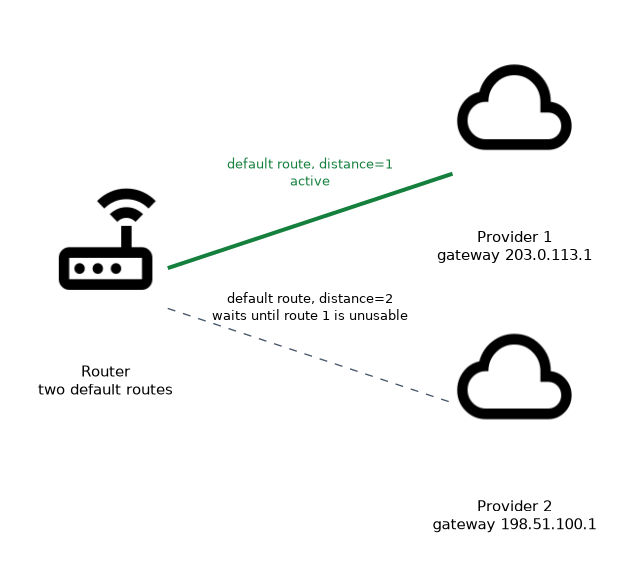 Two static routes to the same destination with different distances give a simple backup. The lower distance is active, and the higher one waits.
/ip route add dst-address=0.0.0.0/0 gateway=203.0.113.1 distance=1
/ip route add dst-address=0.0.0.0/0 gateway=198.51.100.1 distance=2
The second route becomes active only if the first one is not usable. The gateway of the first route must stop being reachable for this to happen, for example because its link goes down. The check-gateway parameter can test the gateway for you.
A simple two router network
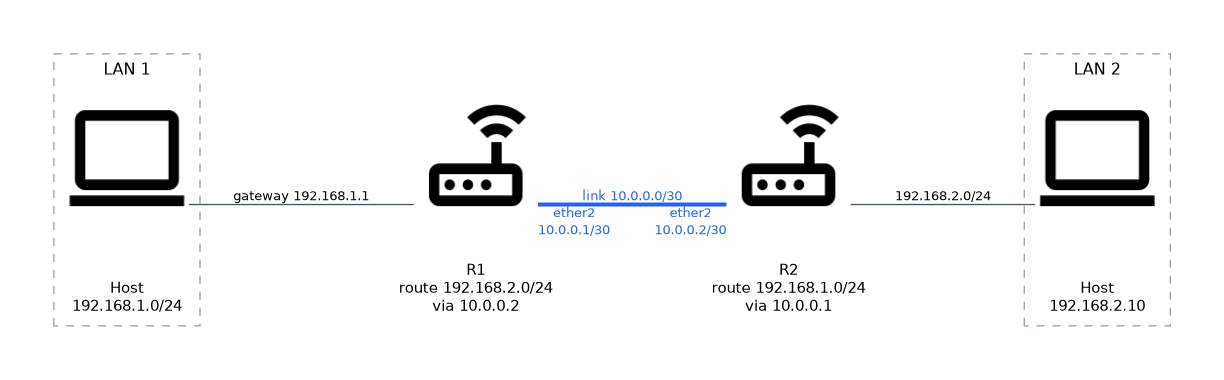 Take two routers, R1 and R2, joined by a link on
 10.0.0.0/30. R1 owns the LAN 192.168.1.0/24 and R2 owns 192.168.2.0/24.
# On R1
/ip address add address=10.0.0.1/30 interface=ether2
/ip route add dst-address=192.168.2.0/24 gateway=10.0.0.2

# On R2
/ip address add address=10.0.0.2/30 interface=ether2
/ip route add dst-address=192.168.1.0/24 gateway=10.0.0.1
Each router knows its own LAN and the link from its connected routes. Each one needs a static route for the LAN on the far side. Routes in both directions are essential, because a reply must also find its way back.
Verify the result with ping and traceroute.
/ping 192.168.2.10 src-address=192.168.1.1
/tool traceroute 192.168.2.10
If a ping fails, check three things: the route exists on both routers, the route is active, and the hosts use the router as their gateway.
A route in one direction only is a common fault, because the packet arrives but the reply is lost.
What to remember for the exam
Seven facts cover this topic.
- A static route is added with
/ip route add dst-address=... gateway=.... - The gateway must be reachable, normally on a connected network.
- The default route is
dst-address=0.0.0.0/0. - Dynamic routes have the D flag and are changed by changing their cause.
- A higher distance makes a static route a backup.
- Static routing needs routes in both directions.
/ip route printshows the table, and the A flag marks active routes.
Common mistakes
These four mistakes are frequent.
Forgetting the return route. The far router has no route back, so replies are lost.
Using an unreachable gateway. The route stays inactive, so check the connected network first.
Trying to edit a dynamic route. Change its source instead, such as the DHCP client or the address.
Adding a default route and a DHCP default route with equal distance. The two compete, so give the one you want a lower distance.
Check yourself
Work through these three questions.
Which command creates a default route through 203.0.113.1?
/ip route add dst-address=0.0.0.0/0 gateway=203.0.113.1. The gateway must be reachable, normally on a connected network.Why do two routers joined by a link both need a static route?
Each router only knows its own LAN and the link. Each needs a route for the far LAN so that packets and their replies can both travel.
How do you make a static route act as a backup?
Give it a higher distance than the main route. It becomes active only when the main route is not usable.
Topic 2 of 2 in Routing
Test yourself on Routing
The full MikroTik MTCNA question bank has 558 questions, with timed practice exams and an explanation for every answer.
This study guide is independent and is not affiliated with, endorsed by, or sponsored by MikroTik. Vendor names, certification names and exam codes are trademarks of their respective owners and are used for identification only.