Introduction · Topic 4 of 8
Initial Configuration for Internet Access
Configure a MikroTik router for Internet access with a WAN DHCP client, a LAN address and default gateway, DNS settings and a basic masquerade NAT rule.
- 5 min
- Includes a diagram
- A DHCP client on the WAN port learns an address, a gateway and DNS from the provider.
- The LAN address of the router is the default gateway of the LAN hosts.
- The router needs a default route to
0.0.0.0/0, which a DHCP client adds automatically.
What it is
Initial configuration gets a LAN of private hosts onto the Internet through one router.
Three pieces make it work: a WAN interface that learns its address from the provider, a LAN interface with a private address, and a NAT rule that rewrites private source addresses. The router also needs a default route and DNS.
This is the most common first task on a MikroTik router, so know it well.
How it works
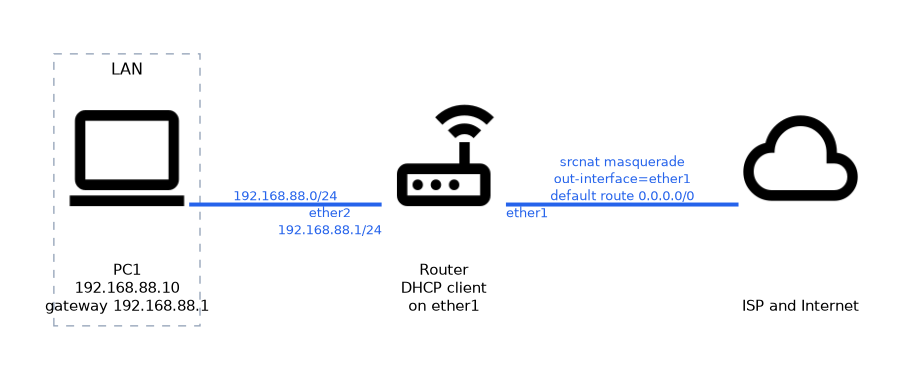 Each piece is a short command, and the order does not matter as long as all four are present.
WAN with a DHCP client
Most providers hand out an address by DHCP. The router acts as a DHCP client on its WAN port.
/ip dhcp-client add interface=ether1 disable=no
/ip dhcp-client print
The client gets an address, a gateway and DNS servers from the provider. By default it also adds a default route through the provider gateway, controlled by the add-default-route parameter. The use-peer-dns parameter decides whether the provider DNS servers are used.
If the provider gives a fixed address, you skip the client and set the address and route by hand.
LAN address and default gateway
The LAN port needs a private address. That address becomes the default gateway of the LAN hosts.
/ip address add address=192.168.88.1/24 interface=ether2The router itself needs a default route too, to send unknown destinations to the provider. With a DHCP client the route is created for you. With a fixed provider address, add it manually.
/ip route add dst-address=0.0.0.0/0 gateway=203.0.113.1
/ip route print
LAN hosts need an address and a gateway of their own. They can set these by hand or get them from a DHCP server on the router, which a later chapter covers. Either way, their gateway is the router LAN address.
DNS
Hosts need name resolution. The router can forward requests for them.
/ip dns set servers=8.8.8.8 allow-remote-requests=yesWith allow-remote-requests=yes, LAN hosts can use the router as their DNS server. If the DHCP client already supplies servers through use-peer-dns, you may not need to set any by hand.
Basic firewall with NAT masquerade
LAN addresses are private and cannot be routed on the Internet. The router replaces them with its own public address on the way out, using a source NAT rule.
/ip firewall nat add chain=srcnat out-interface=ether1 action=masqueradeThe srcnat chain handles traffic that is leaving. The out-interface matches the WAN port. The masquerade action uses whatever address the WAN interface has now, which suits a DHCP address that can change.
Masquerade alone is not a full firewall. A real protection set of filter rules comes in the firewall chapter, but this single rule is what gives the LAN Internet access.
Use masquerade when the WAN address is dynamic, and a fixed src-nat rule only when the address never changes.
Checking the result
Test from the router first, then from a LAN host.
/ping 8.8.8.8
/ping example.com
A reply from an IP address but not from a name points at DNS. No reply at all points at the route, the NAT rule or the provider link.
| Symptom | Likely cause |
|---|---|
| Router pings the Internet, LAN host does not | Missing masquerade rule or wrong host gateway |
| Ping by address works, by name fails | DNS not set or remote requests not allowed |
| DHCP client has no address | Cable, provider or wrong interface |
What to remember for the exam
Six facts cover this topic.
- A DHCP client on the WAN port learns an address, a gateway and DNS from the provider.
- The LAN address of the router is the default gateway of the LAN hosts.
- The router needs a default route to
0.0.0.0/0, which a DHCP client adds automatically. /ip firewall nat add chain=srcnat out-interface=ether1 action=masqueradegives the LAN Internet access.allow-remote-requests=yeslets LAN hosts use the router for DNS.- Test with
/pingby address first and by name second.
Without a srcnat rule, LAN hosts send packets with private source addresses that the Internet will not route back.
Common mistakes
These four mistakes cause most first-day failures.
Choosing the wrong out interface. The masquerade rule must name the WAN port, not the LAN port.
Forgetting the default route. Without it the router does not know where to send Internet traffic.
Leaving DNS unconfigured. Pings by address work but browsing fails, so allow remote requests.
Giving hosts the wrong gateway. The gateway must be the router LAN address, in the same subnet as the host.
Check yourself
Work through these three questions.
Which command makes the WAN port learn its address by DHCP?
/ip dhcp-client add interface=ether1 disable=nomakes the router act as a DHCP client on that port. It learns an address, a gateway and DNS servers.Which NAT rule gives private LAN hosts Internet access?
/ip firewall nat add chain=srcnat out-interface=ether1 action=masquerade. It rewrites the private source address to the WAN address as traffic leaves.Ping by address works but ping by name fails, so what should you check?
Check DNS. Set servers and
allow-remote-requests=yeson the router, or confirm the DHCP client supplied servers.
Topic 4 of 8 in Introduction
Test yourself on Introduction
The full MikroTik MTCNA question bank has 558 questions, with timed practice exams and an explanation for every answer.
This study guide is independent and is not affiliated with, endorsed by, or sponsored by MikroTik. Vendor names, certification names and exam codes are trademarks of their respective owners and are used for identification only.