Firewall · Topic 1 of 6
Firewall Principles, Connection Tracking, Chains and Actions
Learn how the RouterOS firewall tracks connections and their states, how its tables and chains are organised, and how rules are matched and acted on.
- 6 min
- Includes a diagram
- The firewall is stateful and uses connection tracking.
- The connection states are new, established, related, invalid and untracked.
- The input chain handles traffic to the router, forward handles traffic through it, and output handles traffic from it.
What it is
The RouterOS firewall inspects packets as they enter, cross and leave the router, and applies rules to them.
Each rule has a match part, which says which packets it applies to, and an action part, which says what to do with them. Rules are grouped into chains, and chains are grouped into tables by purpose.
The firewall is stateful. It tracks connections, so a rule can treat the reply to an allowed request differently from a brand new packet.
How it works
The router tracks each connection, assigns a state to each packet, and walks the packet through the chains.
Connection tracking
Connection tracking keeps a record of every connection that crosses the router. The record holds the addresses, the ports, the protocol and the current state.
/ip firewall connection print
/ip firewall connection tracking print
The first command lists the tracked connections. The second shows the settings of the tracking system. NAT and most stateful rules depend on connection tracking, so it must stay enabled on a router that uses them.
Connection states
Every packet belongs to a connection, and the connection has a state.
| State | Meaning |
|---|---|
| new | The first packet of a new connection |
| established | The packet belongs to a connection that has seen traffic in both directions |
| related | The packet starts a new connection that is linked to an existing one, such as an error message |
| invalid | The packet does not belong to a known connection and is not a valid start |
| untracked | The packet was excluded from tracking by a raw rule |
The most common pattern is to accept the established and related packets, drop the invalid ones, and then write careful rules for the new ones. This keeps replies flowing while the rules concentrate on who may start a conversation.
Structure of the firewall
The firewall is divided into several tables.
| Table | Menu | Purpose |
|---|---|---|
| filter | /ip firewall filter | Allow or block traffic |
| nat | /ip firewall nat | Change source or destination addresses |
| mangle | /ip firewall mangle | Mark packets and connections, change header fields |
| raw | /ip firewall raw | Act before connection tracking |
The filter table is the focus of this chapter, and NAT has its own pages. Address lists, which several tables use, are covered later too.
Chains
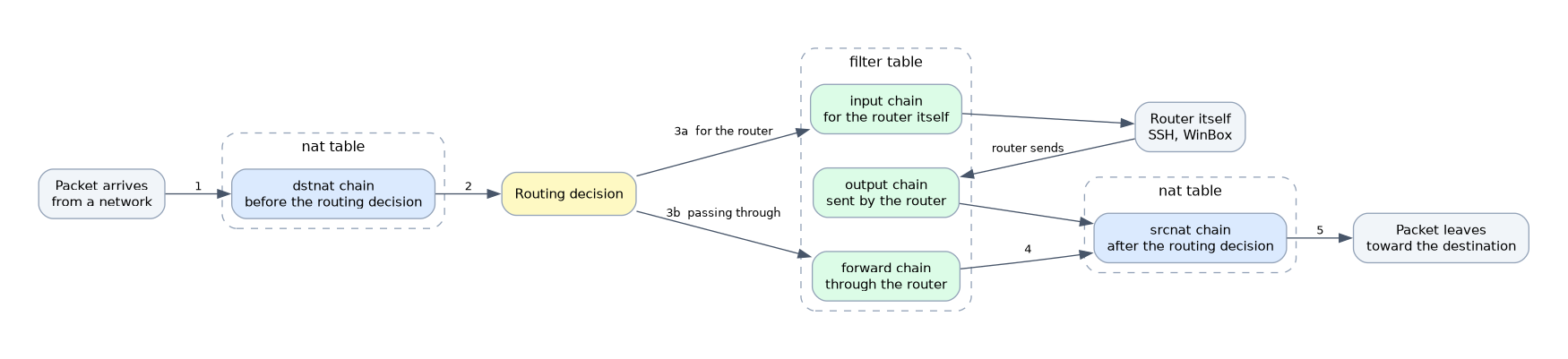 A chain is an ordered list of rules. The filter table has three built in chains, and each one sees a different kind of traffic.
| Chain | Traffic it sees |
|---|---|
| input | Packets sent to the router itself, such as SSH or WinBox |
| forward | Packets that pass through the router from one network to another |
| output | Packets that the router itself sends |
The NAT table has two main chains. The dstnat chain handles packets before the routing decision, and the srcnat chain handles them after it.
The choice of chain is the most important decision when you write a rule. A rule that protects the router belongs in input. A rule that protects the hosts behind the router belongs in forward.
How rules are processed
The router checks the rules of a chain from the top down. The first rule whose conditions match is applied, and its action decides what happens next. If no rule matches, the packet is accepted, so the end of a chain behaves like an accept.
Order is therefore essential. A broad drop rule placed above a specific accept rule blocks the traffic that the accept rule was written for.
/ip firewall filter print
/ip firewall filter print stats
/ip firewall filter move 5 destination=1
The stats option shows packet and byte counters for each rule. They show whether a rule is ever matched, which makes them the first tool for debugging.
Look at the rule counters before you change anything, because a counter that never grows shows a rule that is not being matched.
Actions
The action says what the router does when a rule matches.
| Action | Effect |
|---|---|
| accept | Let the packet through and stop checking the chain |
| drop | Silently discard the packet |
| reject | Discard the packet and send an error back to the sender |
| log | Write a log entry and continue to the next rule |
| passthrough | Count the packet and continue to the next rule |
| jump | Continue in another chain, and return afterwards |
Actions such as log and passthrough do not end the processing. Actions like accept and drop do, and later rules never see the packet.
A basic rule looks like this.
/ip firewall filter add chain=input protocol=tcp dst-port=22 src-address=192.168.88.0/24 action=acceptA rule that you add is placed at the end of the chain, so a drop rule above it may stop it from working.
What to remember for the exam
Seven facts cover this topic.
- The firewall is stateful and uses connection tracking.
- The connection states are new, established, related, invalid and untracked.
- The input chain handles traffic to the router, forward handles traffic through it, and output handles traffic from it.
- The main tables are filter, nat, mangle and raw.
- Rules are checked from the top, and the first match decides, unless the action is one like log or passthrough.
- A packet that matches no rule is accepted.
- Accept lets the packet pass, drop discards it silently and reject discards it with an error.
Common mistakes
These four mistakes are common.
Using the wrong chain. A rule for the router must be in input, and a rule for the hosts behind it must be in forward.
Putting rules in the wrong order. A broad rule above a specific one hides the specific rule.
Forgetting that no match means accept. A chain with no final drop leaves everything else open.
Disabling connection tracking on a router that uses NAT. NAT and stateful rules stop working properly.
Check yourself
Work through these three questions.
Which chain do you use to protect the router itself, and which to protect the hosts behind it?
Use the input chain for traffic to the router, and the forward chain for traffic passing through it.
What do the established and related states mean?
Established packets belong to a connection that has seen traffic in both directions. Related packets start a new connection that is linked to an existing one.
What happens to a packet that matches no rule in a chain?
It is accepted. That is why a chain needs a final drop rule when you want to block everything else.
Topic 1 of 6 in Firewall
Test yourself on Firewall
The full MikroTik MTCNA question bank has 558 questions, with timed practice exams and an explanation for every answer.
This study guide is independent and is not affiliated with, endorsed by, or sponsored by MikroTik. Vendor names, certification names and exam codes are trademarks of their respective owners and are used for identification only.