DHCP · Topic 2 of 2
Address Resolution Protocol, ARP Modes and the ARP Table
Understand how ARP maps IP addresses to MAC addresses, read the RouterOS ARP table, and choose between the enabled, disabled, proxy and reply only modes.
- 5 min
- Includes a diagram
- ARP maps an IP address to a MAC address on the same network.
- An ARP request is a broadcast, and the reply is sent directly to the asker.
/ip arp printshows the table, and/ip arp addcreates a static entry.
What it is
ARP finds the MAC address that belongs to an IP address on the same network.
Ethernet frames need a destination MAC address. A host knows only the IP address of its target, so it asks the whole segment who owns that address, and the owner answers with its MAC address.
Each device remembers the answers in an ARP table. RouterOS lets you read this table, add fixed entries to it, and change how each interface treats ARP.
How it works
A request goes out as a broadcast, a reply comes back directly, and the result is stored for later.
The ARP exchange
When the router wants to reach 192.168.88.10 on a connected network, it first looks in its ARP table. If there is no entry, it broadcasts a request that asks for the owner of that address.
The owner replies with its MAC address. The router stores the pair and sends the frame. Later packets use the stored entry until it ages out.
For a destination on another network, the router resolves the MAC address of the next hop instead, because that is where the frame goes first.
The RouterOS ARP table
/ip arp print
/ip arp add address=192.168.88.50 mac-address=00:0C:42:AA:BB:CC interface=ether2
Each entry shows an IP address, a MAC address and the interface. A flag column tells you how the entry was created.
| Flag | Meaning |
|---|---|
| D | Dynamic, learned from the network |
| H | Created by the DHCP server |
| C | Complete, so the MAC address is known |
| X | Disabled |
Entries that you add yourself are static. They stay in the table until you remove them. Dynamic entries come and go as the router talks to other hosts.
The DHCP server can create entries for its leases when its add-arp parameter is on. This links the lease table to the ARP table.
ARP modes
The ARP mode is a setting of each interface, and it controls how the router treats ARP on that interface.
/interface ethernet set ether2 arp=reply-only
/interface bridge set bridge1 arp=enabled| Mode | Behaviour |
|---|---|
| enabled | Normal ARP, so the router asks and answers requests |
| disabled | The router neither asks nor answers, so static entries are needed on both sides |
| proxy-arp | The router answers requests for hosts on other networks with its own MAC address |
| reply-only | The router answers requests, but learns nothing, so only static entries work |
Enabled is the normal mode and needs no extra configuration. Disabled turns ARP off for the interface. Every neighbour must then have a static entry for the router, and the router needs a static entry for each neighbour.
Proxy ARP lets the router answer on behalf of hosts that are behind it. A host that believes the target is local sends an ARP request, and the router replies with its own MAC address and then forwards the traffic.
Reply only is a simple access control for a LAN. The router answers only for entries it already has, and it does not learn new ones. A host without a static entry, or without a DHCP lease that creates one, cannot reach the router at Layer 3.
Controlling a LAN with reply only
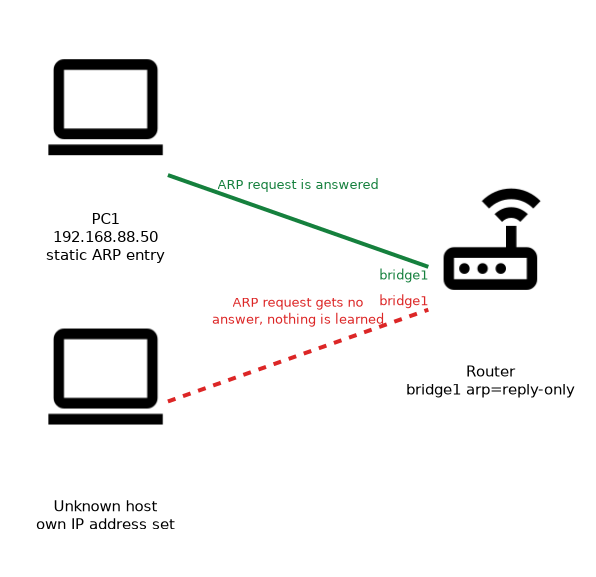 A common use of the reply only mode is to allow just the known hosts.
/interface bridge set bridge1 arp=reply-only
/ip dhcp-server set dhcp1 add-arp=yes
/ip arp add address=192.168.88.50 mac-address=00:0C:42:AA:BB:CC interface=bridge1
With the bridge set to reply only, an unknown host that sets its own IP address gets no ARP answer from the router. Hosts with a lease or a static entry still work.
Reply only works best when the DHCP server creates the ARP entries, so that you do not maintain them by hand.
What to remember for the exam
Six facts cover this topic.
- ARP maps an IP address to a MAC address on the same network.
- An ARP request is a broadcast, and the reply is sent directly to the asker.
/ip arp printshows the table, and/ip arp addcreates a static entry.- The ARP mode is a per interface setting, with enabled, disabled, proxy-arp and reply-only.
- With disabled mode, static ARP entries are needed on both sides.
- Reply only answers for known entries only, and it does not learn new ones.
Setting reply only without static entries or the DHCP add-arp option cuts off every host on that interface.
Common mistakes
These four mistakes are typical.
Using reply only without entries. No host can resolve the router, so the LAN stops working.
Setting disabled on one side only. Both devices need static entries, otherwise neither can find the other.
Confusing proxy ARP with routing. Proxy ARP only answers requests for another network, and it does not replace a route.
Forgetting the interface in a static entry. An entry needs the right interface, or the router may not use it.
Check yourself
Work through these three questions.
Why does a host broadcast an ARP request?
It knows the IP address of the target but not its MAC address. The owner of the address replies with its MAC address.
What does the reply only mode do?
The router answers ARP requests only for entries it already has, and it does not learn new entries. Hosts need a static entry or a DHCP lease that creates one.
What must be configured when ARP is disabled on an interface?
Static ARP entries are needed on both sides. The router and each neighbour must hold an entry for the other.
Topic 2 of 2 in DHCP
Test yourself on DHCP
The full MikroTik MTCNA question bank has 558 questions, with timed practice exams and an explanation for every answer.
This study guide is independent and is not affiliated with, endorsed by, or sponsored by MikroTik. Vendor names, certification names and exam codes are trademarks of their respective owners and are used for identification only.