Introduction to IPv6 · Topic 2 of 3
SLAAC, EUI-64 and IPv6 Subnetting
Learn how hosts build addresses with SLAAC and EUI-64, how to work out the interface ID from a MAC address, and how to split an IPv6 prefix into subnets.
- 5 min
- Includes a diagram
- SLAAC needs a /64 prefix, an interface ID and a Router Advertisement.
- SLAAC is stateless, so no server tracks the addresses.
- EUI-64 inserts
ff:feinto the middle of the MAC address.
What it is
SLAAC lets a host build its own IPv6 address from a router advertisement, and subnetting splits a prefix into networks.
SLAAC stands for Stateless Address Autoconfiguration. The host learns a /64 prefix from a router and adds an interface ID that it creates itself. No server keeps a record of the address, which is why it is called stateless.
EUI-64 is one way to build the interface ID, using the MAC address of the interface. Subnetting works on the other half of the address, the part that identifies the network.
How it works
A 128 bit address is split into a network prefix and a 64 bit interface ID.
SLAAC step by step
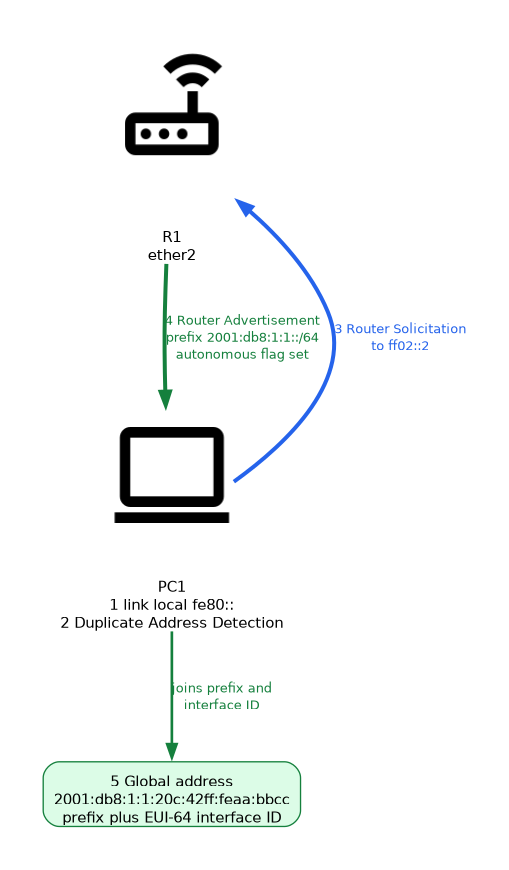 The steps are the same on every host:
- The host creates a link local address, which starts with
fe80::. - It checks that the address is free with Duplicate Address Detection.
- It sends a Router Solicitation, or waits for a periodic Router Advertisement.
- The router advertises a prefix with the autonomous flag set.
- The host joins the prefix and its own interface ID to make a global address, and checks it for duplicates too.
SLAAC works only with a /64 prefix, because the interface ID is 64 bits long. The advertisement also tells the host the router address to use as a default gateway.
Building the interface ID with EUI-64
 EUI-64 turns the 48 bit MAC address into a 64 bit interface ID. There are two changes to the MAC address:
- Insert
ff:fein the middle of the MAC address. - Flip the seventh bit of the first byte, called the universal or local bit.
Take the MAC address 00:0c:42:aa:bb:cc. Splitting it in the middle and inserting fffe gives 000c:42ff:feaa:bbcc. Flipping the seventh bit changes the first byte from 00 to 02.
MAC           00:0c:42:aa:bb:cc
insert fffe   000c:42ff:feaa:bbcc
flip bit 7    020c:42ff:feaa:bbcc
With the prefix 2001:db8:1:1::/64, the address becomes 2001:db8:1:1:20c:42ff:feaa:bbcc. Leading zeros drop out when it is written.
A RouterOS address can use this method too. The eui-64 option builds the interface ID from the MAC address of the interface.
/ipv6 address add address=2001:db8:1:1::/64 interface=ether2 eui-64=yesAn EUI-64 address reveals the MAC address of the device. This is a privacy concern, which temporary addresses are designed to reduce.
Subnetting an IPv6 prefix
IPv6 subnetting is easier than IPv4, because you rarely worry about running out of host addresses. You decide how many bits to use for subnets, then count in hex.
Suppose a site receives 2001:db8:abcd::/48. A /64 per segment leaves 16 bits for the subnet ID, which is 65536 subnets.
| Subnet | Prefix |
|---|---|
| First | 2001:db8:abcd:0::/64 |
| Second | 2001:db8:abcd:1::/64 |
| Eleventh | 2001:db8:abcd:a::/64 |
| Last | 2001:db8:abcd:ffff::/64 |
The subnet ID is the fourth group. Counting up in hex gives the next subnet. Every subnet keeps 64 bits for hosts.
Subnet lengths that fall on a multiple of four bits are easy to read, because each hex digit is four bits. A /52 changes the first digit of the fourth group. A /56 changes the first two digits.
On a point to point link, a /64 is still the safest default. Smaller prefixes on links are possible but can break features that expect a /64.
What to remember for the exam
Seven facts cover most questions on this topic.
- SLAAC needs a /64 prefix, an interface ID and a Router Advertisement.
- SLAAC is stateless, so no server tracks the addresses.
- EUI-64 inserts
ff:feinto the middle of the MAC address. - EUI-64 also flips the seventh bit of the first byte.
- A host first creates a link local address and checks it with Duplicate Address Detection.
- A /48 has 16 bits for subnetting, which gives 65536 /64 subnets.
- Each hex digit in an address is four bits.
Flipping the seventh bit changes the first byte by 02. Byte 00 becomes 02, and byte 02 becomes 00.
Common mistakes
These four mistakes appear often.
Forgetting to flip the bit. The result 000c:42ff:feaa:bbcc is not the EUI-64 interface ID. The first byte must read 02.
Using SLAAC with a prefix that is not /64. The host cannot fill a 64 bit interface ID with a different split, so autoconfiguration fails.
Counting subnets in decimal. The subnet ID is hex, so the subnet after 9 is a, not 10.
Assuming SLAAC involves a server. SLAAC needs only the router advertisement. A DHCPv6 server is a separate mechanism.
Check yourself
Work through these three questions.
What two steps turn a MAC address into an EUI-64 interface ID?
Insert
ff:fein the middle of the MAC address, then flip the seventh bit of the first byte.Why does SLAAC need a /64 prefix?
The host adds a 64 bit interface ID, so the prefix must be the other 64 bits of the address.
How many /64 subnets does a /48 prefix hold?
It holds 65536, because 16 bits remain for the subnet ID.
Topic 2 of 3 in Introduction to IPv6
Test yourself on Introduction to IPv6
The full MikroTik MTCIPv6E question bank has 486 questions, with timed practice exams and an explanation for every answer.
This study guide is independent and is not affiliated with, endorsed by, or sponsored by MikroTik. Vendor names, certification names and exam codes are trademarks of their respective owners and are used for identification only.