Wireless Security · Topic 2 of 3
802.1X and EAP
Learn how 802.1X port based authentication works with EAP and a RADIUS server for wireless clients, including EAP methods and the RouterOS settings.
- 5 min
- Includes a diagram
- 802.1X has a supplicant, an authenticator and an authentication server.
- The access point is the authenticator and relays EAP to a RADIUS server.
- EAP carries the login exchange, and the method is chosen separately.
What it is
802.1X is a standard that checks a user or device before it gets access to the network.
On wireless networks it provides enterprise security. Each user has their own credentials, and a central server decides who may join.
EAP is the extensible authentication protocol. It is the framework that carries the login exchange, and the actual method, such as a certificate or a password, is chosen separately.
How it works
Three parties take part, and the access point passes messages between the other two.
The three roles
| Role | Who it is | Job |
|---|---|---|
| Supplicant | The wireless client | Presents the credentials |
| Authenticator | The access point | Blocks the client until the server approves |
| Authentication server | A RADIUS server | Checks the credentials and gives the answer |
The access point does not decide. It relays the exchange and enforces the answer.
The sequence
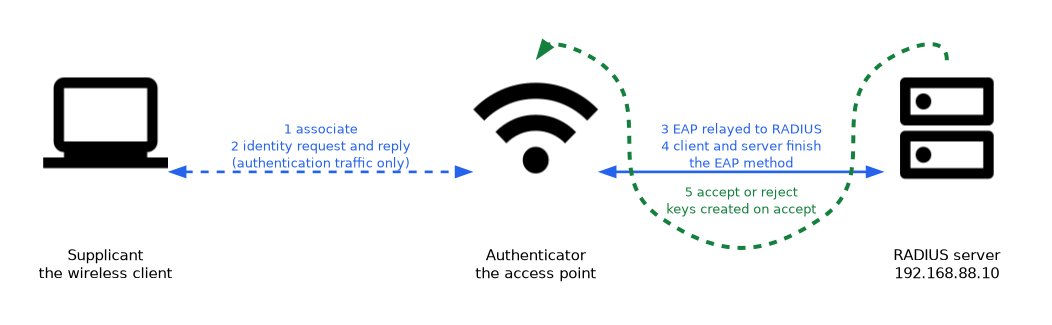
- The client associates with the access point. Only authentication traffic is allowed.
- The access point asks the client for its identity.
- The access point forwards the EAP messages to the RADIUS server.
- The server and client complete the chosen EAP method.
- The server sends accept or reject. On accept, keys are created and normal traffic is allowed.
Because each user gets their own keys, one user cannot read another user's traffic. Removing a user does not require a change for everyone else.
EAP methods
| Method | What the client needs | What the server needs |
|---|---|---|
| EAP-TLS | A client certificate | A server certificate |
| EAP-TTLS | A username and password inside a tunnel | A server certificate |
| PEAP | A username and password inside a tunnel | A server certificate |
EAP-TLS is the strongest, because both sides prove themselves with certificates. It needs a way to issue and manage certificates for every client. EAP-TTLS and PEAP are easier because the client only needs a password, and the server certificate protects the tunnel.
When a client checks the server certificate, it avoids joining a fake access point. Turn that check on whenever the client supports it.
RADIUS
RADIUS is a protocol between the network device and the authentication server. The access point and the server share a secret, and the server holds the users or asks another directory.
RADIUS can also keep accounting records, and it can return extra information, such as a VLAN, for each user.
Configuring the access point
On the legacy wireless package, the access point passes the exchange to RADIUS with the passthrough EAP method.
/radius add service=wireless address=192.168.88.10 secret=SharedSecret1
/interface wireless security-profiles add name=ent1 mode=dynamic-keys authentication-types=wpa2-eap eap-methods=passthrough
/interface wireless set wlan1 security-profile=ent1service=wirelessmarks the RADIUS entry for wireless use.addressandsecretidentify the RADIUS server and its shared secret.authentication-types=wpa2-eapselects enterprise authentication.eap-methods=passthroughtells the access point to relay EAP to RADIUS.
On the wifi driver the security profile also selects an enterprise authentication type, and the RADIUS server is defined in the same /radius menu.
Configuring a client
A RouterOS device used as a client chooses the EAP method itself.
/interface wireless security-profiles add name=cl1 mode=dynamic-keys authentication-types=wpa2-eap eap-methods=eap-tls tls-mode=verify-certificate tls-certificate=client1eap-methodsis the method the client uses.tls-modedecides whether the client checks the server certificate.tls-certificateis the client certificate.
Troubleshooting
If clients cannot join, check the following in order:
- the RADIUS server address, the shared secret and the service setting
- that the access point can reach the server
- the EAP method that the client and server both support
- the dates and trust of the certificates
A wrong shared secret makes every login fail. The server usually shows the requests as invalid, while the access point shows only a rejection.
What to remember for the exam
Seven facts cover this topic.
- 802.1X has a supplicant, an authenticator and an authentication server.
- The access point is the authenticator and relays EAP to a RADIUS server.
- EAP carries the login exchange, and the method is chosen separately.
- EAP-TLS uses certificates on both sides, and PEAP and EAP-TTLS use a password inside a tunnel.
- Each user gets their own keys after the server accepts.
eap-methods=passthroughrelays EAP to RADIUS on a legacy access point.- The shared secret and the
service=wirelesssetting must match the RADIUS server.
Common mistakes
These four errors are common.
Mixing up the roles. The access point is the authenticator and the server decides.
Wrong shared secret. All logins fail until the secret matches on both sides.
Not checking the server certificate. A client may then join a fake access point.
Choosing a method the client lacks. The client and server must support the same EAP method.
Check yourself
Work through these three questions.
Which device is the authenticator in 802.1X?
The access point. It blocks the client until the RADIUS server accepts, and it relays the EAP messages.
Why is EAP-TLS stronger than PEAP?
EAP-TLS uses certificates on both sides. PEAP uses only a password inside a tunnel.
What does
eap-methods=passthroughdo on an access point?It relays the EAP exchange to the RADIUS server instead of handling it locally.
Topic 2 of 3 in Wireless Security
Test yourself on Wireless Security
The full MikroTik MTCEWE question bank has 476 questions, with timed practice exams and an explanation for every answer.
This study guide is independent and is not affiliated with, endorsed by, or sponsored by MikroTik. Vendor names, certification names and exam codes are trademarks of their respective owners and are used for identification only.