CAPsMAN v2 · Topic 6 of 6
CAPsMAN Access List Features
Learn how the wifi access list matches clients by MAC address, SSID, interface, signal and time, and how its actions control who joins a CAPsMAN network.
- 5 min
- Includes a diagram
- The access list decides which clients may join, and it is checked when a client tries to connect.
- The manager applies the first rule that matches.
- Rules can match
mac-address,interface,ssid-regexp,signal-rangeandtime.
What it is
The access list is an ordered set of rules that decides which clients may join the wireless interfaces of a manager.
It acts when a client tries to connect. The manager checks the client against the rules and then accepts it, rejects it, or asks a RADIUS server.
Because the list lives on the manager, one set of rules covers every CAP that the manager controls.
How it works
Each rule has match options and an action, and the first matching rule applies.
The menu
On RouterOS v7 with the wifi driver, the list is at /interface wifi access-list. The original CAPsMAN used /caps-man access-list.
/interface wifi access-list printMatch options
A rule can match on several things.
| Match | Purpose |
|---|---|
mac-address | A specific client |
interface | Only clients that join one interface |
ssid-regexp | Only clients that join SSIDs that match a pattern |
signal-range | Only clients whose signal falls inside a range |
time | Only at certain times or days |
A client must satisfy all the options in a rule. An option that you leave out matches everything.
Actions
| Action | Result |
|---|---|
accept | The client may join |
reject | The client is refused |
query-radius | The manager asks a RADIUS server to decide |
/interface wifi access-list add mac-address=AA:BB:CC:DD:EE:FF action=accept
/interface wifi access-list add ssid-regexp=Guest action=accept
/interface wifi access-list add action=reject
These three rules accept one known client, accept any client of the guest SSID, and reject everything else. The last rule has no match options, so it acts as a final catch all.
Order of the rules
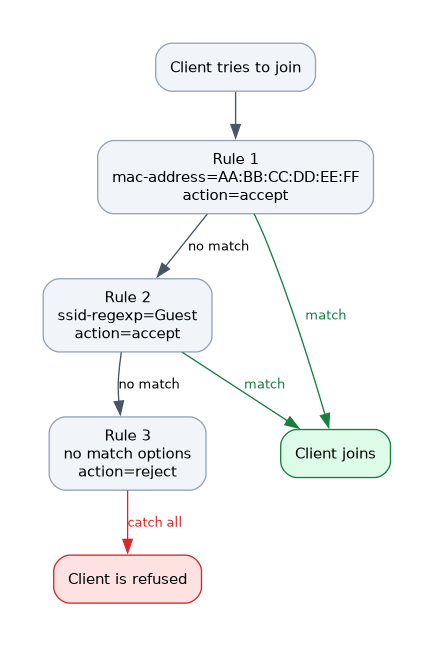 The manager checks the rules from top to bottom and applies the first one that matches.
Put specific rules first and the catch all last. If the reject rule were first, it would refuse every client before the accept rules were checked.
Test an access list from a client that you can lose. A wrong catch all rule can lock out every client, including your own.
Signal range
A signal range rule limits a client by signal strength. For example, a rule can accept a client only if its signal is stronger than a chosen value.
This helps with sticky clients. A client that is too far away is refused, so it must join a nearer access point with a stronger signal.
Use a range with care. A limit that is too strict leaves clients with no connection at the edge of the coverage.
Time
A rule can apply only during certain hours or days. For example, a guest SSID can be allowed only during opening hours.
The router needs a correct clock for this to work.
Per client features
An access list entry can do more than accept or reject.
- It can give a client its own passphrase, so you can remove one device without changing the key for everyone.
- It can place a client in a particular VLAN.
These features are useful for devices such as printers and for staff who need a different network. Check the available parameters in your RouterOS version before you plan to use them.
MAC address matching
A MAC address match is easy to set up, but it is not strong security. Addresses can be copied, so combine the access list with proper encryption.
RADIUS
With query-radius, the manager asks a RADIUS server about the client, normally using its MAC address. This lets a central server hold the list of allowed devices.
The RADIUS server must be defined on the manager, and the network must reach it.
Checking the effect
/interface wifi access-list print
/interface wifi registration-table print- The list shows the rules in the order the manager uses.
- The registration table shows the clients that have joined.
If a client cannot join, look at the rules from the top and find the first one that matches it.
Add a comment to every rule, so that you know why it is there.
What to remember for the exam
Seven facts cover this topic.
- The access list decides which clients may join, and it is checked when a client tries to connect.
- The manager applies the first rule that matches.
- Rules can match
mac-address,interface,ssid-regexp,signal-rangeandtime. - The actions are
accept,rejectandquery-radius. - A final rule with no match options acts as a catch all.
- A signal range helps to refuse distant clients and to push sticky clients to a nearer access point.
- MAC address matching alone is not strong security.
Common mistakes
These four errors are common.
Reject rule first. It blocks every client before the accept rules are checked.
Too strict a signal range. Clients at the edge of coverage cannot connect.
Relying on MAC addresses alone. Addresses can be copied.
Testing from the only client you have. A mistake can lock you out.
Check yourself
Work through these three questions.
How does the manager choose which rule to apply?
It checks the rules from top to bottom and applies the first one that matches the client.
What are the three actions in the wifi access list?
accept,rejectandquery-radius. The last one asks a RADIUS server to decide.How can a signal range help with a sticky client?
It refuses a client whose signal is outside the range, so the client must use a nearer access point with a stronger signal.
Topic 6 of 6 in CAPsMAN v2
Test yourself on CAPsMAN v2
The full MikroTik MTCEWE question bank has 476 questions, with timed practice exams and an explanation for every answer.
This study guide is independent and is not affiliated with, endorsed by, or sponsored by MikroTik. Vendor names, certification names and exam codes are trademarks of their respective owners and are used for identification only.