Manage and Monitor Security Posture · Topic 2 of 3
Activity and Event Collection in Microsoft Sentinel
SC-500 Sentinel: workspaces and roles, content hub, data connectors, AMA with data collection rules, custom tables, automation and retention.
- 5 min
- Includes a diagram
- Sentinel runs on a Log Analytics workspace and is managed in the Defender portal.
- Roles: Reader, Responder, Contributor, Playbook Operator; Automation Contributor for the Sentinel service.
- Content hub solutions bundle connectors, rules, workbooks and playbooks.
What it is
Microsoft Sentinel is a cloud-native SIEM and SOAR. It stores security data in a Log Analytics workspace, detects threats with analytics rules, and automates responses. SC-500 focuses on setting it up: creating and connecting workspaces, assigning roles, installing content, connecting data sources, storing custom data, automating responses and managing retention.
How it works
Workspaces and roles
- Enable Sentinel on a Log Analytics workspace and connect the workspace to the Microsoft Defender portal, where it works alongside Defender XDR. After 31 March 2027, Sentinel is no longer supported in the Azure portal and is available only in the Defender portal.
- Assign the least role needed:
| Role | Can |
|---|---|
| Microsoft Sentinel Reader | View data, incidents and workbooks |
| Microsoft Sentinel Responder | Also manage incidents (assign, change status) |
| Microsoft Sentinel Contributor | Also create and edit analytics rules, workbooks and other content, and manage content hub solutions |
| Microsoft Sentinel Playbook Operator | List, view and manually run playbooks |
| Microsoft Sentinel Automation Contributor | Lets Sentinel attach playbooks to automation rules (assigned to the Sentinel service, not users) |
Creating and editing playbooks needs Logic App Contributor. For automation rules to run playbooks, the Sentinel service account needs permissions on the playbooks' resource group (assigning them needs Owner). Assign Sentinel roles at the resource group that holds the workspace.
Content hub
The content hub provides packaged solutions for products and scenarios: data connectors, analytics rules, workbooks, hunting queries and playbooks. Install a solution, then configure its connector and enable its rules.
Data connectors
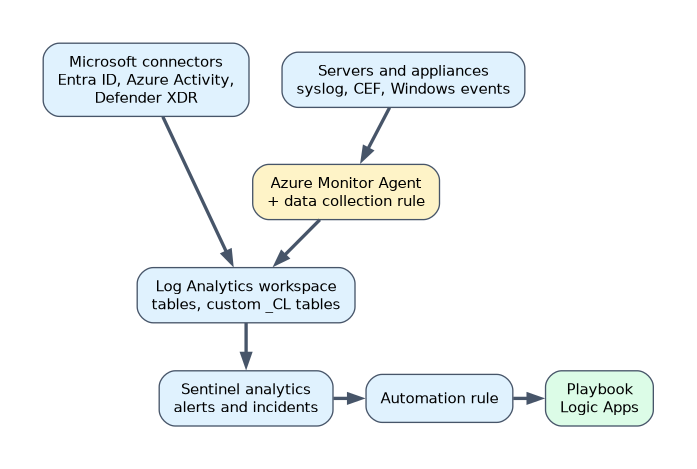
| Source | Typical approach |
|---|---|
| Azure Activity, Microsoft Entra ID, Defender XDR, Defender for Cloud | Built-in Microsoft connectors, often enabled with a few clicks or a policy |
| Linux syslog and CEF appliances | Syslog via AMA and CEF via AMA: the Azure Monitor Agent (AMA) on a Linux machine or log forwarder, with a data collection rule (DCR); data lands in the Syslog and CommonSecurityLog tables |
| Windows security events | The Windows Security Events via AMA connector with a DCR that selects All, Common, Minimal or Custom (XPath) events; data lands in the SecurityEvent table |
| Windows Event Forwarding (WEF) | The Windows Forwarded Events connector, with AMA on the Windows Event Collector and a DCR; forwarded events, including Security log events, land in the WindowsEvent table, not SecurityEvent |
| Servers outside Azure | Onboard with Azure Arc so AMA can be installed |
Data collection rules define what to collect, any transformation, and which workspace and table receive it.
Custom log tables
Create custom tables (names end in _CL) to store data that has no built-in table, and ingest it through a DCR, for example with the Logs ingestion API.
Automation
- Automation rules run when incidents or alerts are created or updated: assign owners, change severity, add tags, close known false positives, or run a playbook.
- Playbooks are Logic Apps workflows that take actions such as blocking a user, isolating a machine or posting to Teams.
Retention
Each table has an analytics (interactive) retention period for fast querying, up to two years, and can keep data longer in lower-cost long-term retention, up to 12 years of total retention; older data is reached with search jobs. Set the workspace default and override it per table to balance cost and investigation needs.
Microsoft Purview audit data
Microsoft Purview Audit records user and admin activity in Microsoft 365. Auditing must be turned on in Purview. Security teams can then search it from the Audit page in the Microsoft Defender portal, which is the same audit log search as in Purview, and hunt related cloud app activity in the CloudAppEvents table with advanced hunting.
A worked example: a firewall appliance sends CEF messages. The team deploys a Linux VM as a log forwarder with AMA, creates a DCR for CEF, installs the appliance's solution from the content hub to get its parsers and analytics rules, and adds an automation rule that runs a playbook to notify the network team for high-severity incidents.
Legacy agents are retired. When a question asks how to collect syslog, CEF or Windows events, choose the Azure Monitor Agent with a data collection rule.
How the exam asks about this
- "An analyst must manage incidents but not edit analytics rules." Microsoft Sentinel Responder.
- "Collect only specific Windows security event IDs." Windows Security Events via AMA with a DCR that filters them.
- "Automatically run a response when a high-severity incident is created." An automation rule that triggers a playbook.
What to remember for the exam
- Sentinel runs on a Log Analytics workspace and is managed in the Defender portal.
- Roles: Reader, Responder, Contributor, Playbook Operator; Automation Contributor for the Sentinel service.
- Content hub solutions bundle connectors, rules, workbooks and playbooks.
- AMA plus DCRs collect syslog (
Syslog), CEF (CommonSecurityLog), Windows security events (SecurityEvent) and forwarded events (WindowsEvent); Arc onboards non-Azure servers. - Custom tables end in _CL. Automation rules trigger playbooks built on Logic Apps.
- Interactive retention plus cheaper long-term retention per table.
Collecting every Windows event is expensive. Use the DCR to select the events you actually need.
Common mistakes
Giving Contributor to analysts who only work incidents. Use Responder.
Using the retired Log Analytics agent. Use AMA with DCRs.
Keeping everything in interactive retention. Move older data to long-term retention to save cost.
Check yourself
Which Sentinel role can manage incidents but not create analytics rules?
Microsoft Sentinel Responder.
What defines which events the Azure Monitor Agent collects and where they go?
A data collection rule (DCR).
What are Sentinel playbooks built on?
Azure Logic Apps workflows.
Topic 2 of 3 in Manage and Monitor Security Posture
Test yourself on Manage and Monitor Security Posture
The full Microsoft SC-500 question bank has 650 questions, with timed practice exams and an explanation for every answer.
This study guide is independent and is not affiliated with, endorsed by, or sponsored by Microsoft. Vendor names, certification names and exam codes are trademarks of their respective owners and are used for identification only.