Implement Authentication and Access Management · Topic 3 of 6
Conditional Access Policies
SC-300 Conditional Access: assignments, conditions, grant controls, templates, report only mode, exclusions, evaluation order and troubleshooting tools.
- 6 min
- Includes a diagram
- Conditional Access needs P1. Security defaults is the free baseline.
- Exclusions beat inclusions. When policies conflict, a block wins.
- Only IP range named locations can be trusted.
What it is
Conditional Access is the policy engine of Zero Trust in Microsoft Entra ID. A policy is an if then statement: if a sign in matches these assignments and conditions, then apply these controls. It lets you require MFA only when it matters, allow only healthy devices to reach sensitive apps, and block risky situations.
Conditional Access needs Microsoft Entra ID P1. The free alternative, security defaults, applies a fixed baseline and cannot be customised.
How it works
The parts of a policy
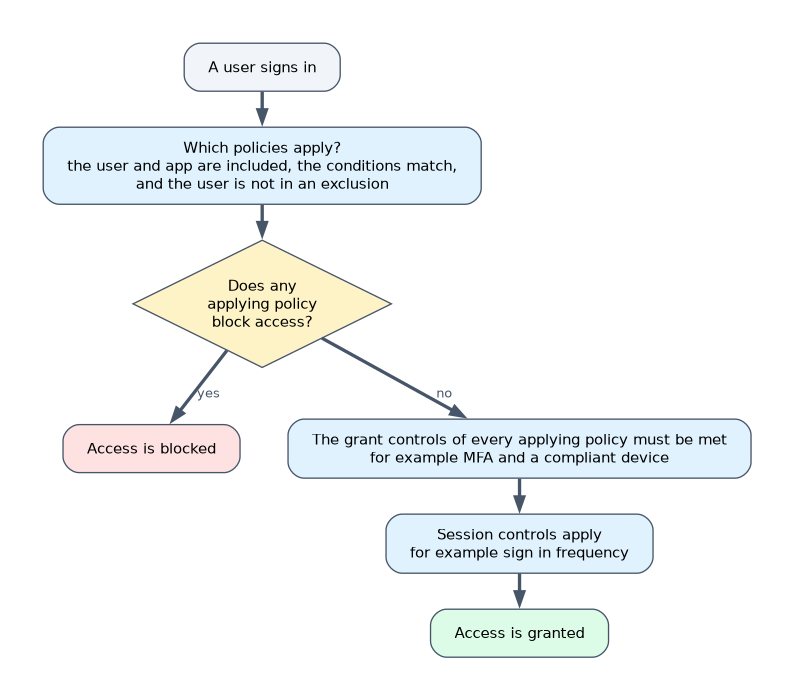
| Part | What you choose |
|---|---|
| Users and workload identities | Which users, groups or roles are included, and which are excluded. Workload identities can also be targeted |
| Target resources | Which cloud apps or actions, such as all resources, a specific app, or user actions like registering security information |
| Conditions | User risk, sign in risk, device platform, locations, client apps, and device filters |
| Grant controls | Block access, or grant access with requirements |
| Session controls | Limits applied after access is granted |
Exclusions take precedence over inclusions. If a user is in both an included group and an excluded group, the policy does not apply to that user. When several policies apply, they are all enforced, and a block overrides any grant.
Conditions in detail
- Locations use named locations, which are either country or region lists, or IP address ranges. Only IP ranges can be marked as trusted. A countries location can resolve a user's country from the IP address, or from GPS coordinates through the Authenticator app.
- Device platforms include Windows, macOS, iOS and Android.
- Client apps separate browsers and modern authentication clients from legacy protocols.
- Filter for devices targets devices by attributes, for example
extensionAttribute1 -eq "PAW".
Grant controls
| Control | Meaning |
|---|---|
| Block access | Refuses the sign in |
| Require multifactor authentication | A second factor |
| Require authentication strength | A specific set of methods, such as phishing resistant MFA |
| Require device to be marked as compliant | The device meets Microsoft Intune compliance rules |
| Require Microsoft Entra hybrid joined device | A domain joined, registered device |
| Require approved client app or app protection policy | A managed mobile app |
| Require password change | Used with user risk |
| Require terms of use | The user accepts terms first |
You can require all of the selected controls, or one of them. Legacy authentication protocols such as POP3 and IMAP cannot show MFA prompts, so a policy should block legacy authentication.
Designing a privileged access workstation policy
To allow administrators to reach the Azure portal only from privileged access workstations, with a device attribute PAW, create a policy that targets the administrator roles and the Azure management app, and blocks access on all devices except those matching the filter. The mistake is to block devices that match the filter, which would block the workstations you want to allow.
Templates, report only and emergency accounts
- Templates give ready made policies for common needs, such as requiring MFA for administrators, blocking legacy authentication or requiring MFA for risky sign ins.
- Report only mode evaluates a policy and records what it would have done without enforcing it, so you can test before turning it on.
- Always exclude emergency access accounts from policies that could block them, so a mistake cannot lock every administrator out.
Testing and troubleshooting
| Tool | Use |
|---|---|
| What If | Enter a user, app and conditions to see which policies would apply and why |
| Sign in logs, Conditional Access tab | Shows, for a real sign in, each policy and its result: success, failure, not applied, or report only |
| Conditional Access insights workbook | Shows the effect of policies over time |
A user who is unexpectedly prompted or blocked is usually caught by a different policy than the one you expected, or is excluded from the one you expect.
SigninLogs
| where ConditionalAccessStatus == "failure"
| project TimeGenerated, UserPrincipalName, AppDisplayName, ConditionalAccessPolicies
Choosing the design
| The need | Policy |
|---|---|
| MFA for all administrators | Target admin roles, require MFA or phishing resistant strength |
| Finance app only from managed devices | Target the app, require a compliant device |
| Stop password spray against old protocols | Block legacy authentication |
| Block sign in from countries where you have no staff | Named location of countries, block |
| Guests must use MFA | Target guest and external users, require MFA |
| Test a change safely | Report only mode, then enforce |
A worked scenario
A company wants all administrators to use phishing resistant MFA. An administrator starts from a template and adjusts it: it targets the directory roles, applies to all cloud apps, requires the Phishing resistant MFA strength, and excludes two emergency access accounts. It is first set to report only. After a week, the sign in logs and the insights workbook show that a break glass account would have been affected, and it is added to the exclusions. The policy is then set to On. Later a contractor reports being blocked, and What If shows that a country block policy applies.
What to remember for the exam
- Conditional Access needs P1. Security defaults is the free baseline.
- Exclusions beat inclusions. When policies conflict, a block wins.
- Only IP range named locations can be trusted.
- Report only mode tests a policy safely. What If and the sign in logs troubleshoot it.
- Exclude emergency access accounts from blocking policies.
Blocking "devices that match the PAW filter" blocks the workstations you meant to allow. Block all devices except those that match.
How the exam asks about this
- "A user is in the included Finance group and the excluded Contractors group." The policy does not apply because exclusion takes precedence.
- "Which named location type can be marked trusted?" IP ranges.
- "See which policies would apply to a user and app." The What If tool.
- "Test a policy without enforcing it." Report only mode.
Common mistakes
Letting inclusion win over exclusion. Exclusion always takes precedence.
Forgetting to block legacy authentication. MFA cannot be prompted there.
Forgetting emergency access accounts. A bad policy can lock out everyone.
Turning a new policy on straight away. Test it in report only mode first.
Check yourself
What happens to a user who is both included and excluded?
The policy does not apply to the user, because exclusions take precedence.
Which tool shows which policies would apply to a user and app?
The What If tool.
Why block legacy authentication?
Legacy protocols cannot present MFA prompts, so attackers can bypass MFA through them.
Topic 3 of 6 in Implement Authentication and Access Management
Test yourself on Implement Authentication and Access Management
The full Microsoft SC-300 question bank has 650 questions, with timed practice exams and an explanation for every answer.
This study guide is independent and is not affiliated with, endorsed by, or sponsored by Microsoft. Vendor names, certification names and exam codes are trademarks of their respective owners and are used for identification only.