Perform Threat Hunting · Topic 4 of 4
Notebooks, MCP and Sentinel Graph
SC-200 deep hunting: Jupyter notebooks and PySpark on the data lake, the Sentinel MCP server and its roles, and Sentinel graph for relationships.
- 7 min
- Includes a diagram
- Notebooks come from the Microsoft Sentinel extension for Visual Studio Code, and run PySpark and Python libraries on the data lake.
- Notebooks suit machine learning, large scale analysis and visualisation, and can run as jobs.
- The Sentinel MCP server is hosted, uses Entra identity, and has data exploration, Security Copilot agent creation and triage collections.
What it is
Some hunts need more than KQL. Jupyter notebooks let you analyse the data lake with Python, machine learning and visualisation. The Microsoft Sentinel MCP server lets AI tools query security data in plain language. Sentinel graph models the relationships between users, devices, resources and threats so you can reason about reach and impact. These are the tools for deep analysis, large scale data and AI assisted hunting.
How it works
Jupyter notebooks on the data lake
Jupyter notebooks are interactive documents that mix code, results and notes. For Sentinel they are provided by the Microsoft Sentinel extension for Visual Studio Code, which connects to the data lake and lets you run Python for Spark (PySpark) and use Python libraries.
What notebooks add over KQL:
- Complex transformations and statistics, across very large datasets, using distributed computing with Apache Spark.
- Machine learning, for example to build an anomaly detection model or to cluster behaviour.
- Visualisation, with charts and graphs inside the notebook.
- Low and slow attacks, which evade rule based detection, can be found by analysing long histories and connected events.
- Reproducibility, because the notebook documents the steps of the hunt.
A good pattern is to use KQL for exploration and filtering, and a notebook when you need modelling, joining many sources, or algorithms KQL does not offer. Notebooks can run as scheduled notebook jobs so an analysis repeats on a schedule, with results written back to a table.
| The need | Choose |
|---|---|
| Quick filter and count over recent data | KQL in advanced hunting |
| Statistical or machine learning analysis of a year of data | A notebook on the data lake |
| Visual exploration of results with charts | A notebook |
| Repeat the same analysis every night | A KQL job or a notebook job |
The Sentinel MCP server
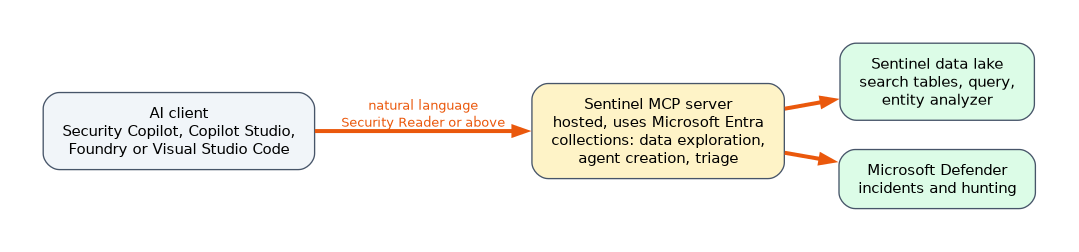 The Model Context Protocol (MCP) is an open standard that lets AI models use external tools and data in a structured and safe way. Microsoft Sentinel's MCP server is a hosted interface that exposes security tools to AI clients, so analysts can query security data in natural language and build security agents, without writing KQL or knowing the table schema.
Key points:
- It is fully hosted and uses Microsoft Entra for identity, so there is no infrastructure to deploy.
- Tools are grouped into scenario focused collections.
| Collection | What it is for |
|---|---|
| Data exploration | Search for relevant tables, query the data lake and analyse entities such as users and URLs |
| Security Copilot agent creation | Create Security Copilot agents for complex workflows |
| Triage | Triage incidents and hunt for threats |
- Typical tools include search tables (semantic search over the table catalog, returning schemas), a query tool for the lake, an entity analyzer that gives risk verdicts for users and URLs, and a tool to list data lake workspaces.
- Compatible clients include Microsoft Security Copilot, Microsoft Copilot Studio, Microsoft Foundry and Visual Studio Code. A hunter can connect an AI assistant in Visual Studio Code, where the notebooks also run, to the MCP server and ask questions in plain language.
- Most tools need you to be onboarded to the Sentinel data lake.
- Access needs at least a role such as Security Reader, Security Operator or Security Administrator, for users, managed identities or service principals.
Example prompts are "Find the top three users at risk and explain why", or "Find sign in failures in the last 24 hours and summarise the key findings". As with any AI, check the results against the underlying data before acting.
Sentinel graph
Microsoft Sentinel graph is a graph analytics capability that models nodes, such as users, devices, cloud resources and threat intelligence, and edges, which are the relationships and activity between them. It lets defenders and AI agents reason over connected data in a way tables cannot, for example "what could happen if this account is compromised?" or "what is the blast radius of this compromised document?".
Graph powers several experiences across the platform.
| Experience | What it does |
|---|---|
| Blast radius analysis in the incident graph | Shows the vulnerable paths from a compromised entity to a critical asset |
| Graph based hunting in Defender | Traverses relationships between users, devices and other entities to reveal privileged access paths |
| Attack paths in Exposure Management and Defender for Cloud | Show how weaknesses can be chained to reach critical assets before a breach |
| Purview Insider Risk and Data Security Investigations | Visualise data leak blast radius and the users and activities linked to a breach |
| Graph tools in the MCP server (preview) | Let AI reason over exposure, hunting and data risk graphs |
Use Sentinel graph to analyse relationships between entities. For example, to answer whether a set of compromised accounts shares access to a server, graph shows the connections directly, where a KQL join would be laborious.
Putting the tools together
A typical advanced hunt moves between tools: a hunter explores with KQL, uses the MCP server to ask a plain language question and find the right tables, switches to a notebook to model a year of history, and uses graph to see which privileged paths the suspects have. Findings are then turned into analytics rules or custom detections.
A worked scenario
A SOC suspects a low and slow credential attack that stays under every threshold. A hunter uses the Sentinel MCP server from Visual Studio Code to ask which tables hold sign in data, and the search tables tool returns the schemas. In a notebook on the data lake, she uses PySpark to compute a baseline of sign in behaviour over twelve months and flags accounts that deviate slightly but persistently. For the flagged accounts, graph based hunting shows two of them can reach a domain controller through a service account. The team creates an analytics rule from the finding, and the notebook runs weekly as a job.
What to remember for the exam
- Notebooks come from the Microsoft Sentinel extension for Visual Studio Code, and run PySpark and Python libraries on the data lake.
- Notebooks suit machine learning, large scale analysis and visualisation, and can run as jobs.
- The Sentinel MCP server is hosted, uses Entra identity, and has data exploration, Security Copilot agent creation and triage collections.
- MCP clients include Security Copilot, Copilot Studio, Foundry and Visual Studio Code. Access needs Security Reader, Operator or Administrator. Most tools need data lake onboarding.
- Sentinel graph models relationships as nodes and edges for blast radius, graph hunting and attack paths.
MCP lets you ask in plain language. A notebook lets you write Python. Graph lets you follow relationships.
How the exam asks about this
- "Which tool runs PySpark against the Sentinel data lake?" Jupyter notebooks, through the Sentinel extension for Visual Studio Code.
- "Query security data in natural language from an AI client." The Sentinel MCP server.
- "Which minimum role lets a user list and invoke the MCP tools?" Security Reader, Security Operator or Security Administrator.
- "Analyse relationships between entities." Sentinel graph.
Common mistakes
Using a notebook for a simple filter. KQL is faster for that.
Trusting AI answers blindly. Verify with the data.
Forgetting data lake onboarding. Most MCP tools need it.
Expecting tables to show attack paths. Graph does.
Check yourself
What provides notebooks for the Sentinel data lake?
The Microsoft Sentinel extension for Visual Studio Code, which runs Python and PySpark on Jupyter notebooks.
Name two Sentinel MCP tool collections.
Data exploration and triage, along with Security Copilot agent creation.
What are the two parts of a graph?
Nodes, such as users and devices, and edges, which are the relationships between them.
Topic 4 of 4 in Perform Threat Hunting
Test yourself on Perform Threat Hunting
The full Microsoft SC-200 question bank has 650 questions, with timed practice exams and an explanation for every answer.
This study guide is independent and is not affiliated with, endorsed by, or sponsored by Microsoft. Vendor names, certification names and exam codes are trademarks of their respective owners and are used for identification only.