Manage a Security Operations Environment · Topic 7 of 8
Custom Detection Rules in Defender XDR
SC-200 custom detections: rules from advanced hunting queries, run frequencies and continuous NRT, required columns, response actions, scope and management.
- 6 min
- Includes a diagram
- A custom detection starts from an advanced hunting query and needs Timestamp, ReportId and entity columns.
- Frequencies are continuous (NRT), 1, 3, 12 and 24 hours. Continuous queries use a single table, so a join needs a scheduled frequency.
- Actions depend on the entity: devices, files, users or email messages. Message actions are soft delete, hard delete and move.
What it is
Built in detections cannot know your environment. A custom detection rule in Microsoft Defender XDR turns a hunting query into a rule that runs on a schedule, raises alerts when the query returns results, and can take response actions automatically. It is the main way a detection engineer creates detections for Defender data such as devices, email, identities and cloud apps.
How it works
Creating a rule
The usual process has four steps, which also appear as a wizard in the portal.
- Build and tune the query in advanced hunting, until it returns the results you want.
- Select Create detection rule from the query editor.
- Enter the rule details: the name, how often it runs, and the alert details, such as title, severity, category and the MITRE techniques.
- Choose the response actions and the scope, then save the rule.
Query requirements
For a query to work as a custom detection it must return certain columns so the alert can be tied to events and entities.
- A Timestamp column.
- A ReportId column, which identifies the event.
- Columns that identify the affected entity, such as DeviceId (or a similar device column), a user or mailbox column, or the identifiers needed for the actions you want.
Using arg_max(Timestamp, ReportId) in a summarised query is a common way to keep the latest event for each entity while preserving the required columns. A rule can also map extra columns to the alert, so analysts see useful details.
Run frequency
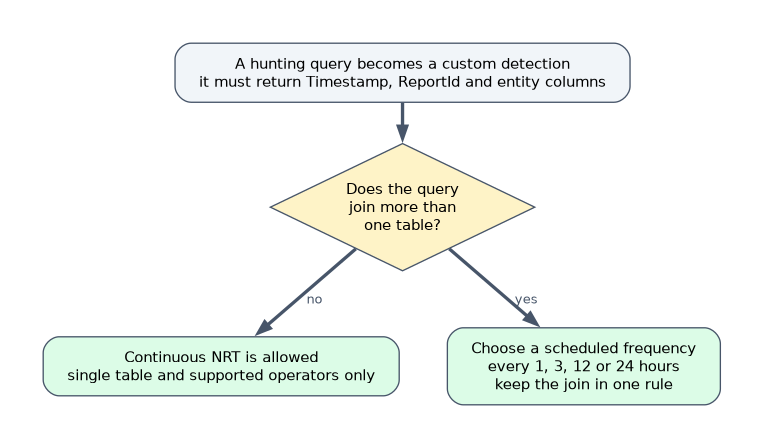 How often the rule runs depends on the frequency you choose.
| Frequency | Behaviour |
|---|---|
| Continuous (NRT) | Near real time. Runs very frequently, but the query may use only a single table and supported operators, so it cannot join two tables |
| Every hour, every 3 hours, every 12 hours | Scheduled runs that can use more complex queries |
| Every 24 hours | The least frequent run, with a lookback of up to 30 days |
The least frequent run is every 24 hours, so a one day time filter covers all new data for that frequency. Choose the frequency that fits how fast you must detect. A detection that needs a join between two tables, for example network events joined to process events, must use a scheduled frequency and cannot be continuous. If an hour of delay is acceptable, running every hour and keeping the join in one rule is the right answer, and splitting it into two single table continuous rules would not be able to correlate the events.
Alert details and grouping
Each rule defines the alert that it creates: the title, description, severity, category, MITRE ATT&CK techniques and recommended actions. You can use dynamic fields from the query results in the title and description. Alerts from a custom detection join Defender XDR's incident correlation, so related alerts are grouped into one incident.
Response actions
A rule can take automatic actions on the entities it finds. They depend on the kind of entity.
| Entity | Actions |
|---|---|
| Devices | Isolate the device, collect an investigation package, run an antivirus scan, initiate an investigation, restrict app execution |
| Files | Allow or block the file, quarantine the file |
| Users | Mark the user as compromised, disable the user, force a password reset |
| Email messages | Move to a mailbox folder such as Junk, soft delete, or hard delete |
For a custom detection that matches the messages of a phishing campaign, the available automatic actions on the messages are soft delete, hard delete or move. Isolating a device, collecting a package or marking a user as compromised act on devices or users and not on the messages themselves.
Scope
The scope decides which devices the rule applies to. You can run it on all devices or only on selected device groups. If you have configured Microsoft Sentinel scoping, include the SentinelScope column in the query so alerts are visible to scoped analysts.
Managing rules
In Custom detection rules you can view every rule, with its last run, status and the number of alerts. You can:
- Edit the query, frequency, actions or scope.
- Turn a rule on or off without deleting it.
- Run it now to test.
- Delete a rule that is no longer needed.
A rule that fails repeatedly shows an error and may be switched off automatically, so check the status after changing a query. Use clear names and tags so you know who owns each rule, and review noisy rules regularly. Tuning options, such as an exclusion in the query, remove false positives without disabling the whole rule.
Defender XDR custom detections compared with Sentinel analytics rules
| Defender XDR custom detection | Sentinel analytics rule | |
|---|---|---|
| Data | Defender XDR advanced hunting tables | Sentinel workspace tables |
| Query tool | Advanced hunting | Log Analytics KQL |
| Actions | Built in actions on devices, users, email | Automation rules and playbooks |
| Typical use | Endpoint, email, identity and cloud app detections | Logs from many sources, including non Microsoft ones |
When Sentinel is onboarded to the Defender portal, advanced hunting can query both sets of tables, so one KQL query can join Defender tables with Sentinel tables.
A worked scenario
A hunter finds a pattern of process creation followed by outbound connections to rare destinations, which suggests beaconing. The query joins DeviceNetworkEvents to DeviceProcessEvents, so continuous frequency is not possible. The team accepts a delay of an hour, so the rule is set to run every hour. The query keeps the latest event per device with arg_max so it returns Timestamp, ReportId and DeviceId. The rule raises a high severity alert mapped to a command and control technique, and its action isolates the device. It is scoped to servers only, and an analyst later adds an exclusion for a known monitoring tool.
What to remember for the exam
- A custom detection starts from an advanced hunting query and needs Timestamp, ReportId and entity columns.
- Frequencies are continuous (NRT), 1, 3, 12 and 24 hours. Continuous queries use a single table, so a join needs a scheduled frequency.
- Actions depend on the entity: devices, files, users or email messages. Message actions are soft delete, hard delete and move.
- Scope can limit a rule to device groups.
- Rules can be edited, turned off, run now or deleted.
A join between tables means a scheduled frequency, not continuous.
How the exam asks about this
- "A rule must join DeviceNetworkEvents to DeviceProcessEvents and an hour of delay is fine." Every hour, with the join kept in one rule.
- "Which automatic action can a custom detection take on phishing messages?" Soft delete.
- "Which columns must the query return?" Timestamp, ReportId and entity identifying columns.
- "What is the least frequent run frequency?" Every 24 hours.
Common mistakes
Choosing continuous for a joined query. It supports only a single table.
Forgetting ReportId or Timestamp. The rule cannot be saved.
Expecting device actions to apply to emails. Message actions are separate.
Never reviewing rules. Noisy rules waste analyst time.
Check yourself
Why can a continuous detection not use a join?
Continuous (NRT) rules can query only a single table.
Which columns does a custom detection query need?
Timestamp, ReportId and columns that identify the affected entity.
What is the longest interval between runs of a custom detection?
Every 24 hours.
Topic 7 of 8 in Manage a Security Operations Environment
Test yourself on Manage a Security Operations Environment
The full Microsoft SC-200 question bank has 650 questions, with timed practice exams and an explanation for every answer.
This study guide is independent and is not affiliated with, endorsed by, or sponsored by Microsoft. Vendor names, certification names and exam codes are trademarks of their respective owners and are used for identification only.