Design solutions that align with security best practices and priorities · Topic 1 of 4
Ransomware Resiliency and Business Continuity
SC-100 resiliency: prioritizing business-critical assets, secure backup and BCDR for hybrid and multicloud, ransomware defense and security updates.
- 6 min
- Includes a diagram
- Assume breach. Prioritize by business impact, using RTO, RPO and critical assets.
- Ransomware plan order: recovery plan, limit damage (privileged access), make it hard to get in.
- Protect backups: immutable vault, soft delete, multi-user authorization with a Resource Guard, separate identities.
What it is
Resiliency means the business keeps operating, or recovers quickly, when an attack succeeds. Ransomware is the standard test case: attackers encrypt or steal data and demand payment. A resilient design assumes that some attack will get through (the assume breach principle) and makes sure it cannot destroy the ability to recover.
The exam asks you to prioritize what to protect, design backup and disaster recovery (BCDR) that attackers cannot erase, defend against ransomware with the controls that matter most, and keep systems patched.
How it works
Identify and prioritize threats to business-critical assets
You cannot protect everything equally. Start from the business.
- Inventory assets and find the business-critical ones: the systems and data whose loss stops revenue, harms safety or breaks the law.
- Run a business impact analysis: what is the cost per hour of downtime, and what are the recovery objectives (RTO and RPO) for each asset?
- Identify threats to those assets using threat modeling and threat intelligence, and map them to attack techniques with the MITRE ATT&CK framework.
- Rank risks by likelihood and impact, and spend first on the top of the list.
Microsoft tools that help: Microsoft Defender for Cloud (asset inventory and risk), Microsoft Security Exposure Management (attack paths and critical assets), Defender Vulnerability Management and Microsoft Secure Score for prioritized recommendations.
Ransomware defense in order of priority
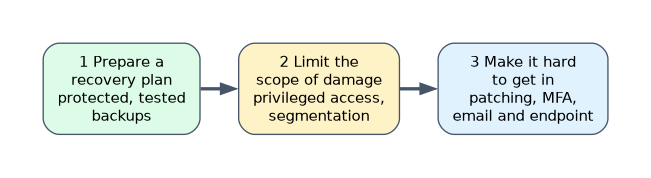 Microsoft's guidance for rapidly protecting against ransomware and extortion orders the work in three steps.
| Step | Focus | Examples |
|---|---|---|
| 1. Prepare a recovery plan | Be able to restore without paying | Protected, tested backups, documented restore order, an isolated recovery environment |
| 2. Limit the scope of damage | Contain a compromise | Privileged access protection, least privilege, network segmentation, tiering of admin accounts |
| 3. Make it hard to get in | Reduce initial access | Patching, MFA and phishing resistant sign in, email and endpoint protection, closing exposed remote access |
The ordering is deliberate: backups and privileged access come first because they decide whether an incident is a bad day or a business ending event. Attackers target backup systems and domain administrators first.
Secure backup and restore (BCDR)
| Control | Purpose |
|---|---|
| 3-2-1 principle | Three copies, two media types, one copy offline or in a separate trust boundary |
| Immutable backups | Backups cannot be modified or deleted before retention ends. In Azure Backup this is an immutable vault |
| Soft delete | Deleted backups are kept for a period so accidental or malicious deletion can be reversed |
| Multi-user authorization (MUA) | A Resource Guard in a separate tenant or subscription requires a second approval for destructive backup operations |
| Separate credentials and identities | Backup administrators are not the same people or accounts as production domain administrators |
| Cross region restore and replication | Survive the loss of a region. Azure Site Recovery replicates workloads for failover |
| Test restores | A backup that has never been restored is an assumption. Run regular recovery drills |
For hybrid and multicloud, protect on premises servers and other clouds too. Azure Backup covers Azure resources and, through agents such as the Azure Backup Server and MARS agent and Azure Arc enabled servers, on premises machines. Use each cloud's native backup for workloads there, or a vendor solution, and keep the backup administration identities and keys isolated from the systems being protected.
Security updates
Unpatched software is the most common way in. Design a repeatable patching strategy.
| Tool | Role |
|---|---|
| Azure Update Manager | Assess and install updates on Azure VMs and Azure Arc enabled servers, with schedules and maintenance configurations |
| Microsoft Intune and Windows Update for Business / Windows Autopatch | Update rings and deadlines for Windows clients |
| Defender Vulnerability Management | Find missing patches and misconfigurations and prioritize by exploit likelihood and asset importance |
| Hotpatch | Install some Windows Server updates without a restart, for supported configurations |
A good strategy has a cadence (monthly, plus out of band for critical fixes), test rings before broad rollout, reporting on compliance and a path for emergency patching when a vulnerability is actively exploited.
Ransomware and privileged access
Ransomware operators usually become domain or cloud administrators before they encrypt. Prioritize protecting privileged access: phishing resistant MFA, Privileged Identity Management (PIM) with just in time elevation, separate privileged access workstations, no standing administrator rights and disabling legacy authentication. This is why privileged access appears in the second step of the plan.
A worked scenario
A hospital group has patient systems that cannot go down for more than four hours. The architect ranks the electronic records system and imaging systems as critical, then designs: an immutable Azure Backup vault protected by a Resource Guard in a separate subscription, Azure Site Recovery to a second region for the records system, restore drills every quarter, PIM and privileged access workstations for administrators, and Azure Update Manager schedules with a tested ring. Detection comes from Defender XDR and Microsoft Sentinel.
What to remember for the exam
- Assume breach. Prioritize by business impact, using RTO, RPO and critical assets.
- Ransomware plan order: recovery plan, limit damage (privileged access), make it hard to get in.
- Protect backups: immutable vault, soft delete, multi-user authorization with a Resource Guard, separate identities.
- Test restores. A never-tested backup is not a backup.
- Azure Update Manager patches Azure and Arc servers. Defender Vulnerability Management prioritizes what to patch.
When a ransomware question says "attackers deleted the backups", the answer is immutability plus multi-user authorization, not "more backups".
How the exam asks about this
- "Prevent an administrator account from deleting backups." Immutable vault and multi-user authorization.
- "Which first for ransomware?" A tested recovery plan and protected backups, then privileged access protection.
- "Patch Azure and on premises servers from one place." Azure Update Manager with Azure Arc.
- "Recover after a regional outage." Azure Site Recovery or cross region restore.
Common mistakes
Same credentials for backup and production. One compromise destroys both.
Backups in the same trust boundary. Ransomware encrypts what it can reach.
Skipping restore tests. Failures are discovered during the incident.
Patching everything equally. Prioritize by exploitability and asset value.
Check yourself
Which Azure Backup feature requires a second approval for destructive operations?
Multi-user authorization using a Resource Guard.
What are the three steps of Microsoft's ransomware guidance in order?
Prepare a recovery plan, limit the scope of damage, make it hard to get in.
Which tool patches Azure VMs and Azure Arc enabled servers?
Azure Update Manager.
Topic 1 of 4 in Design solutions that align with security best practices and priorities
Test yourself on Design solutions that align with security best practices and priorities
The full Microsoft SC-100 question bank has 770 questions, with timed practice exams and an explanation for every answer.
This study guide is independent and is not affiliated with, endorsed by, or sponsored by Microsoft. Vendor names, certification names and exam codes are trademarks of their respective owners and are used for identification only.