Design security operations, identity, and compliance capabilities · Topic 6 of 7
Securing Privileged Access
SC-100 privileged access: the enterprise access model, PIM, entitlement management, access reviews, CIEM and privileged access workstations.
- 6 min
- Includes a diagram
- Enterprise access model: control plane, management plane, data and workload plane, user and app access, privileged access.
- PIM: eligible roles, JIT activation, MFA, approval, justification, time bound. Keep emergency access accounts.
- Entitlement management uses access packages. Access reviews recertify access and can auto apply results.
What it is
Privileged access is any access that can change security controls, identities or critical data: Global Administrator, subscription Owner, domain admin, database admin. It is what attackers want, and what ransomware operators need, so it deserves the strongest protection. The design goal is that no one has standing, unmonitored power: privileged roles are just in time, reviewed, limited and used only from secure devices.
How it works
The enterprise access model
Microsoft's enterprise access model replaces the older three tier model. It separates access into planes so that a compromise in one cannot reach the more critical one.
| Plane | Covers |
|---|---|
| Control plane | Identity systems and the permissions to administer them (Entra ID, domain controllers, PKI), the most critical |
| Management plane | Administration of applications, infrastructure and data (Azure management, servers) |
| Data and workload plane | The applications and data |
| User and app access plane | How employees, partners and customers reach resources |
| Privileged access | Controls how admins move between planes. Admin accounts and devices are dedicated per plane |
Principles: separate accounts for privileged work (no email and browsing on the admin account), do not let credentials from a higher plane be exposed to a lower one, and treat identity systems as the most critical assets.
Microsoft Entra Privileged Identity Management (PIM)
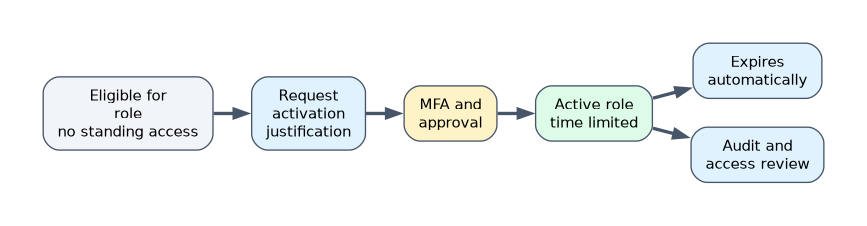 PIM provides just in time (JIT), time bound and approved elevation for Entra roles, Azure resource roles and PIM for Groups.
| Feature | Behavior |
|---|---|
| Eligible vs active | A person is eligible for a role and activates it when needed, instead of holding it permanently |
| Activation settings | Maximum duration, require MFA (or an authentication context), require justification or ticket number, require approval, send notifications |
| Time bound assignments | Eligibility and active assignments can have start and end dates |
| Alerts and audit | Alerts for stale or over privileged roles, full activation history |
| Access reviews of roles | Periodically confirm that role holders still need access |
PIM needs the Microsoft Entra ID Governance or P2 licensing for the users in scope. Keep two or more cloud only emergency access accounts with the permanent Global Administrator role, strong phishing resistant authentication, excluded from normal Conditional Access that could lock them out, and alert on every sign in.
Entitlement management and access reviews
| Feature | Purpose |
|---|---|
| Entitlement management | Bundle access (groups, apps, SharePoint sites, roles) into access packages with request and approval rules, expiry and separation of duties checks, for employees and guests |
| Access reviews | Recurring reviews of group membership, application access, guest users and privileged roles. Reviewers can be owners, managers or the users themselves. Decisions can be applied automatically, and inactive users can be flagged |
| Lifecycle workflows | Automate joiner, mover and leaver tasks |
Use these to prevent permission creep, where people accumulate rights as they change roles.
Evaluating security and governance of Entra ID
An architect assesses: how many permanent privileged assignments exist, whether Global Administrators are few, whether admins use phishing resistant MFA, whether privileged roles are PIM managed, whether access reviews run, whether legacy authentication is blocked, and what Identity Secure Score and Microsoft Entra recommendations say. Use administrative units and custom roles to delegate narrowly (for example, reset passwords only for one department) instead of broad roles.
Securing administration of cloud tenants
| Platform | Controls |
|---|---|
| Entra and Microsoft 365 | Least privilege roles, PIM, Conditional Access for admin portals, separate admin accounts, restricted management administrative units |
| Azure | Azure RBAC at the narrowest scope, PIM for Azure roles, Microsoft Entra ID MFA enforced for Azure management, JIT VM access, resource locks, Azure Policy |
| SaaS | Admin role separation inside the SaaS app, SSO with Conditional Access, Defender for Cloud Apps session monitoring, review OAuth app permissions |
| Multicloud | Federate AWS and GCP administration to Entra ID, use permission boundaries and organization policies, remove long lived keys and monitor with Defender for Cloud |
Cloud infrastructure entitlement management (CIEM)
CIEM finds and fixes excessive permissions across clouds: identities that hold far more access than they use, unused roles, and inactive identities. Microsoft Entra Permissions Management was a standalone CIEM product for Azure, AWS and GCP, and Microsoft retired it on November 1, 2025, so the exam objective is now about the practice rather than one product, using the posture and identity governance capabilities in Microsoft Defender for Cloud and Microsoft Entra. The practice is the same: discover permissions, compare granted with used, right size with least privilege, and monitor for anomalies.
Secure workstations for privileged access
A privileged access workstation (PAW) is a hardened device used only for administration.
| Practice | Detail |
|---|---|
| Security levels | Microsoft describes a spectrum: enterprise, specialized and privileged profiles, with increasing restriction |
| Hardening | Managed with Intune, Entra joined, compliant device required by Conditional Access, Credential Guard, application control, no local admin, no email or general web browsing |
| Remote administration | Azure Bastion (browser based RDP and SSH with no public IP), JIT VM access, or a managed Azure Virtual Desktop or jump host with Conditional Access, instead of exposing management ports |
| Network | Admin access only from the PAW, with network rules limiting management paths |
| Monitoring | Alerts on administrative sign ins from other devices |
A worked scenario
A company finds 40 permanent Global Administrators. The architect reduces them to a handful, makes the rest eligible in PIM with approval and MFA, creates two monitored emergency accounts, gives helpdesk administrative unit scoped roles, runs quarterly access reviews, and requires PAWs with Conditional Access for all admin portals. For Azure and AWS, the team reviews unused high privilege identities and right sizes their roles.
What to remember for the exam
- Enterprise access model: control plane, management plane, data and workload plane, user and app access, privileged access.
- PIM: eligible roles, JIT activation, MFA, approval, justification, time bound. Keep emergency access accounts.
- Entitlement management uses access packages. Access reviews recertify access and can auto apply results.
- CIEM finds excessive permissions across clouds. Microsoft Entra Permissions Management, the standalone product, was retired on November 1, 2025.
- PAWs, Bastion and JIT VM access protect administrative sessions.
"Remove standing administrator access but still allow admins to elevate when needed" is PIM with eligible assignments.
How the exam asks about this
- "Require approval and MFA each time someone uses a privileged role." PIM activation settings.
- "Guests keep access after projects end." Entitlement management expiry and access reviews.
- "Detect overprivileged identities in Azure and AWS." Cloud infrastructure entitlement management (CIEM).
- "Admins manage servers without exposing RDP to the internet." Azure Bastion with JIT VM access from a PAW.
Common mistakes
Making everyone eligible but never reviewing. Reviews keep eligibility honest.
No emergency accounts. A broken Conditional Access policy can lock out all admins.
Admin work on everyday devices. Credentials are exposed to phishing.
Global Administrator for helpdesk tasks. Use scoped roles and administrative units.
Check yourself
What is the main benefit of an eligible PIM assignment?
The role is not usable until activated, so there is no standing privileged access.
Which Microsoft Entra feature recertifies group membership and guest access on a schedule?
Access reviews.
Which hardened device type should administrators use for privileged tasks?
A privileged access workstation.
Topic 6 of 7 in Design security operations, identity, and compliance capabilities
Test yourself on Design security operations, identity, and compliance capabilities
The full Microsoft SC-100 question bank has 770 questions, with timed practice exams and an explanation for every answer.
This study guide is independent and is not affiliated with, endorsed by, or sponsored by Microsoft. Vendor names, certification names and exam codes are trademarks of their respective owners and are used for identification only.