Design security operations, identity, and compliance capabilities · Topic 4 of 7
Modern Authentication, Conditional Access and External Identities
SC-100 authentication: Conditional Access design, continuous access evaluation, risk scoring, protected actions, B2B, External ID and Verified ID.
- 6 min
- Includes a diagram
- Conditional Access: assignments, conditions, grant controls, session controls. Use report only mode first. Exclude break glass accounts.
- Phishing resistant strength: FIDO2, Windows Hello for Business, certificate based authentication, passkeys.
- ID Protection: user risk and sign in risk, low, medium, high.
What it is
Modern authentication evaluates every request using many signals, not just a password. In Microsoft Entra ID, this is built from Conditional Access, continuous access evaluation, risk based policies and protected actions. This topic also covers external identities (partners, customers and verified credentials) and how to validate that Conditional Access really implements Zero Trust.
How it works
Conditional Access
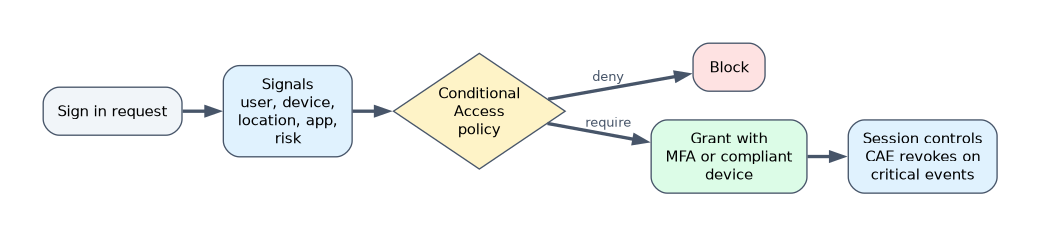 A Conditional Access policy is an if then statement: if these assignments match, then apply these access controls.
| Part | Examples |
|---|---|
| Users and workload identities | All users, groups, roles, guests, service principals |
| Target resources | Cloud apps, user actions (register security info), authentication contexts |
| Conditions | Sign in risk, user risk, device platform, location, client app, device filter |
| Grant controls | Block, require MFA, require authentication strength, require compliant or hybrid joined device, require approved app or app protection policy, require terms of use, require password change |
| Session controls | Sign in frequency, persistent browser session, app enforced restrictions, Defender for Cloud Apps session control, token protection, continuous access evaluation |
Authentication strengths define which MFA methods are acceptable: MFA, passwordless MFA or phishing resistant MFA (FIDO2 security keys, Windows Hello for Business, certificate based authentication, passkeys). Require phishing resistant strength for administrators and sensitive apps.
A baseline of Zero Trust aligned policies:
| Policy | Purpose |
|---|---|
| Require MFA for all users | Stop password only attacks |
| Require phishing resistant MFA for admins | Protect privileged accounts |
| Block legacy authentication | Legacy protocols cannot do MFA |
| Require compliant or hybrid joined device for sensitive apps | Verify device health |
| Risk based policies | Require MFA or password change for risky sign ins and users |
| Restrict guests | Limit what external users can reach |
| Protect security info registration | Require a trusted location or device |
Always exclude emergency access (break glass) accounts from the policies, protect them separately and monitor their use, and use report only mode before enforcing a new policy.
Risk scoring with Microsoft Entra ID Protection
ID Protection calculates user risk (the account is probably compromised) and sign in risk (this sign in is probably not the real user), each as low, medium or high, using signals such as leaked credentials, impossible travel, anonymous IP addresses and unfamiliar sign in properties. Use risk as a condition in Conditional Access: require MFA for medium sign in risk, and require a secure password change for high user risk. Risk detections can also flow to Defender XDR and Sentinel.
Continuous access evaluation (CAE)
Normally an access token stays valid until it expires, even if the situation changes. CAE lets supporting services, such as Exchange Online, SharePoint Online, Teams and Microsoft Graph, react in near real time to critical events: the user is disabled or deleted, the password changes or sessions are revoked, MFA is enabled for the user, the user is flagged as high risk, or the user moves to a location that violates a policy. The service rejects the token and the client must reauthenticate. CAE aware clients get longer lived tokens (up to 28 hours) because revocation is fast, so security improves without frequent prompts. Strict enforcement blocks access when the location rule cannot be evaluated. Token protection and CAE complement each other.
Protected actions
Protected actions are sensitive operations in Microsoft Entra, such as deleting or changing Conditional Access policies or creating or changing cross tenant access settings, that you protect with a Conditional Access authentication context. When an admin attempts one, Entra requires the extra control you set, for example phishing resistant MFA with a compliant device, even though they already hold the role. This guards against a stolen admin session making dangerous changes.
Validate alignment with Zero Trust
| Tool or practice | Purpose |
|---|---|
| Report only mode | See what a policy would have done in the sign in logs without enforcing it |
| What If tool | Test which policies apply to a specific user, app and conditions |
| Conditional Access insights and reporting workbook | Visualize impact and gaps over time |
| Sign in logs (Conditional Access tab) | Per sign in policy evaluation |
| Policy templates and Zero Trust guidance | Start from Microsoft's recommended baseline |
| Coverage review | Check that all users, all apps, all device platforms and guests are covered, with exclusions justified |
Common gaps are excluded groups that grow, legacy authentication still allowed, workload identities not covered, and apps not covered because a policy targets only some apps.
External identities
| Scenario | Solution |
|---|---|
| Partners and vendors in your tenant | Microsoft Entra B2B collaboration: invite guest users who sign in with their own identity. Govern with entitlement management access packages, access reviews and Conditional Access for guests |
| Trust across organizations | Cross tenant access settings control inbound and outbound access and let you trust MFA and device claims from partner tenants |
| Shared Teams channels | B2B direct connect |
| Customers and consumers | Microsoft Entra External ID with a dedicated external tenant for customer facing apps, with branded sign up and sign in |
| Decentralized identity | Microsoft Entra Verified ID issues and verifies verifiable credentials based on open standards (decentralized identifiers), for example proving employment or identity without sharing extra data, held in a digital wallet such as Microsoft Authenticator |
Verified ID supports identity proofing during onboarding and account recovery, so that a help desk can confirm a person with a verifiable credential instead of guessable questions.
A worked scenario
An architect reviews a Conditional Access setup and finds legacy authentication allowed for one group and admins protected only by regular MFA. They add a block legacy authentication policy, require phishing resistant strength for admins, add risk based policies, and place Conditional Access policy changes under protected actions. They enable CAE strict enforcement for Exchange and SharePoint, and use report only mode and the What If tool before enforcement.
What to remember for the exam
- Conditional Access: assignments, conditions, grant controls, session controls. Use report only mode first. Exclude break glass accounts.
- Phishing resistant strength: FIDO2, Windows Hello for Business, certificate based authentication, passkeys.
- ID Protection: user risk and sign in risk, low, medium, high.
- CAE provides near real time revocation for supported services and allows longer lived tokens.
- Protected actions use authentication contexts to step up sensitive Entra operations. B2B for partners, External ID for customers, Verified ID for verifiable credentials.
"Stop a stolen token being used after the user is disabled" is continuous access evaluation.
How the exam asks about this
- "Force stronger authentication when an admin changes a Conditional Access policy." Protected actions with an authentication context.
- "Test the effect of a new policy without blocking users." Report only mode, and the What If tool.
- "Let partner organizations' MFA satisfy your policy." Cross tenant access settings trusting MFA claims.
- "Prove a person's identity during onboarding without extra data." Microsoft Entra Verified ID.
Common mistakes
Excluding groups permanently. Exclusions become the attack path.
Locking out emergency accounts. Exclude and monitor them.
Relying on token lifetime. CAE and token protection address stolen tokens.
Treating B2B and External ID as the same. One is partners in your tenant, the other is customers in an external tenant.
Check yourself
Which feature revokes access in near real time when a user is disabled?
Continuous access evaluation.
Which MFA methods count as phishing resistant?
FIDO2 security keys, Windows Hello for Business, certificate based authentication and passkeys.
Which Entra feature issues verifiable credentials?
Microsoft Entra Verified ID.
Topic 4 of 7 in Design security operations, identity, and compliance capabilities
Test yourself on Design security operations, identity, and compliance capabilities
The full Microsoft SC-100 question bank has 770 questions, with timed practice exams and an explanation for every answer.
This study guide is independent and is not affiliated with, endorsed by, or sponsored by Microsoft. Vendor names, certification names and exam codes are trademarks of their respective owners and are used for identification only.