Design security operations, identity, and compliance capabilities · Topic 1 of 7
Detection and Response with XDR and SIEM
SC-100 detection and response: Microsoft Defender XDR, Microsoft Sentinel as SIEM, connectors, analytics rules, UEBA and workspace design.
- 6 min
- Includes a diagram
- XDR is deep and integrated across Microsoft products. SIEM is broad across any source. Use both.
- Defender XDR: incidents, AIR, automatic attack disruption, advanced hunting.
- Sentinel: connectors, analytics rules (scheduled, NRT, Fusion, anomaly), UEBA, threat intelligence, watchlists, hunting, workbooks.
What it is
Two kinds of platform sit at the center of security operations.
- Extended detection and response (XDR) collects and correlates signals from a defined set of security products, such as endpoints, identities, email and cloud apps, and responds automatically. It is deep and integrated.
- Security information and event management (SIEM) collects logs from any source, correlates them with rules and analytics, and supports investigation, retention and compliance. It is broad and flexible.
Microsoft's products are Microsoft Defender XDR and Microsoft Sentinel. A good design uses both, with the XDR handling the deep Microsoft signals and the SIEM covering everything else.
How it works
Microsoft Defender XDR
Defender XDR unifies the signals of:
| Product | Protects |
|---|---|
| Defender for Endpoint | Devices (Windows, macOS, Linux, mobile) |
| Defender for Office 365 | Email, collaboration and Teams |
| Defender for Identity | On premises Active Directory and hybrid identity |
| Defender for Cloud Apps | SaaS apps and shadow IT (CASB) |
| Microsoft Entra ID Protection | Identity risk signals |
| Defender Vulnerability Management | Exposure and missing patches on devices |
What it adds on top of the individual products:
- Incidents that correlate alerts across products into one attack story, so analysts work one incident instead of many alerts.
- Automated investigation and response (AIR) that investigates alerts and remediates, for example isolating a device or removing a malicious email.
- Automatic attack disruption that contains an in progress attack, such as ransomware, by disabling a compromised account or isolating devices.
- Advanced hunting with KQL across the unified data.
- Threat analytics, threat intelligence reports tied to your exposure.
Microsoft is moving to a unified security operations platform, where Defender XDR, Microsoft Sentinel and exposure management are used together in the Microsoft Defender portal.
Microsoft Sentinel
Microsoft Sentinel is a cloud native SIEM and SOAR solution built on Azure Monitor Log Analytics.
| Capability | Role |
|---|---|
| Data connectors | Ingest from Microsoft services (Entra, Microsoft 365, Defender products, Azure resources), other clouds (AWS, GCP), network and security appliances (via Common Event Format and Syslog forwarding with the Azure Monitor Agent), and custom APIs |
| Analytics rules | Detect threats: scheduled (KQL query on a schedule), near real time (NRT), Fusion (multistage attack detection using machine learning), anomaly rules, and Microsoft security rules that create incidents from other products' alerts |
| Incidents | Group related alerts and entities for investigation |
| UEBA (user and entity behavior analytics) | Builds baselines for users and entities and flags anomalies. Needs entity data from Entra ID |
| Threat intelligence | Import indicators (for example over TAXII) and match them to your logs |
| Watchlists | Reference lists (VIP users, known IPs) used in queries |
| Hunting | Proactive queries, bookmarks, livestream and notebooks |
| Workbooks | Dashboards and reports |
| Content hub | Prebuilt solutions: connectors, rules, playbooks, workbooks |
Cost and data design. Sentinel charges for data ingested and retained. Choose between analytics and cheaper long term tiers such as basic or auxiliary logs and the Sentinel data lake for high volume, low value logs that you need to keep but rarely query. Use commitment tiers when volume is predictable and filter or transform data at ingestion (data collection rules) to reduce noise.
Workspace and tenant design
| Question | Guidance |
|---|---|
| One workspace or several? | Start with one workspace for simplicity and better correlation |
| When to split | Data residency or sovereignty rules, separate ownership with strong access isolation, or different retention needs |
| Many customers (service provider) | Azure Lighthouse for cross tenant management |
| Restrict who sees what | Azure RBAC at workspace, resource group and table level, and resource context permissions |
| Multiple workspaces | Query across them with cross workspace queries and manage incidents centrally |
How XDR and SIEM work together
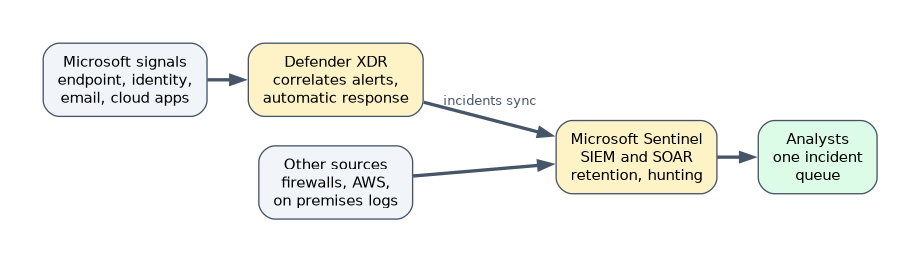
| Defender XDR | Microsoft Sentinel | |
|---|---|---|
| Sources | Microsoft security products | Any source |
| Strength | Deep correlation, automatic response | Custom correlation, long retention, compliance, hunting across everything |
| Typical use | First line detection of endpoint, identity, email and app attacks | Central view across the estate, third party and on premises logs, cloud infrastructure |
Incidents from Defender XDR flow into Sentinel, and the incident status stays synchronized in both directions, so an incident is not worked twice. Raw Defender data can also be streamed to Sentinel for custom analytics and retention.
Designing detection and response
- List the assets and attack surface (identities, endpoints, workloads, cloud, OT).
- Map each to a detection source: Defender plans for Microsoft workloads, connectors for the rest.
- Define detection coverage against ATT&CK and fill gaps.
- Decide what responds automatically (AIR, attack disruption, automation rules) and what needs a human.
- Set retention to meet compliance and investigation needs.
A worked scenario
A manufacturer has Microsoft 365 E5, Azure workloads, a Linux firewall fleet and an AWS account. The architect enables Defender XDR for endpoints, identity, email and cloud apps, connects Sentinel with connectors for Entra, Azure, AWS, and CEF logs from the firewalls through a forwarder, turns on UEBA, and keeps Defender incidents synchronized with Sentinel. High volume firewall logs go to a cheaper tier with a longer retention.
What to remember for the exam
- XDR is deep and integrated across Microsoft products. SIEM is broad across any source. Use both.
- Defender XDR: incidents, AIR, automatic attack disruption, advanced hunting.
- Sentinel: connectors, analytics rules (scheduled, NRT, Fusion, anomaly), UEBA, threat intelligence, watchlists, hunting, workbooks.
- Start with one Sentinel workspace. Split for residency, ownership or retention. Azure Lighthouse for multi tenant.
- Incidents synchronize between Defender XDR and Sentinel.
"Correlate alerts from endpoint, identity and email into one incident" is Defender XDR. "Ingest logs from a firewall and AWS" is Sentinel connectors.
How the exam asks about this
- "Detect a multistage attack across several data sources." Fusion analytics rule in Sentinel.
- "Automatically contain an active ransomware attack." Defender XDR automatic attack disruption.
- "Ingest syslog from network appliances." Azure Monitor Agent with a Syslog or CEF connector.
- "Reduce cost of high volume logs that are rarely queried." A cheaper log tier such as basic, auxiliary or the data lake.
Common mistakes
Choosing XDR or SIEM, not both. They answer different needs.
One workspace per team. It fragments correlation and increases cost.
Ingesting everything at the top tier. Filter and tier by value.
Turning on UEBA without entity data. It needs identity data to build baselines.
Check yourself
Which Sentinel rule type detects multistage attacks with machine learning?
Fusion.
Which Defender XDR capability contains an in progress attack automatically?
Automatic attack disruption.
When should you split into more than one Sentinel workspace?
For data residency, separate ownership with isolation, or different retention needs.
Topic 1 of 7 in Design security operations, identity, and compliance capabilities
Test yourself on Design security operations, identity, and compliance capabilities
The full Microsoft SC-100 question bank has 770 questions, with timed practice exams and an explanation for every answer.
This study guide is independent and is not affiliated with, endorsed by, or sponsored by Microsoft. Vendor names, certification names and exam codes are trademarks of their respective owners and are used for identification only.