Prepare the data · Topic 2 of 8
Storage Modes and Parameters
PL-300 storage modes: choose between Import, DirectQuery, Dual, live connection and Direct Lake, and create Power Query parameters to switch sources.
- 5 min
- Includes a diagram
- Import is fastest and needs refresh. DirectQuery is current but slower. Dual lets a table behave as either.
- Direct Lake refresh updates metadata only. It needs a Fabric capacity.
- Direct Lake on OneLake does not fall back to DirectQuery. Direct Lake on SQL can.
What it is
A table's storage mode decides where the data lives and who runs the queries. Import copies the data into the model. DirectQuery leaves the data at the source and queries it on demand. Direct Lake reads Delta tables from Microsoft Fabric into memory. The choice affects speed, freshness, size limits and which features you can use. Parameters let you store a value, such as a server name or a date, and reuse it in queries.
How it works
The storage modes
| Mode | Where the data lives | Strength | Limit |
|---|---|---|---|
| Import | A compressed copy in the model | Fastest queries, full DAX and Power Query | Needs refresh. Shared capacity models are limited to 1 GB. |
| DirectQuery | At the source | Always current, no size limit in the model | Slower, depends on the source, fewer transformations |
| Dual | Both, chosen per query | Dimension tables that join to Import or DirectQuery tables | Used in composite models |
| Live connection | In Analysis Services or a published semantic model | One shared model | No Power Query or new tables in the report |
| Direct Lake | Delta tables in OneLake | Import like speed on very large data, no full copy | Needs a Fabric capacity |
Import models are refreshed on a schedule, so the data is as old as the last refresh. DirectQuery shows the source as it is now, but every visual sends queries to the source, so a slow database means a slow report. In DirectQuery, Power Query steps must be translated to the source language, which is called query folding, so you can use fewer transformations.
Direct Lake
Direct Lake is a storage mode for semantic models in Microsoft Fabric. It loads columns from Delta tables in OneLake straight into memory, and queries are processed by the same VertiPaq engine as Import. A refresh only updates metadata (called framing), so it takes seconds and does not copy the data.
There are two flavours.
- Direct Lake on OneLake reads from one or more Fabric items and does not fall back to DirectQuery. It can be combined with Import tables.
- Direct Lake on SQL uses a single source through its SQL analytics endpoint, and falls back to DirectQuery when it cannot read a Delta table directly, for example when the table is a SQL view.
Direct Lake needs a Fabric capacity (or Premium). Import and DirectQuery work with any Power BI license.
Choosing between them
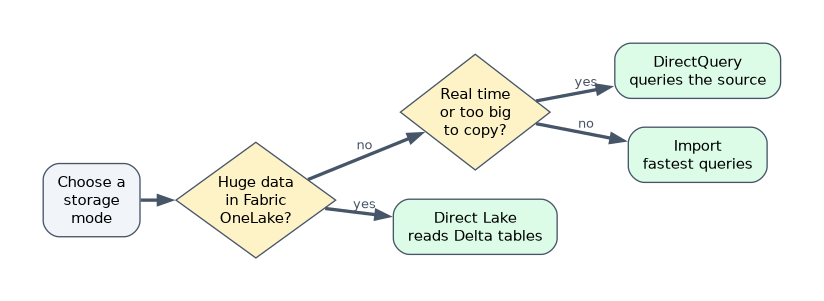
| Situation | Choice |
|---|---|
| Small or medium data, fast interactive reports, many transformations | Import |
| Data must be near real time, or too large to copy | DirectQuery |
| Very large data already in a Fabric lakehouse or warehouse | Direct Lake |
| An existing certified model owns the data | Live connection |
| Large fact table plus a small lookup that is not in Fabric | Composite model |
Parameters
A parameter is a named value. Open Manage Parameters in the Power Query Editor and choose New Parameter. You set a name, a type (Text, Decimal number, Date and so on), Suggested Values (Any value, a List of values or a Query) and the Current Value.
Common uses:
- A server and database parameter, so you switch from development to production by changing one value.
- A filter value, such as a minimum year, used in a Filter Rows step.
- RangeStart and RangeEnd, which must be Date/Time parameters with exactly these names, and are required to configure incremental refresh.
To use a parameter, edit the step and replace the typed value with the parameter name. You can modify it later in Manage Parameters, or in the Power BI service for a published model.
Do not confuse these with what if parameters and field parameters. Those are created on the Modeling side, add a table to the model and are used in DAX or in visuals. Power Query parameters exist before the load.
A worked scenario
A retailer has a 4 billion row transaction table in a Fabric lakehouse and a small product list in Excel. The analyst builds a model with the transactions in Direct Lake on OneLake and the product list as an Import table. Reports are fast, and nothing has to be copied. For the Excel file path she uses a parameter, so the file can move without editing queries.
What to remember for the exam
- Import is fastest and needs refresh. DirectQuery is current but slower. Dual lets a table behave as either.
- Direct Lake refresh updates metadata only. It needs a Fabric capacity.
- Direct Lake on OneLake does not fall back to DirectQuery. Direct Lake on SQL can.
- A live connection keeps the model at the source, so you cannot shape the data in the report.
- Power Query parameters need a name, a type and a current value. RangeStart and RangeEnd are Date/Time.
Automatic page refresh works for DirectQuery sources, not for Import tables.
How the exam asks about this
- "Reports must show data that is minutes old." DirectQuery, or Direct Lake.
- "Data volume is huge and already in OneLake." Direct Lake.
- "Switch between test and production servers easily." A parameter.
- "Which storage mode lets a dimension table join both Import and DirectQuery tables?" Dual.
Common mistakes
Picking DirectQuery for speed. Import is usually faster.
Expecting full Power Query in DirectQuery. Steps that cannot fold are not allowed or are slow.
Calling Direct Lake a copy of the data. It reads Delta tables and does not duplicate them.
Mixing up parameters. Power Query parameters and what if parameters are different features.
Check yourself
Which storage mode only updates metadata when it refreshes?
Direct Lake.
What must RangeStart and RangeEnd be?
Date/Time parameters with those exact names.
When does Direct Lake on SQL fall back to DirectQuery?
When it cannot read a Delta table directly, such as when the source is a SQL view.
Topic 2 of 8 in Prepare the data
Test yourself on Prepare the data
The full Microsoft PL-300 question bank has 657 questions, with timed practice exams and an explanation for every answer.
This study guide is independent and is not affiliated with, endorsed by, or sponsored by Microsoft. Vendor names, certification names and exam codes are trademarks of their respective owners and are used for identification only.