Protect devices · Topic 4 of 6
Windows Update Rings, Feature and Quality Updates
MD-102 Windows updates: plan update rings with deferrals and deadlines, feature update policies, quality updates, expedite policies and rollout rings.
- 5 min
- Includes a diagram
- Quality deferral is 0 to 30 days. Feature deferral is 0 to 365 days. Deadlines are 2 to 30 days. Grace period is 0 to 7 days.
- Feature update policies pin the target version. Set the ring's feature deferral to 0 when you use one.
- An expedite policy installs one update immediately, bypasses deferral, and can force a restart after 0 to 2 days.
What it is
Windows updates in Intune use Windows Update for Business policies. Update rings control how and when updates install (deferrals, deadlines, restarts). Feature update policies pin devices to a Windows version. Expedite policies push an urgent quality update. You combine these with deployment rings (pilot, broad) to roll updates out in stages.
How it works
Planning for updates
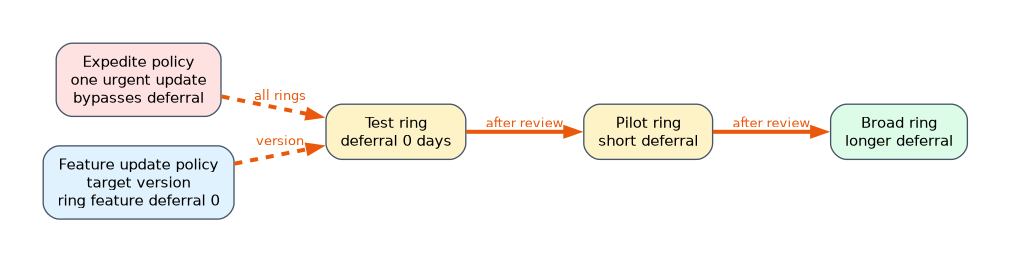 Define deployment rings: a small test group, a pilot of representative users, then broad groups. Give each ring its own update ring policy with a longer deferral as the ring gets larger. Use device groups and assign a ring to each. Keep a clear rollback or pause option. Confirm that devices meet hardware and storage needs, and that the network can handle the downloads (see Delivery Optimization).
Update rings
Create an update ring under Devices, Windows updates, Update rings.
| Setting | Detail |
|---|---|
| Quality update deferral | 0 to 30 days after release |
| Feature update deferral | 0 to 365 days after release |
| Servicing channel | General Availability Channel (the normal channel) or Windows Insider options for testing |
| Automatic update behavior | How updates download, install and restart, such as auto install at a set time |
| Active hours | Hours when restarts are avoided |
| Deadline for feature updates | 2 to 30 days before forced install |
| Deadline for quality updates | 2 to 30 days before forced install |
| Grace period | 0 to 7 days after install before an automatic restart |
| Auto restart before deadline | Lets the device restart when the user is away |
| Pause | Pause feature or quality updates for a ring, usually for 35 days at a time |
Deadlines count from the time the device first detects the update. The grace period applies to automatic restarts. A manual restart does not wait.
Feature update policies
A feature update policy sets the target Windows version (for example Windows 11 25H2). Devices in scope move to that version and then stay on it, with no further feature updates, until you change the policy. You can choose rollout options: make available as soon as possible, or start on a date and spread out with a gradual rollout (groups of devices over days). Microsoft recommends feature update policies instead of feature deferrals in rings. If you use a policy, set the ring's feature update deferral to 0, so the ring does not hold it back. Restart behaviour and deadlines still come from the ring.
A feature update policy requires devices to be Windows 10 or 11 Pro, Enterprise or Education, and a Windows 10 and later feature updates policy can also upgrade Windows 10 to Windows 11.
Quality updates and expedite policies
Quality updates are the monthly security releases. Deferral and deadlines in the update ring control them. For an urgent fix that cannot wait, use an expedite policy (Windows updates, Quality updates):
- It targets one specific update and installs it as soon as possible, bypassing deferrals.
- You choose how long after install a forced restart happens, from 0 to 2 days.
- It does not change how future quality updates deploy.
- Some ring settings block expedites: leave Enable pre-release builds as Not configured, set Automatic update behavior to Reset to default, and do not choose Turn off all notifications for change notifications.
Microsoft says expedite is not for routine monthly servicing. Use deadlines in an update ring for that.
Driver and other updates
Intune also has driver update policies, where you approve driver updates by category, and Windows Update for Business reports for status. Office and Microsoft Store updates follow their own settings.
Monitoring
Reports, Windows updates show update ring status and the feature update and quality update reports (by device and by update). For Windows Update for Business reports in a Log Analytics workspace, use the workbook. Check Per setting status for conflicts.
A worked scenario
A company defines three rings: Test (10 devices, quality deferral 0), Pilot (200 devices, 3 days) and Broad (everyone else, 7 days). Each ring has a deadline of 3 days for quality updates and a 2 day grace period. A feature update policy moves everyone to Windows 11 25H2 with a gradual rollout, and the ring feature deferral is set to 0. When a zero day vulnerability appears, the admin creates an expedite policy for that update with a one day restart.
What to remember for the exam
- Quality deferral is 0 to 30 days. Feature deferral is 0 to 365 days. Deadlines are 2 to 30 days. Grace period is 0 to 7 days.
- Feature update policies pin the target version. Set the ring's feature deferral to 0 when you use one.
- An expedite policy installs one update immediately, bypasses deferral, and can force a restart after 0 to 2 days.
- Use rings, with test, pilot and broad groups, to stage updates.
- Deadlines start when the device first discovers the update.
Urgent single fix means expedite. Normal monthly updates mean update rings.
How the exam asks about this
- "Hold the quality update for a week on most devices." A quality update deferral of 7 days in the ring.
- "Keep devices on Windows 11 24H2 even though 25H2 exists." A feature update policy targeting 24H2.
- "Install a critical security update immediately." An expedite policy.
- "Force a restart after the deadline only after a short delay." The grace period.
Common mistakes
Using feature deferrals and a feature update policy together. They conflict.
Expecting expedite to be for monthly updates.
Setting deadlines too short. Users lose work to forced restarts.
Skipping a pilot ring.
Check yourself
What is the range of the quality update deferral?
0 to 30 days.
What should the ring's feature deferral be when a feature update policy is used?
0 days.
Which policy installs one specific update right away?
An expedite policy.
Topic 4 of 6 in Protect devices
Test yourself on Protect devices
The full Microsoft MD-102 question bank has 658 questions, with timed practice exams and an explanation for every answer.
This study guide is independent and is not affiliated with, endorsed by, or sponsored by Microsoft. Vendor names, certification names and exam codes are trademarks of their respective owners and are used for identification only.