Manage and secure applications · Topic 5 of 5
App Configuration Policies
MD-102 app configuration: managed device and managed app policies, key value pairs, the configuration designer, and allowing only work accounts in Outlook.
- 5 min
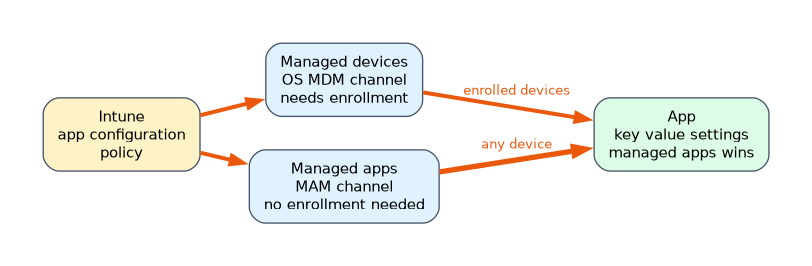
- Includes a diagram
- Managed devices policies need enrollment and the MDM channel. Managed apps policies use the MAM channel and work without enrollment.
- If both exist, the managed apps policy takes precedence.
- Settings are key value pairs from the app vendor, entered with the configuration designer, XML or JSON.
What it is
An app configuration policy preloads settings into an app, so users do not have to enter them. Examples are the email server in Outlook, a home page in Edge, or which accounts an app accepts. There are two kinds. Managed devices policies deliver settings through the device management channel for enrolled devices. Managed apps policies deliver them through the app management (MAM) channel, with no enrollment needed. Both use key value pairs.
How it works
Two channels
| Managed devices | Managed apps | |
|---|---|---|
| Channel | The OS MDM channel | The Intune app management channel (SDK) |
| Needs enrollment | Yes, the device must be enrolled | No. Works on unenrolled devices |
| Targets | Devices or users, for apps deployed by Intune | Users, for Intune SDK enabled apps (or wrapped apps) |
| Platforms | iOS/iPadOS and Android Enterprise | iOS/iPadOS, Android and Windows |
| App requirement | iOS: app is deployed and managed by Intune. Android: from managed Google Play or a deployed LOB app | App supports the Intune App SDK, or was wrapped |
If an app receives both, the managed apps policy takes precedence over the managed devices one. A device that is not enrolled can only receive the managed apps type. Microsoft recommends the MAM channel for Microsoft 365 apps on iOS.
Creating a policy
Under Apps, App configuration policies, Add, choose Managed devices or Managed apps.
- Basics: name, description, the device enrollment type (for managed devices, Android Enterprise or iOS/iPadOS), the platform and the targeted app.
- Settings: the configuration settings format:
- Use configuration designer: pick keys from a list the app supports and enter values.
- Enter XML data (iOS) or a JSON payload for managed Google Play (Android), pasted from the app vendor.
- A custom key value list (the Name is the key) when you use the general settings section.
- Assignments: include and exclude groups, with optional assignment filters.
Which keys exist is decided by the app vendor, so read the vendor's documentation for supported keys and values.
Common configurations
| Goal | Setting |
|---|---|
| Allow only work accounts in Outlook and other Microsoft apps | iOS keys IntuneMAMAllowedAccountsOnly and IntuneMAMUPN. Android key com.microsoft.intune.mam.AllowedAccountUPNs. On enrolled iOS devices, use a managed devices policy |
| Preconfigure Outlook | Server name, email address, authentication and S/MIME options |
| Set the Edge home page and block personal sign in | Edge app configuration keys |
| Deliver settings to a Zebra or Samsung app | OEMConfig or the app's own schema |
| Configure the Defender app as the Tunnel client | A Defender app configuration policy |
Use {{userprincipalname}} style tokens so each user's own details fill in automatically.
Related items to know
- Assignment filters work with managed apps policies (Android, iOS/iPadOS and Windows) and managed devices policies (Android Enterprise, iOS/iPadOS), so you can split by device owner or model.
- App protection policies and app configuration policies are separate. APP protects data, while app configuration sets how an app behaves. They are often deployed together to the same user group.
- A managed devices policy reaches the app only after the app is installed and managed. If the app is not pinned to the management profile on iOS, it cannot receive it.
- Conflicting policies for the same app and key can cause unexpected results, so use one source for each setting.
A worked scenario
A consultancy wants only company accounts in Outlook on its iPhones. The phones are enrolled, and Outlook is deployed by Intune, so the admin creates a managed devices app configuration policy for iOS with the keys IntuneMAMAllowedAccountsOnly set to Enabled and IntuneMAMUPN set to {{userprincipalname}}. Unenrolled personal phones use a managed apps policy delivered through the MAM channel, and a Conditional Access policy requires app protection there.
What to remember for the exam
- Managed devices policies need enrollment and the MDM channel. Managed apps policies use the MAM channel and work without enrollment.
- If both exist, the managed apps policy takes precedence.
- Settings are key value pairs from the app vendor, entered with the configuration designer, XML or JSON.
- Limit Microsoft apps to work accounts with IntuneMAMAllowedAccountsOnly and IntuneMAMUPN on iOS, and AllowedAccountUPNs on Android.
- Managed Google Play apps and managed iOS apps are the targets of managed devices policies.
"Unenrolled" in a scenario means the managed apps channel. "Enrolled and deployed by Intune" means managed devices.
How the exam asks about this
- "Preconfigure Outlook on enrolled iPhones." A managed devices app configuration policy.
- "Configure an app on personal devices that are not enrolled." A managed apps app configuration policy.
- "Block personal Gmail accounts in Outlook." An allowed accounts only key in an app configuration policy.
- "Which policy wins if both channels configure an app?" The managed apps policy.
Common mistakes
Using app protection settings to limit accounts. Those settings control data movement.
Targeting managed devices policies at unenrolled devices. They need enrollment.
Guessing keys. Use the vendor's documented keys.
Setting the same key in two policies.
Check yourself
Which channel works without device enrollment?
The managed apps (MAM) channel.
Which policy wins when both channels configure an app?
The managed apps policy.
What format do app configuration settings use?
Key value pairs.
Topic 5 of 5 in Manage and secure applications
Test yourself on Manage and secure applications
The full Microsoft MD-102 question bank has 658 questions, with timed practice exams and an explanation for every answer.
This study guide is independent and is not affiliated with, endorsed by, or sponsored by Microsoft. Vendor names, certification names and exam codes are trademarks of their respective owners and are used for identification only.