Non Relational Data on Azure · Topic 1 of 3
Azure Blob Storage
DP-900 Azure Blob Storage: block, append and page blobs, hot, cool, cold and archive tiers, redundancy options, lifecycle rules, and Data Lake Storage Gen2.
- 6 min
- Includes a diagram
- Blob Storage holds unstructured objects in containers inside a storage account.
- The three blob types are block, append and page.
- Tiers: hot, cool (30 days), cold (90 days), archive (180 days). Archive is offline.
What it is
Azure Blob Storage is Microsoft's object storage for large amounts of unstructured data, such as images, video, backups, logs and documents. It is inexpensive, scales to very large sizes, and is reached over HTTPS from any application.
Blob Storage lives inside an Azure storage account, which is the container for all Azure Storage services and sets the redundancy and performance options.
How it works
Storage accounts, containers and blobs
You create a storage account first. Inside it, blobs are placed in containers, which work like folders at the top level. The namespace is flat by default, so a name such as photos/2025/cat.jpg is just a long blob name that looks like a path.
Turning on a hierarchical namespace gives real directories, atomic folder renames and permissions on folders. This feature is what turns Blob Storage into Azure Data Lake Storage Gen2, the usual store for big data analytics.
Types of blob
| Blob type | Best for |
|---|---|
| Block blob | Text and binary files such as documents, images and media. The most common type |
| Append blob | Data that is only added to the end, such as log files |
| Page blob | Random read and write access, such as the disks of virtual machines |
Access tiers
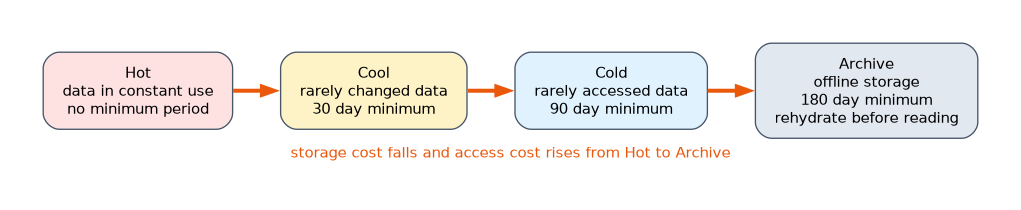 Tiers let you trade storage cost against access cost.
| Tier | Meant for | Minimum storage period |
|---|---|---|
| Hot | Data in constant use | None |
| Cool | Data accessed infrequently | 30 days |
| Cold | Data rarely accessed but needed quickly | 90 days |
| Archive | Data kept long term, rarely read | 180 days |
Hot has the highest storage cost and the lowest access cost. Each cooler tier lowers the storage price and raises the cost of reading. Moving or deleting a blob before the minimum period ends triggers an early deletion charge for the remaining days.
The archive tier is offline. A blob in archive cannot be read until it is rehydrated to an online tier, which takes hours. You can set the tier per blob, or let a lifecycle management policy move blobs automatically, for example to cool after 30 days and to archive after 180.
Redundancy
Azure keeps several copies of your data. You choose the redundancy for the account.
| Option | Copies kept |
|---|---|
| LRS, locally redundant | Three copies in one datacenter |
| ZRS, zone redundant | Copies across three availability zones in one region |
| GRS, geo redundant | LRS in the primary region plus a copy in a secondary region |
| GZRS, geo zone redundant | ZRS in the primary region plus a copy in a secondary region |
The read access versions, RA-GRS and RA-GZRS, let applications read from the secondary region.
Protection and access
Data is encrypted at rest by default. Access can use Microsoft Entra ID with role assignments, a shared access signature that grants limited, time bound access to chosen resources, or the account keys. Soft delete and versioning help you recover from accidental deletion or overwrite. A container can also host a static website straight from the $web container.
A worked scenario
A company stores customer contracts as PDF files. For the first month they are opened daily, so they sit in hot. After 30 days a lifecycle rule moves them to cool, and after a year to archive, where storage is cheapest. When a lawyer needs an archived contract, it must be rehydrated first, which takes hours. The files never needed a database, only cheap, durable object storage.
How a blob is addressed
Every blob has a URL built from the account, container and name.
https://contosodata.blob.core.windows.net/contracts/2025/acme.pdfHere contosodata is the storage account, contracts is the container and 2025/acme.pdf is the blob name. A shared access signature is a string of parameters added to the URL that states the permissions, the start and expiry time, and a signature. Anyone holding the signed URL gets exactly that access and nothing more, until it expires.
Recovering from mistakes
| Feature | What it does |
|---|---|
| Soft delete | Keeps deleted blobs for a retention period so they can be restored |
| Versioning | Keeps earlier versions each time a blob is overwritten |
| Snapshots | A read only copy of a blob at a point in time |
| Immutable storage | Blocks changes and deletion for a set time, for compliance |
A simple cost view
Suppose you keep 10 TB of reports. In the hot tier you pay the most per month to store them but little to read them. If nobody reads them for a year, the cool or cold tiers save money on storage, and archive saves the most. The catch is that reading from a cooler tier costs more per operation, and archive needs rehydration, so the cheapest tier is only right for data you almost never touch.
Security in brief
Use Microsoft Entra ID roles for people and applications where you can, because access can then be revoked centrally. Use a shared access signature for short, limited sharing, and keep the account keys out of application code. Encryption at rest is on by default, and a firewall can restrict access to chosen networks.
What to remember for the exam
- Blob Storage holds unstructured objects in containers inside a storage account.
- The three blob types are block, append and page.
- Tiers: hot, cool (30 days), cold (90 days), archive (180 days). Archive is offline.
- A hierarchical namespace makes it Data Lake Storage Gen2.
- A shared access signature gives limited access without sharing the account key.
A question about "logs added to the end of a file" wants an append blob. "Virtual machine disks" wants a page blob. Anything else is usually a block blob.
How the exam asks about this
- "Lowest storage cost for data kept for years and rarely read." Archive tier.
- "Automatically move old blobs to a cheaper tier." A lifecycle management policy.
- "Which feature adds real folders and folder permissions?" Hierarchical namespace.
- "Survive the loss of an entire region." Geo redundant storage.
Common mistakes
Reading an archived blob directly. It must be rehydrated first.
Expecting a flat namespace to have real folders. Only the hierarchical namespace gives true directories.
Assuming the cooler tier is always cheaper. Storage costs fall, but access costs rise, and early deletion is charged.
Mixing up redundancy and tiering. Redundancy is how many copies and where. Tiers are how fast and how costly access is.
Check yourself
Which blob type suits log files that only grow at the end?
An append blob.
Which access tier is offline and needs rehydration before reading?
Archive.
Which feature makes Blob Storage into Data Lake Storage Gen2?
A hierarchical namespace.
Topic 1 of 3 in Non Relational Data on Azure
Test yourself on Non Relational Data on Azure
The full Microsoft DP-900 question bank has 503 questions, with timed practice exams and an explanation for every answer.
This study guide is independent and is not affiliated with, endorsed by, or sponsored by Microsoft. Vendor names, certification names and exam codes are trademarks of their respective owners and are used for identification only.