Ingest and Transform Data · Topic 3 of 6
Ingesting Batch Data with Shortcuts, Mirroring and Pipelines
DP-700 batch ingestion: create and manage OneLake shortcuts, choose mirroring for databases, and copy data with pipeline Copy activities and Copy jobs.
- 5 min
- Includes a diagram
- Shortcuts point, mirroring replicates, pipelines and Copy jobs copy.
- Internal shortcuts use the caller's identity; external shortcuts use a connection's credentials.
- A shortcut in Tables shows as a table only when it targets a Delta folder.
What it is
There are three ways to get batch data into OneLake, and the exam expects you to pick the right one.
A shortcut points at data where it already lives, with no copy. Mirroring keeps a continuously replicated copy of a source database in OneLake. A pipeline (or a Copy job) copies data on a schedule.
How it works
OneLake shortcuts
A shortcut is a folder in OneLake that points to a target. Readers see the data as if it were local, and nothing is duplicated.
| Kind | Targets | Identity used |
|---|---|---|
| Internal | Another lakehouse, warehouse, KQL database or mirrored database in OneLake | The calling user's identity; they need access to the target |
| External | Azure Data Lake Storage Gen2, Azure Blob Storage, Amazon S3, S3-compatible storage, Google Cloud Storage, Dataverse, on-premises sources through a gateway | A cloud connection with its own credentials |
Where you create the shortcut matters in a lakehouse:
- In Tables, a shortcut to a Delta folder appears as a table that Spark, the SQL analytics endpoint and semantic models can use. Create it at the top level of Tables, or inside a schema in a schema-enabled lakehouse.
- In Files, a shortcut can point to any folder of any format, for example CSV files you read with Spark.
Managing shortcuts:
- Deleting a shortcut removes only the pointer; the target data stays.
- Deleting files inside a shortcut folder deletes them at the target, if the identity has write permission.
- If the target is moved or renamed, the shortcut breaks and must be recreated.
- External shortcuts depend on their connection, so expired credentials stop all reads.
Mirroring
Mirroring replicates a source into OneLake as Delta tables in near real time, with no pipeline to build. The item is a mirrored database with a read-only SQL analytics endpoint.
| Mirroring type | Example sources |
|---|---|
| Database mirroring | Azure SQL Database, Azure SQL Managed Instance, SQL Server, Azure Cosmos DB, Azure Database for PostgreSQL, Snowflake |
| Metadata mirroring | Azure Databricks Unity Catalog tables (shortcuts, no data copied) |
| Open mirroring | Any application that writes change files to the mirrored database's landing zone |
After the initial snapshot, mirroring reads the source's changes and applies inserts, updates and deletes. You can mirror all tables or chosen tables. The compute used for replication is not charged to your capacity, which makes mirroring cheaper than a frequent copy pipeline.
Ingest data by using pipelines
The Copy activity is the workhorse of pipeline ingestion.
| Setting | Options |
|---|---|
| Source | A connection and table, query or files |
| Destination | Lakehouse table or Files, warehouse table, KQL database, external stores |
| Table action | For example Append or Overwrite |
| Mapping | Column mapping and type conversion |
| Staging | Interim storage, used for example when loading a warehouse from some sources |
On-premises and network-protected sources are reached through an on-premises data gateway. The Copy data assistant builds a Copy activity step by step, and the Lookup and ForEach pattern runs one Copy per table from a control list.
A Copy job is a separate item for straightforward bulk copies. It copies many tables at once, supports full and incremental copy, and runs on a schedule without building a pipeline. Choose a pipeline when you need control flow, transformations or several activities around the copy.
Choosing between them
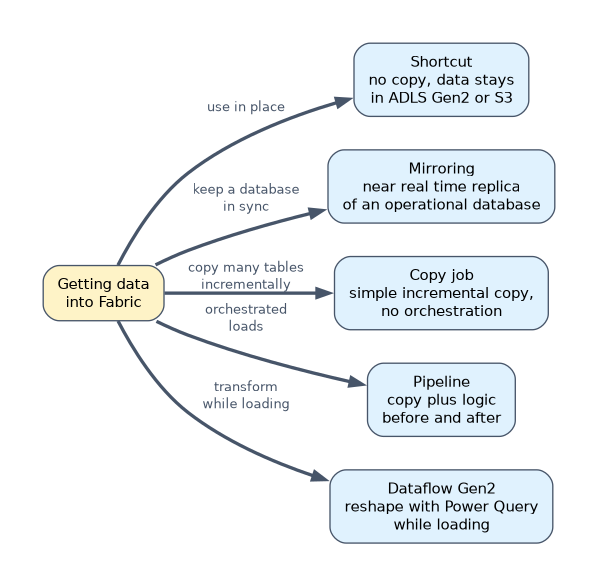
| Need | Choose |
|---|---|
| Use data in ADLS Gen2 or S3 without copying it | Shortcut |
| Near-real-time replica of Azure SQL Database for analytics | Mirroring |
| Nightly copy from many sources with logic before and after | Pipeline |
| Simple incremental copy of 50 tables with no orchestration | Copy job |
| Reshape data with Power Query while loading | Dataflow Gen2 |
A worked example
A retailer has sales history as Delta tables in ADLS Gen2, an Azure SQL Database for orders, and files on a file server in the office.
The ADLS Gen2 Delta folders become shortcuts in the Tables area of a lakehouse, so they are queryable at once with no copy. The Azure SQL Database is mirrored, so new orders appear within minutes. The file server files are copied nightly by a pipeline Copy activity through an on-premises data gateway, and a notebook then cleans them.
How the exam asks about this
- "Query Delta tables in Amazon S3 from Fabric without moving the data." External shortcut in the lakehouse Tables area.
- "Keep an analytics copy of an Azure SQL Database current with minimal development." Mirroring.
- "Copy data from an on-premises SQL Server every night." A pipeline Copy activity or Copy job using an on-premises data gateway.
What to remember for the exam
- Shortcuts point, mirroring replicates, pipelines and Copy jobs copy.
- Internal shortcuts use the caller's identity; external shortcuts use a connection's credentials.
- A shortcut in Tables shows as a table only when it targets a Delta folder.
- Mirrored databases are read-only in Fabric and include a SQL analytics endpoint.
- On-premises sources need an on-premises data gateway.
Deleting a shortcut is safe, but deleting files through it is not. File deletes inside the shortcut folder remove the data at the target.
Common mistakes
Copying data that a shortcut could expose. If the data is already in a supported store and format, a shortcut avoids a second copy and stays current.
Creating a shortcut to CSV files in the Tables area. It will not appear as a table; put it under Files or convert the data to Delta.
Building a pipeline to replicate a supported database. Mirroring does it with less work and keeps up with changes.
Check yourself
Which identity does an internal OneLake shortcut use to read its target?
The identity of the user who reads through the shortcut, so that user needs access to the target.
What happens to the target data when you delete a shortcut?
Nothing; only the shortcut pointer is removed.
When is a Copy job a better choice than a pipeline?
When you need a simple full or incremental copy of many tables on a schedule, without control flow or extra activities.
Topic 3 of 6 in Ingest and Transform Data
Test yourself on Ingest and Transform Data
The full Microsoft DP-700 question bank has 645 questions, with timed practice exams and an explanation for every answer.
This study guide is independent and is not affiliated with, endorsed by, or sponsored by Microsoft. Vendor names, certification names and exam codes are trademarks of their respective owners and are used for identification only.