Implement and Manage an Analytics Solution · Topic 5 of 5
Orchestrating Processes with Pipelines, Notebooks and Dataflow Gen2
DP-700 orchestration: choose Dataflow Gen2, a pipeline or a notebook, set schedules and event triggers, and use parameters and dynamic expressions.
- 5 min
- Includes a diagram
- Pipelines orchestrate; notebooks transform with code; Dataflow Gen2 transforms with Power Query.
- Event triggers use Activator: Blob Storage events, OneLake events and job events.
- Base parameters override the notebook's parameter cell;
notebookutils.notebook.exit()returns a value.
What it is
Orchestration decides what runs, in what order, and when. In Fabric the main orchestrator is the pipeline (data pipeline). It calls notebooks, Dataflow Gen2, Copy activities, stored procedures and other pipelines, and controls the order with dependencies and conditions.
A run starts from a schedule, an event such as a file landing in storage, or a manual or API call. Parameters and dynamic expressions let one pipeline handle many tables or dates instead of one copy per case.
How it works
Choose between Dataflow Gen2, a pipeline and a notebook
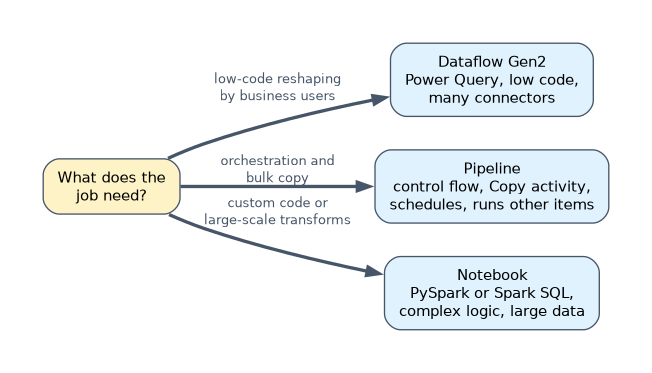
| Item | Best for | Skills |
|---|---|---|
| Dataflow Gen2 | Low-code transformation with Power Query, many connectors, data destinations | Power Query, little or no code |
| Pipeline | Orchestration, control flow, bulk copy with the Copy activity, scheduling | Configuration and expressions |
| Notebook | Complex or large-scale transformation, custom logic, machine learning | PySpark, Spark SQL, Scala, R |
A pipeline is often the outer layer that runs dataflows and notebooks in order. Choose a notebook when logic is complex or data is large, and Dataflow Gen2 when business users maintain a Power Query style transformation.
Schedules and event-based triggers
Select Schedule on a pipeline, notebook, Dataflow Gen2 or other item to run it repeatedly, choosing the frequency, time zone, start date and end date.
Event-based runs use Add trigger on the pipeline, which is built on Activator and the Real-Time hub. Common events:
| Event source | Example |
|---|---|
| Azure Blob Storage events | Start a load when a file is created in a container |
| OneLake events | Start when a file is created or deleted in a lakehouse |
| Job events | Run something when another Fabric job fails or succeeds |
A schedule suits regular batch windows. An event trigger suits data that arrives at unpredictable times, so the pipeline runs once per arrival instead of polling.
Control flow activities
| Activity | Purpose |
|---|---|
| Lookup | Read a value or a small table, such as a watermark or a list of tables |
| ForEach | Run inner activities for each item in an array, in parallel or in sequence |
| If Condition, Switch | Branch on an expression |
| Until | Repeat until a condition is true |
| Set variable, Append variable | Store values during the run |
| Invoke pipeline | Call a child pipeline |
| Fail | End the run with a custom error message and code |
Each activity connects to the next with a dependency condition: on success, on failure, on completion or on skip.
Parameters and dynamic expressions
Pipeline parameters are set when the run starts; variables change during the run. Expressions start with @, and @{...} embeds an expression inside a string.
| Expression | Returns |
|---|---|
@pipeline().parameters.TableName | The value of a pipeline parameter |
@activity('Get watermark').output.firstRow.LastLoad | A column from a Lookup activity's first row |
@item().name | The current element inside a ForEach |
@concat('raw/', formatDateTime(utcNow(), 'yyyy/MM/dd')) | A date-based folder path |
@pipeline().RunId | The ID of the current run, useful for logging |
In a notebook, mark one cell as the parameter cell. The pipeline's Notebook activity passes base parameters, which override those defaults at run time.
# Parameter cell (toggle "parameter cell" on this cell)
table_name = "customers"
load_date = "2026-01-01"
A notebook returns a value with notebookutils.notebook.exit(), which the pipeline reads as @activity('Run notebook').output.result.exitValue.
row_count = spark.table(table_name).count()
notebookutils.notebook.exit(str(row_count))
Orchestrating notebooks from a notebook
notebookutils.notebook.run() runs one notebook and returns its exit value. notebookutils.notebook.runMultiple() runs several in parallel in the same session, or as a dependency graph.
result = notebookutils.notebook.run("Load_Customers", 600, {"load_date": "2026-01-01"})
notebookutils.notebook.runMultiple(["Load_Customers", "Load_Products", "Load_Orders"])
Notebook orchestration shares one Spark session, so many small notebooks start quickly. A pipeline gives visual monitoring, retries and non-Spark activities.
A worked example
A pipeline must load 40 tables listed in a control table, each with its own watermark. A Lookup reads the control table, and a ForEach over @activity('Lookup tables').output.value runs a Copy activity per table.
The source query uses @{item().schema}.@{item().table} and the watermark from the current item. An on failure path sends a Teams or Outlook message with @pipeline().RunId. One parameterized pipeline replaces 40 copies.
How the exam asks about this
- "Business analysts must maintain a Power Query transformation." Dataflow Gen2.
- "Start the load as soon as a file arrives in Blob Storage." A pipeline with a storage event trigger.
- "Pass the load date from the pipeline to a notebook." A base parameter on the Notebook activity, received by the parameter cell.
What to remember for the exam
- Pipelines orchestrate; notebooks transform with code; Dataflow Gen2 transforms with Power Query.
- Event triggers use Activator: Blob Storage events, OneLake events and job events.
- Base parameters override the notebook's parameter cell;
notebookutils.notebook.exit()returns a value. - Lookup plus ForEach plus parameters is the metadata-driven pattern for many tables.
- Dependency conditions: on success, on failure, on completion, on skip.
Base parameter values are injected in a new cell right after the cell marked as the parameter cell. If the defaults are set in an unmarked cell, or reassigned later in the notebook, the pipeline's values are lost.
Common mistakes
Building one pipeline per table. A Lookup and ForEach driven by a control table is easier to maintain.
Polling with a frequent schedule for unpredictable files. An event trigger runs only when the file arrives.
Reading a notebook's output from the wrong path. The exit value is at output.result.exitValue on the Notebook activity.
Check yourself
Which pipeline activity reads a watermark value from a table?
The Lookup activity; its first row is available at
output.firstRow.How does a notebook return a value to the calling pipeline?
By calling
notebookutils.notebook.exit()with the value, which the pipeline reads fromoutput.result.exitValue.Which item should run a transformation that needs complex PySpark logic over large tables?
A notebook, usually called from a pipeline for scheduling and dependencies.
Topic 5 of 5 in Implement and Manage an Analytics Solution
Test yourself on Implement and Manage an Analytics Solution
The full Microsoft DP-700 question bank has 645 questions, with timed practice exams and an explanation for every answer.
This study guide is independent and is not affiliated with, endorsed by, or sponsored by Microsoft. Vendor names, certification names and exam codes are trademarks of their respective owners and are used for identification only.