Prepare Data · Topic 2 of 7
Ingest or Access Data and Choose a Store
Shortcuts, mirroring, pipelines, Dataflow Gen2 and notebooks; choosing a lakehouse, warehouse or Eventhouse; OneLake integration for Eventhouse and models.
- 5 min
- Includes a diagram
- Shortcuts point to data in OneLake or in external storage such as ADLS Gen2, Amazon S3, S3 compatible storage, Google Cloud Storage or Dataverse; nothing is copied.
- Mirroring keeps a near real time Delta replica of a supported database in OneLake.
- Lakehouse: Spark writes, read-only T-SQL. Warehouse: full T-SQL writes. Eventhouse: KQL for streaming and time series.
What it is
Getting data into Fabric is two decisions. First, ingest or access: copy the data into OneLake, or leave it where it is and point to it. Second, which store: lakehouse, warehouse or Eventhouse.
All three stores keep their data in OneLake. Lakehouse and warehouse tables are Delta tables, so other engines can read them without another copy.
How it works
Access in place: shortcuts and mirroring
A shortcut is a pointer inside a lakehouse (or a KQL database) to data stored elsewhere, such as another OneLake location, Azure Data Lake Storage Gen2, Amazon S3, S3 compatible storage, Google Cloud Storage or Dataverse. Nothing is copied, and the data appears as a table or a folder.
A shortcut under Tables that points to a Delta table shows up as a table, which you can query from the SQL analytics endpoint and use in a semantic model. A shortcut under Files can point to any format.
Mirroring continuously replicates a supported operational database, such as Azure SQL Database, Azure Cosmos DB or Snowflake, into OneLake as Delta tables. A mirrored database comes with a SQL analytics endpoint for read-only T-SQL queries.
Ingest: copy tools
| Tool | Best for |
|---|---|
| Data pipeline Copy activity or copy job | Bulk or scheduled copies from many sources with little transformation |
| Dataflow Gen2 | Low-code Power Query transformations, written to a destination such as a lakehouse or warehouse |
| Notebook | Code-first transformations with Spark (PySpark or Spark SQL) |
| Eventstream | Streaming events into an Eventhouse or lakehouse |
T-SQL COPY INTO | Loading files from Azure storage into a warehouse table |
A data pipeline also orchestrates the others: it can run a dataflow, a notebook and a stored procedure in sequence.
Choosing a store
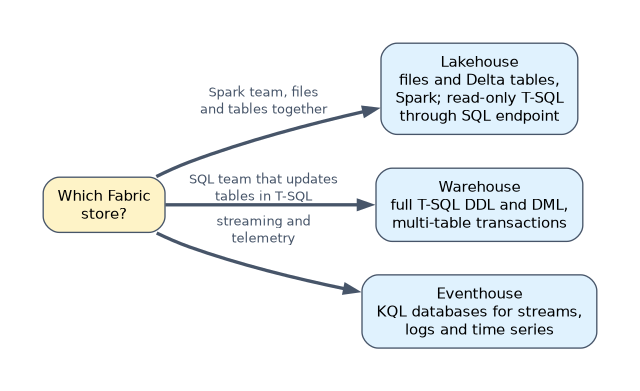
| Store | Write with | Query with | Choose it when |
|---|---|---|---|
| Lakehouse | Spark, Dataflow Gen2, pipelines | Spark, plus read-only T-SQL through the SQL analytics endpoint | You need files and tables together, or the team works in Spark |
| Warehouse | T-SQL (full DDL and DML, multi-table transactions), pipelines, dataflows | T-SQL | The team works in SQL and needs inserts, updates and deletes in T-SQL |
| Eventhouse (KQL databases) | Eventstream and other ingestion | KQL | Streaming, logs, telemetry and time series with fast queries over recent data |
A frequent exam clue is the team's skill. "SQL developers who need stored procedures that update tables" means a warehouse. "Data scientists with notebooks and semi-structured files" means a lakehouse.
OneLake integration for Eventhouse
OneLake availability can be turned on for a KQL database or for single tables. The data is then also available in OneLake in Delta format.
Other engines can now use it without a separate copy job. A lakehouse shortcut, a Spark notebook or a Direct Lake semantic model can read the Eventhouse data.
OneLake integration for semantic models
An import semantic model on a Fabric or Premium capacity has a OneLake integration setting. When it is on, the model writes its import tables to OneLake as Delta tables each time it is refreshed.
Those tables can then be reached with a lakehouse shortcut and queried with T-SQL or Spark. This is useful when the clean, business-ready data only exists inside the model, for example after Power Query transformations. A Fabric administrator must allow semantic models to export data to OneLake in the tenant settings.
A worked example
A retailer has sales in Azure SQL Database, clickstream events in Azure Event Hubs and product files in an Amazon S3 bucket.
- Mirror the Azure SQL database, so sales tables stay current in OneLake with no pipeline to maintain.
- Create an S3 shortcut in the lakehouse for the product files, because the files must stay in S3.
- Send clickstream events through an Eventstream into an Eventhouse and turn on OneLake availability.
- A Spark notebook reads all three sources through OneLake and writes clean tables to the lakehouse.
"Avoid copying the data" or "data must remain in the source storage" means a shortcut. "Keep an operational database in sync with little effort" means mirroring.
How the exam asks about this
- "Use files in ADLS Gen2 in a lakehouse without duplicating them." A shortcut.
- "SQL developers must update tables with T-SQL stored procedures." A warehouse, because the SQL analytics endpoint is read-only.
- "Analysts must use import model tables in a Spark notebook." Turn on OneLake integration for the semantic model.
What to remember for the exam
- Shortcuts point to data in OneLake or in external storage such as ADLS Gen2, Amazon S3, S3 compatible storage, Google Cloud Storage or Dataverse; nothing is copied.
- Mirroring keeps a near real time Delta replica of a supported database in OneLake.
- Lakehouse: Spark writes, read-only T-SQL. Warehouse: full T-SQL writes. Eventhouse: KQL for streaming and time series.
- OneLake availability exposes Eventhouse data as Delta tables in OneLake.
- Semantic model OneLake integration writes import tables to OneLake on refresh.
The SQL analytics endpoint of a lakehouse cannot run INSERT, UPDATE or DELETE on its tables. Write to lakehouse tables with Spark, a dataflow or a pipeline, or use a warehouse.
Common mistakes
Copying data that only needs to be read. A pipeline copy duplicates storage and adds a schedule to maintain. When the data can stay where it is, a shortcut is simpler.
Choosing a lakehouse for a T-SQL team that updates rows. The lakehouse's SQL side is read-only. The warehouse is the store for full T-SQL.
Building a pipeline to export model data. Semantic model OneLake integration already writes import tables to OneLake as Delta tables.
Check yourself
What is the difference between a shortcut and mirroring?
A shortcut points to data where it already is and copies nothing; mirroring replicates a database into OneLake as Delta tables and keeps it in sync.
Which store do you choose for telemetry that analysts query with KQL?
An Eventhouse with a KQL database.
How can Spark read an Eventhouse table without a copy job?
Turn on OneLake availability for the table or database, then read the Delta data, for example through a lakehouse shortcut.
Topic 2 of 7 in Prepare Data
Test yourself on Prepare Data
The full Microsoft DP-600 question bank has 648 questions, with timed practice exams and an explanation for every answer.
This study guide is independent and is not affiliated with, endorsed by, or sponsored by Microsoft. Vendor names, certification names and exam codes are trademarks of their respective owners and are used for identification only.