Implement and Manage Semantic Models · Topic 1 of 6
Storage Modes and Composite Models
Choose Import, DirectQuery, Direct Lake or Dual storage mode, use the large semantic model storage format, and design composite models in Fabric.
- 6 min
- Includes a diagram
- Import is fastest but needs refresh; DirectQuery is current but depends on the source.
- Direct Lake reads Delta tables in OneLake on demand, with no Power Query step; shape the data upstream.
- Dual tables act as Import or DirectQuery as needed, which keeps relationships regular in composite models.
What it is
A table's storage mode decides where its data lives when a report asks a question. Semantic models in Fabric use four modes: Import, DirectQuery, Direct Lake and Dual.
A composite model mixes modes or sources in one model, for example a DirectQuery fact table with Import dimensions, or a published semantic model extended with your own tables. The large semantic model storage format is a setting that lets an Import model grow beyond the normal size limit.
How it works
The four storage modes
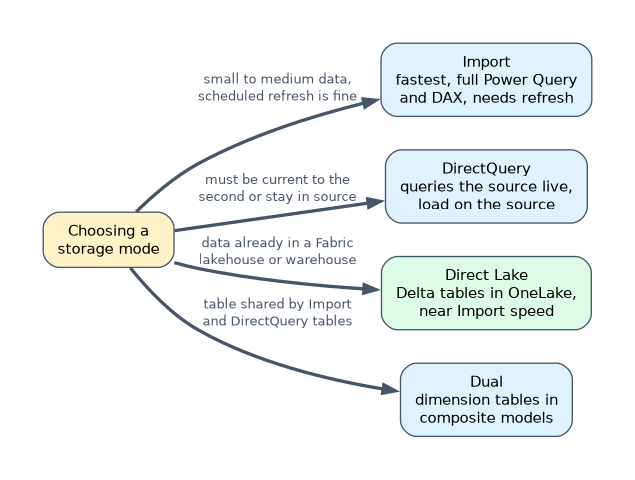
| Mode | Where the data is read from | Freshness | Speed and limits |
|---|---|---|---|
| Import | A compressed copy in the model's memory | As of the last refresh | Fastest queries; full Power Query and DAX; refresh needed |
| DirectQuery | The source, queried at run time | Current | Depends on the source; heavy source load; some DAX and modelling limits |
| Direct Lake | Delta tables in OneLake, loaded into memory on demand | Latest data after the model reframes | Near Import speed with no import refresh; Fabric only |
| Dual | Import or DirectQuery, chosen per query | Both | For dimension tables in composite models |
Choose Import for small to medium data that can be refreshed on a schedule and needs the richest feature set. Choose DirectQuery when data must be current to the second, is too large to copy, or must stay in the source for compliance.
Choose Direct Lake when the data is already in a Fabric lakehouse or warehouse as Delta tables and is too large or changes too often for scheduled imports. Direct Lake tables have no Power Query step, so derived columns and cleaning belong upstream in the lakehouse or warehouse.
Large semantic model storage format
The large semantic model storage format is turned on in the semantic model's settings on a Fabric or Premium capacity.
| Use it when | Why |
|---|---|
| An Import model will exceed 10 GB | Without it, the model is capped at 10 GB; with it, size is limited by the capacity's memory |
| You plan to use query scale-out | Query scale-out requires the large format |
| Incremental refresh will keep growing the model | Partitions can accumulate beyond the default limit |
Publishing a .pbix file is still limited by file size. Large models are usually published small, then grow through refresh, often with incremental refresh.
Composite models
A composite model has more than one source group. A source group is the Import part of the model, or one DirectQuery source.
Two common patterns:
- Import plus DirectQuery. A huge fact table stays in DirectQuery, and small dimension tables are set to Dual. Slicers on dimensions then answer from memory, while fact queries go to the source.
- DirectQuery to a published semantic model. A report author connects to a certified shared model and adds an Excel budget table and a few local measures. The shared model stays unchanged for everyone else.
The second pattern needs Build permission on the shared model and a tenant setting that allows DirectQuery connections to semantic models.
Relationships across source groups
A relationship between tables in different source groups is a limited relationship. Limited relationships do not add a blank row for unmatched keys, behave like an inner join, and can be slower.
A relationship between tables in the same source group, or between a Dual table and a table of the DirectQuery source it belongs to, is a regular relationship. Setting shared dimensions to Dual is how you keep relationships regular in an Import plus DirectQuery design.
Aggregations in composite models
A user-defined aggregation adds an Import summary table, such as sales by day and product, over a DirectQuery detail table. With Manage aggregations, you map its columns to the detail table, and queries at a matching grain are answered from memory. Detailed queries still go to the source.
A worked example
A retailer has a 3-billion-row sales table in a Fabric warehouse, product and store tables, and a sales target spreadsheet that the planning team edits.
- The sales data is already Delta in OneLake, so a Direct Lake model on the warehouse avoids copying 3 billion rows and avoids DirectQuery's slower queries. The capacity must allow a table that size: the Direct Lake row guardrail is 3,000 million rows per table on F128 and 1,500 million on F64.
- The planning team needs the targets beside the actuals without changing the central model. They create a composite model with DirectQuery to the published semantic model and import their spreadsheet.
- A separate legacy Import model built on an on-premises source is expected to pass 10 GB, so the team enables the large semantic model storage format and sets up incremental refresh.
"Data must be current to the second from an operational database" points to DirectQuery. "Large Delta tables in a lakehouse, fast queries, no scheduled import" points to Direct Lake.
How the exam asks about this
- "Slicers on a DirectQuery model are slow; dimensions are small." Set the dimension tables to Dual.
- "An Import model will grow beyond 10 GB on a Fabric capacity." Enable the large semantic model storage format.
- "Add local data to a certified shared model without changing it." A composite model with DirectQuery to the semantic model.
What to remember for the exam
- Import is fastest but needs refresh; DirectQuery is current but depends on the source.
- Direct Lake reads Delta tables in OneLake on demand, with no Power Query step; shape the data upstream.
- Dual tables act as Import or DirectQuery as needed, which keeps relationships regular in composite models.
- The large storage format lifts the 10 GB Import cap and is required for query scale-out.
- Relationships across source groups are limited relationships that behave like inner joins.
Extending a shared semantic model needs Build permission on it. Read permission only lets you view reports; it does not let you connect a composite model.
Common mistakes
Choosing Import for data that must be current every minute. Import shows data as of the last refresh. Use DirectQuery or Direct Lake.
Leaving dimensions in Import beside a DirectQuery fact. The relationship becomes limited and slicer queries can be slow. Set the dimensions to Dual.
Planning Power Query steps for a Direct Lake table. Direct Lake reads the Delta table as it is. Do the cleaning and add derived columns in the lakehouse or warehouse instead.
Check yourself
Which storage mode should a small dimension table use beside a DirectQuery fact table?
Dual, so it can answer slicer queries from memory and still join to the fact table at the source.
What does the large semantic model storage format change?
It lets an Import model grow beyond 10 GB, up to the capacity's memory, and it is required for query scale-out.
What do you need to add your own table to a published semantic model?
A composite model with a DirectQuery connection to the semantic model, Build permission on it, and the tenant setting that allows it.
Topic 1 of 6 in Implement and Manage Semantic Models
Test yourself on Implement and Manage Semantic Models
The full Microsoft DP-600 question bank has 648 questions, with timed practice exams and an explanation for every answer.
This study guide is independent and is not affiliated with, endorsed by, or sponsored by Microsoft. Vendor names, certification names and exam codes are trademarks of their respective owners and are used for identification only.