Implement and Manage Semantic Models · Topic 6 of 6
Direct Lake and Incremental Refresh
Direct Lake framing, refresh and DirectQuery fallback, Direct Lake on OneLake vs on SQL analytics endpoint, and incremental refresh with RangeStart.
- 6 min
- Includes a diagram
- Direct Lake refresh is framing: a metadata update to the latest Delta version, not a data import.
- Keep your Direct Lake data up to date reframes automatically; turn it off to control when new data appears.
- DirectLakeBehavior: Automatic (fallback), DirectLakeOnly, DirectQueryOnly.
What it is
Direct Lake is a storage mode in which a semantic model reads Delta tables in OneLake directly, loading the columns a query needs into memory. It gives near Import speed without copying data into the model on a schedule.
Incremental refresh is the large-model technique for Import models. Instead of reloading every row, the model is split into date partitions and only the recent ones are refreshed.
How it works
Framing and refresh behaviour
A Direct Lake model does not import data. Its refresh, called framing, is a quick metadata operation that points the model at the latest version of each Delta table. After framing, the next queries load the columns they need from the Delta files.
The model setting Keep your Direct Lake data up to date reframes automatically when the Delta tables change. It is on by default.
Turn it off when a load writes several tables in steps and reports must not show a half-finished load. Then reframe the model yourself at the end of the load, for example with a semantic model refresh step in the data pipeline, or on a schedule.
The first queries after framing can be slower because columns must be loaded again into memory. Keeping Delta tables well maintained, with fewer, larger files and V-Order, also helps Direct Lake performance.
DirectQuery fallback
Direct Lake on the SQL analytics endpoint can fall back to DirectQuery, sending SQL queries to the endpoint instead of reading Delta files. Fallback happens when, for example:
- a table exceeds the guardrails for the capacity size, such as the per-table limits on rows, Parquet files or row groups;
- the model uses a SQL view instead of a Delta table;
- the SQL analytics endpoint has row-level security, object-level security or dynamic data masking on a table the model uses.
The model property DirectLakeBehavior controls this. You set it in the model's Properties pane in Model view, or with an XMLA tool such as Tabular Editor:
| Value | Behaviour |
|---|---|
| Automatic (default) | Use Direct Lake, fall back to DirectQuery when needed |
| DirectLakeOnly | Never fall back; queries that cannot run in Direct Lake fail |
| DirectQueryOnly | Always use DirectQuery, useful for testing |
Choose DirectLakeOnly when predictable performance matters more than always getting an answer, so that a slow fallback never hides a design problem.
Direct Lake on OneLake vs on SQL analytics endpoint
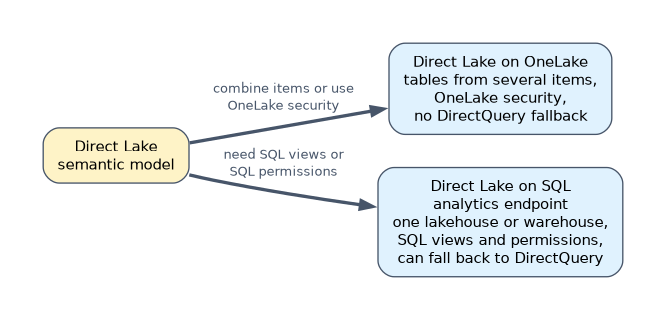
| Direct Lake on OneLake | Direct Lake on SQL analytics endpoint | |
|---|---|---|
| Tables come from | Delta tables in OneLake, possibly from several Fabric items | One lakehouse or warehouse, through its SQL analytics endpoint |
| DirectQuery fallback | None | Yes, when DirectLakeBehavior is Automatic |
| SQL views | Not available | Available, but they always use DirectQuery |
| Security applied | OneLake security | SQL analytics endpoint permissions, with granular SQL security causing fallback |
Choose Direct Lake on OneLake when the model combines tables from several lakehouses or warehouses, or when security is defined with OneLake security. Choose Direct Lake on SQL analytics endpoint when the model needs SQL views or relies on SQL permissions and you accept DirectQuery fallback.
Incremental refresh
Incremental refresh applies to Import tables (and to hybrid tables with a DirectQuery partition). You set it up in Power BI Desktop:
- Create two Date/Time parameters named exactly RangeStart and RangeEnd.
- Filter the table's date column with them, inclusive on one side and exclusive on the other.
- Define the policy on the table: how much history to store and how much to refresh.
Table.SelectRows(Source, each [OrderDate] >= RangeStart and [OrderDate] < RangeEnd)| Policy option | Effect |
|---|---|
| Archive data starting N years before refresh date | History to keep; older partitions are dropped |
| Incrementally refresh data starting N days before refresh date | Only these partitions are refreshed |
| Get the latest data in real time with DirectQuery | Adds a DirectQuery partition for today, making a hybrid table (Fabric or Premium capacity) |
| Only refresh complete days | Skips the current, incomplete day |
| Detect data changes | Refreshes a partition only if the maximum of a chosen column, such as LastModified, has changed |
The filter must fold to the source, so the source receives a query for each partition's date range. The first refresh in the service creates the partitions and loads all history; later refreshes touch only the recent window.
A worked example
A model has 4 billion sales rows in a lakehouse and a separate 600 million row Import model on Azure SQL Database.
- For the lakehouse data, build a Direct Lake on OneLake model, because it also needs a product table from another team's warehouse. A 4 billion row table needs F256 or larger, whose guardrail is 6,000 million rows per table; on a smaller SKU, Direct Lake on OneLake refresh fails rather than falling back.
- The nightly load writes facts then dimensions, so turn off automatic updates and reframe the model as the pipeline's last step.
- For the Azure SQL model, add RangeStart and RangeEnd, keep 5 years, refresh the last 10 days, and turn on Detect data changes on
LastModified. - Deploy later changes to that model through the XMLA endpoint so the partitions are kept.
"Reports must not show partially loaded data" points to turning off automatic Direct Lake updates and reframing after the load.
How the exam asks about this
- "A Direct Lake model must never send queries to the SQL analytics endpoint." Set DirectLakeBehavior to DirectLakeOnly, or use Direct Lake on OneLake.
- "A model needs tables from two lakehouses in Direct Lake mode." Direct Lake on OneLake.
- "Refresh only the last seven days of a large Import table." Incremental refresh with RangeStart and RangeEnd.
What to remember for the exam
- Direct Lake refresh is framing: a metadata update to the latest Delta version, not a data import.
- Keep your Direct Lake data up to date reframes automatically; turn it off to control when new data appears.
- DirectLakeBehavior: Automatic (fallback), DirectLakeOnly, DirectQueryOnly.
- Direct Lake on SQL analytics endpoint falls back for views, guardrails and SQL granular security; Direct Lake on OneLake never falls back.
- Incremental refresh needs RangeStart and RangeEnd Date/Time parameters and a filter that folds.
Republishing an incrementally refreshed model from Power BI Desktop replaces its partitions, and the next refresh reloads all history. Deploy changes through the XMLA endpoint instead.
Common mistakes
Setting up incremental refresh on a Direct Lake model. Direct Lake has no import refresh to make incremental. It reframes to the latest Delta version instead.
Filtering with >= on both RangeStart and RangeEnd. Rows on a boundary land in two partitions and are counted twice. Use >= for one bound and < for the other.
Using SQL views in a Direct Lake model and expecting Direct Lake speed. Views always run through DirectQuery. Materialize them as Delta tables.
Check yourself
What happens when a Direct Lake model is refreshed?
It is reframed: the model's metadata is updated to point at the latest version of each Delta table, and no data is imported.
When does Direct Lake on SQL analytics endpoint fall back to DirectQuery?
When guardrails are exceeded, when a table is a SQL view, or when SQL granular security applies, if DirectLakeBehavior is Automatic.
Which two parameters does incremental refresh require?
Date/Time parameters named exactly RangeStart and RangeEnd, used to filter the table's date column.
Topic 6 of 6 in Implement and Manage Semantic Models
Test yourself on Implement and Manage Semantic Models
The full Microsoft DP-600 question bank has 648 questions, with timed practice exams and an explanation for every answer.
This study guide is independent and is not affiliated with, endorsed by, or sponsored by Microsoft. Vendor names, certification names and exam codes are trademarks of their respective owners and are used for identification only.