Describe Azure Management and Governance · Topic 3 of 4
Managing and Deploying Azure Resources
AZ-900 management tools: Azure portal, Cloud Shell, Azure CLI, Azure PowerShell, Azure Arc, infrastructure as code, Azure Resource Manager and ARM templates.
- 5 min
- Includes a diagram
- The portal is graphical. Cloud Shell is a browser shell with Bash or PowerShell and the tools preinstalled.
- Azure CLI uses az commands. Azure PowerShell uses cmdlets. Both are cross platform.
- Azure Arc brings Azure management to resources outside Azure.
What it is
You can manage Azure by clicking in a web portal, by typing commands, or by describing your environment in a file and letting Azure build it. All three routes reach the same management layer.
This topic covers the interfaces, the way to manage resources outside Azure, and the idea of infrastructure as code.
How it works
Azure portal
The Azure portal is the web interface for Azure. It is graphical, so it is the easiest place to start and to explore. You can build dashboards, create resources by following forms, and view everything in your subscriptions.
Azure Cloud Shell
Cloud Shell is a shell you use in the browser, already signed in to your account. You can choose Bash or PowerShell, and it has Azure CLI and Azure PowerShell ready to use with no installation. It uses an Azure Files share to keep your files between sessions.
Azure CLI and Azure PowerShell
Both are command line tools for managing Azure and both run on Windows, macOS and Linux. They suit repeatable tasks and scripts.
| Tool | Style | Example |
|---|---|---|
| Azure CLI | Commands that start with az | az group create --name myRG --location eastus |
| Azure PowerShell | Cmdlets named verb and noun | New-AzResourceGroup -Name myRG -Location eastus |
Choose by preference. People who already work in PowerShell tend to use Azure PowerShell, and others tend to use the CLI.
Azure Arc
Azure Arc extends Azure management to resources that run outside Azure, such as servers on premises, in other clouds or at the edge, and Kubernetes clusters. Once connected, those resources can use Azure tools such as Azure Policy, tags, role based access control and monitoring from one place.
Infrastructure as code
Infrastructure as code (IaC) means defining your infrastructure in files instead of building it by hand. The files can be stored in version control, reviewed and reused.
- Consistency: the same file gives the same result every time.
- Speed: whole environments are created in minutes.
- Fewer errors: there is no manual clicking to forget a step.
Azure Resource Manager and ARM templates
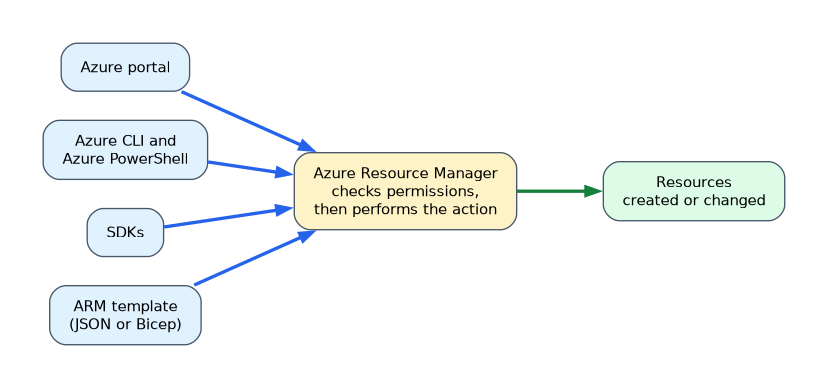 Azure Resource Manager (ARM) is the management layer for Azure. Every request from the portal, the command line, an SDK or a template goes through ARM, which checks permissions and then performs the action. This is why all the tools behave consistently.
An ARM template is a JSON file that declares the resources you want. Azure works out how to create them. You can deploy the same template again to get the same result. Bicep is a simpler language that is turned into an ARM template, so people can write less code.
Cloud Shell in practice
Cloud Shell opens from the portal and keeps your files in an Azure Files share, so they persist between sessions. You can choose Bash or PowerShell. Common tools are already installed, and you are signed in automatically.
The same task in the CLI and PowerShell
Creating a resource group shows how the two tools differ in style but not in result.
az group create --name rg-demo --location westeurope
New-AzResourceGroup -Name rg-demo -Location westeurope
The Azure CLI uses lowercase commands and options with double dashes. Azure PowerShell uses cmdlets named verb and noun, with a Az prefix on the noun.
Inside an ARM template
An ARM template is a JSON file with a few main sections.
| Section | Holds |
|---|---|
| parameters | Values you supply at deployment, such as a name or size |
| variables | Values worked out inside the template |
| resources | The things to create |
| outputs | Values returned after deployment, such as an address |
Deployments are repeatable. Deploying the same template twice leaves the same result, because Azure makes the resources match the file.
Where Azure Arc helps
A company runs servers in its own datacenter and in another cloud. With Azure Arc, it connects them to Azure, then applies the same tags, policies and monitoring that it uses for Azure resources. The servers do not move. Only their management does.
How the exam asks about this
- "Which tool is a browser-based shell with the Azure tools already installed?" Azure Cloud Shell.
- "Which feature manages servers outside Azure from Azure?" Azure Arc.
- "Which approach deploys the same environment repeatedly from a file?" Infrastructure as code with an ARM template.
- "Which service receives every request to create or change a resource?" Azure Resource Manager.
What to remember for the exam
- The portal is graphical. Cloud Shell is a browser shell with Bash or PowerShell and the tools preinstalled.
- Azure CLI uses az commands. Azure PowerShell uses cmdlets. Both are cross platform.
- Azure Arc brings Azure management to resources outside Azure.
- Infrastructure as code gives repeatable, consistent deployments from files.
- Azure Resource Manager is the management layer that every tool uses.
- ARM templates are declarative JSON files. Bicep is a simpler language that produces them.
"Manage on premises or other cloud servers from Azure" points to Azure Arc. "Repeatable deployment from a file" points to ARM templates.
Common mistakes
Thinking Cloud Shell needs software installed. It runs in the browser with the tools ready.
Treating the CLI and PowerShell as different capabilities. Both manage Azure. The difference is syntax and preference.
Believing Arc moves resources to Azure. It manages them where they are.
Confusing ARM with an ARM template. ARM is the service. A template is a file you give it.
Deploying a template to the wrong subscription or resource group changes real resources. Check the target before you deploy.
Check yourself
Which tool lets you manage servers outside Azure from Azure?
Azure Arc.
What kind of file is an ARM template?
A declarative JSON file that describes the resources to deploy.
What is Azure Resource Manager?
The management layer that processes every request to create or change Azure resources.
Topic 3 of 4 in Describe Azure Management and Governance
Test yourself on Describe Azure Management and Governance
The full Microsoft AZ-900 question bank has 500 questions, with timed practice exams and an explanation for every answer.
This study guide is independent and is not affiliated with, endorsed by, or sponsored by Microsoft. Vendor names, certification names and exam codes are trademarks of their respective owners and are used for identification only.